
Inspiring
March 21, 2022
Answered

premiere pro can't change sample rate stuck on 96000hz

  • March 21, 2022
  • 3 replies
  • 1045 views

It seems like this issue would've been a common one but apparently i haven't found any similar coincidences in the forums.

My issue here is that I can't change the sample rate in the audio hardware preferences:
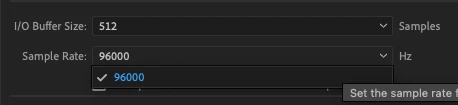
This makes it hard because my devices are in 48k Hz and I can't get any audio out.

This topic has been closed for replies.
Correct answer Ewan Lim

(Note: I've tried everything you have done and then some. I have not found a real solution to the 96000Hz issue but have summized that it is a legitimate Apple problem.)
My 593405th solution was to buy an Elgato Wave 1 for the Wavelink software and tricked Premeire Pro into playing it. I stopped trying to change the sample rate on a Mac.

My eventual TWO solutions were:
1) Bought an AMD + RTX Windows PC. This solved every other adobe/mac issue.
2) Went back to FCPX for newer projects.

If u have a choice, get a Windows PC because it'll let you problem solve a lot more things for a lot of clients. If you really want to stay on a mac then do take up a meditation class.

3 replies

Ewan LimAuthorCorrect answer
Inspiring
November 2, 2022

(Note: I've tried everything you have done and then some. I have not found a real solution to the 96000Hz issue but have summized that it is a legitimate Apple problem.)
My 593405th solution was to buy an Elgato Wave 1 for the Wavelink software and tricked Premeire Pro into playing it. I stopped trying to change the sample rate on a Mac.

My eventual TWO solutions were:
1) Bought an AMD + RTX Windows PC. This solved every other adobe/mac issue.
2) Went back to FCPX for newer projects.

If u have a choice, get a Windows PC because it'll let you problem solve a lot more things for a lot of clients. If you really want to stay on a mac then do take up a meditation class.

Richard van den Boogaard
Community Expert
Community Expert
March 21, 2022

Is it possible to delete and reinstall the drivers of your audio card?

Ewan LimAuthor
Inspiring
March 22, 2022

I'm on a mac.


Essentially, i've tried re-installing everything one by one. And essentially it isn't a driver issue. I wish it was as simple as that.

I then decided to just do a clean reinstall of Premiere Pro. Nope. So I'm not sure what is the real problem here.

Community Expert
March 21, 2022

What audio hardware do you have? Which driver class are you using?