tmiv
Participant
November 29, 2016
Answered

Premiere Pro CC 2017 corrupted my files

  • November 29, 2016
  • 2 replies
  • 1347 views

I've been working on a 3 hour long video And decided to update Premiere Pro and Media Encoder for the final export. After reopening my project it says "The project appears to be damaged, it cannot be opened." Is there a fix or should I start from scratch again?

    This topic has been closed for replies.
    Correct answer R Neil Haugen

    I presume you have the original project file ... I'd just resume using the version it was created in and export from their. And btw ... updating a project is not considered a best-practice. Most of us keep previous versions "up" as long as we need to for finishing of older projects. I'm just past using 2014 now, and don't have it loaded. I still have 2015.2 and 2015.4 ... and note, 2015.3 SHOULD have been named 2016 ... it was a complete version/build update from 2015.2.

    To download a previous version  ... as shown below ... go to the "Find Additional Apps" tab circled here ...
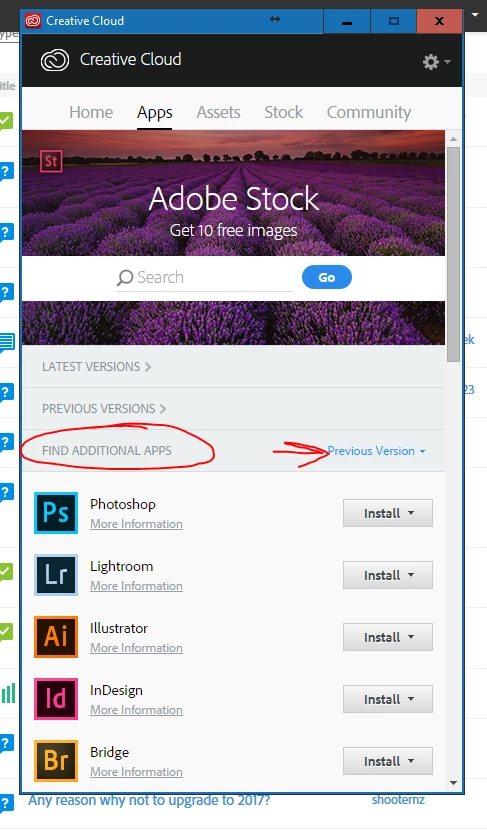
    ... and ignore the "Previous Versions" thing I point to. Simply go down the list below, and by Prpro, click the "Install" button, which will drop a list down of previous versions. It gives you the first release of each version, and after downloading/installing one, you can then update that to the last release of that version.

    Neil

    2 replies

    tmiv
    tmivAuthor
    Participant
    November 29, 2016

    Thanks Neil, I continued searching last night after I made this post, because of impatience. I found that previous versions of Premiere won't work with projects created on the newer versions. I may have been a little too panicked and finally realized the project file was opening up CS6, something I forgot I had installed still. I manually opened the CC version and project file and that worked out.

    Thanks for the pointer on updating before a project is completed. I'm a graphic designer and backwards compatibility hasn't affected me in Photoshop, Illustrator or InDesign. I get many people that want video projects, so I'll be going through a lot more noob experiences. I'll remember your advice from here on out.

    Thanks again,

    TMIV

    R Neil Haugen
    Legend
    November 29, 2016

    Welcome to the ... group?

    I started in a "little" video as a new maybe offering for our portrait studio ... the missus & I have been portrait photogs for um ... a bit more than 35 years now ... and in wanting to know what the heck these odd video programs were doing, because they sure weren't like Lightroom or Photoshop! Well, I've been re-programmed, I think ... or perhaps, re-purposed?

    I was a TA at Adobe MAX the beginning of the month ... and assisted computer labs in a 'basic' editing class and another on colorist work via the Lumetri panel. A very high percentage of the people in all the classes I worked in were there because they'd been doing Illustrator or InDesign for their company ... and been told that if they could do that, they should also "naturally" be able to handle the video "stuff" also.

    Right!

    Video post is rather ... complicated ... at times. So feel free to ask away here, both on technical problems and also how to really do something ... this versus that method. It's kinda polite to try something before asking about it, of course ... but then ask away as to why when you tried X, it went all ... wonky ... suddenly.

    Neil

    Everyone's mileage always varies ...
    R Neil Haugen
    R Neil HaugenCorrect answer
    Legend
    November 29, 2016

    I presume you have the original project file ... I'd just resume using the version it was created in and export from their. And btw ... updating a project is not considered a best-practice. Most of us keep previous versions "up" as long as we need to for finishing of older projects. I'm just past using 2014 now, and don't have it loaded. I still have 2015.2 and 2015.4 ... and note, 2015.3 SHOULD have been named 2016 ... it was a complete version/build update from 2015.2.

    To download a previous version  ... as shown below ... go to the "Find Additional Apps" tab circled here ...

    ... and ignore the "Previous Versions" thing I point to. Simply go down the list below, and by Prpro, click the "Install" button, which will drop a list down of previous versions. It gives you the first release of each version, and after downloading/installing one, you can then update that to the last release of that version.

    Neil

    Everyone's mileage always varies ...