
Premiere Pro CC 2018 Crashing On Start
Hello All,
I've been researching for weeks on and off and can't seem to figure this issue out. Backstory, I started a project on the 2017 version a few months ago. This project I'm working on is not too big, like under 20 gigs. It will end up being a short web vid between 6 to 8 min video. I made the mistake of updating the project to 2018 once Premiere upgraded rather than finishing it on the 2017 version. I've worked on projects in between updates and never had an issue before. It continued working just fine until a few weeks later, I opened and it wouldn't stop crashing. Like right at application start. Thought maybe the project became corrupt somehow. Started dummy projects, importing the files, sequences of my original project and they would work for a little bit but once I got further into the project BAM, crash city. I've worked on other projects since then and they haven't had any issues.
Anyhow, I ended up uninstalling Premiere Pro CC 2018, using that Adobe Cleaner app, reinstalling. Building my original project back from zero: I went back to the backup files and even started it on a new drive in case that was part of the problem. I got as far as syncing up my audio/video, adding metadata, merging some clips and right when I was about to start making some actual edits, BAM, crash city all over again. The "new" project also keeps crashing right at application start. Before I uninstall 2018 and reinstall 2017 and hope an XML export helps to get me where I left off, I wondered if anyone else had a similar problem and possibly a fix.
Stuff I've already tried:
Upgraded to High Sierra macOS - hasn't helped.
Created a new user on my computer to see if it was related to some corrupted permission files, the project still crashes logged in as the new user.
Cleared all medial cache files and reset the preferences and plug-in cache upon start
The only other thing I haven't done is try to open it in another system that has the most updated Premiere app. It would be awesome if I could make it work on my computer, obviously. I know my laptop is a little old but aside from this, it works like new. Any insight welcome, thank you!
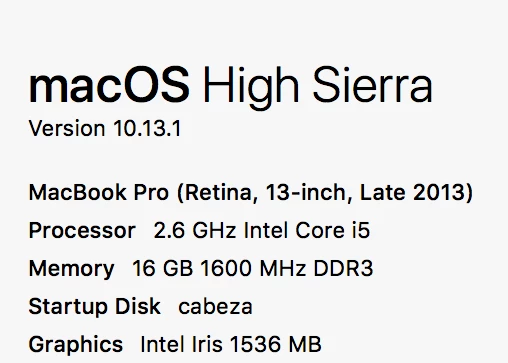
My computer specs:
Crash Report excerpt:
Exception Type: EXC_BAD_INSTRUCTION (SIGILL)
Exception Codes: 0x0000000000000001, 0x0000000000000000
Exception Note: EXC_CORPSE_NOTIFY
Termination Signal: Illegal instruction: 4
Termination Reason: Namespace SIGNAL, Code 0x4
Terminating Process: exc handler [0]
Application Specific Information:
BUG IN CLIENT OF LIBPLATFORM: Trying to recursively lock an os_unfair_lock
 AdChoices