
Participant
June 9, 2018
Answered

Premiere Pro CC 2018 Freeze/Long Delay on click "File" Menu

  • June 9, 2018
  • 12 replies
  • 11751 views

I've encounter a strange problem.  Every time I start a new project in Premiere Pro 2018, import just 1 clip or JPEG file, put it on Source window.  After that, when I press "File" menu, everything freeze.  The App is not crashed, it just took a very long time to drop File menu.  If I select any Sub-menu in it, it choke again.  To verify this problem, I make a fresh install Windows 10 and fresh Premiere CC only installation.  The problem still occur.  I also try to use Cleaner Tool to uninstall everything and install it again.  It does not change anything.

To trace it, I install Windows Performance Recorder (WPR) and try to analyze it.  Following is the analytic result I get from WPR.  I did not include disk activity since I hardly see any disk IO in it.

It seemed it was choked in some MSG check.  However, the strange things are I have 2 computer with almost identical setup.

Computer 1: Xeon E3-1231 v3, GA-H97M-DH, 32GB 1600Mhz DDR3

Computer 2: i5-6500, Asrock H170 Pro, 32GB 2133Mhz DDR4

Only Computer 1 experience this problem.  Computer 2 everything goes fine.  I also use Process Monitor to see what happen after I click "File Menu".  Strange thing is I saw a lot FASTIO_LOCK and Unlock operation.  However, this change to lockfile and unlockfile in computer 2 and my fresh installation.

I think there should be some serious design flaws in Premiere CC which pass your QC or unit test.  Could you please release some update?
This topic has been closed for replies.
Correct answer KCDN

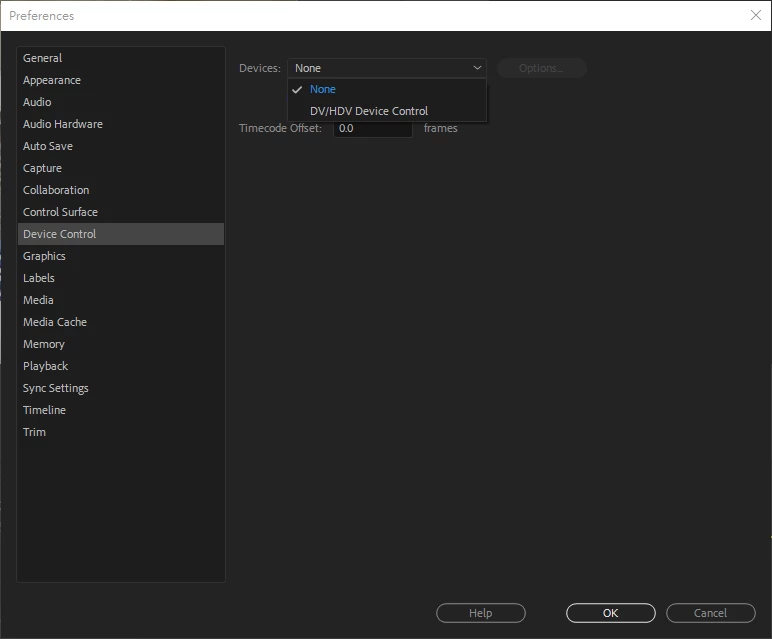
I solve it finally.  I change Preference -> Device Control from "DV/HDV Device Control" to "None" then everything went back to normal.

It looks like premiere is waiting for device response and put everything in halt.  It looks like a one time setting.  Once you change it, even new project will back to default "DV/HDV", the system still OK.

12 replies

brandonl8911795
Inspiring
October 30, 2020

Two years later and the same problem and solution are still a big help. No clue how you sorted that, but it did the trick for me as well. I didn't get a full crash but a notable lag for the program to respond. Ugh....

Kevin-Monahan
Community Manager
Community Manager
June 29, 2018

Hi KCDN,

I recommend that you contact Adobe support directly for 1-1 assistance on this vexing issue: Contact Customer Care

Please let us know what happens or if you need additional assistance.

Thanks,
Kevin

Kevin Monahan - Sr. Community and Engagement Strategist – Adobe Pro Video and Audio
KCDNAuthorCorrect answer
Participant
July 19, 2018

I solve it finally.  I change Preference -> Device Control from "DV/HDV Device Control" to "None" then everything went back to normal.

It looks like premiere is waiting for device response and put everything in halt.  It looks like a one time setting.  Once you change it, even new project will back to default "DV/HDV", the system still OK.

Kevin-Monahan
Community Manager
Community Manager
July 19, 2018

Awesome!

Kevin Monahan - Sr. Community and Engagement Strategist – Adobe Pro Video and Audio