Participant
June 17, 2020
Question

Premiere Pro CC 2019 crashes when selecting motion graphic or creating a new one

  • June 17, 2020
  • 1 reply
  • 196 views

Hi. I'm on Windows 10.

Whenever I create a new text layer (motion graphic) or select one, Premiere just says "Sorry, a serious error has occured that" blah blah blah.

Is there a problem with the files? Do I need to reinstall Premiere Pro?

I've tried using legacy titles, but it's kinda pointless.

Is there any way I can fix this?
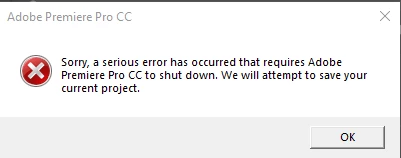


[Moderator note: please do NOT use the 'attach files' box at the bottom, as that requires that users download files from unknown sources. Simply drag/drop the image onto your main reply box please. I fixed this for you this time.]

This topic has been closed for replies.

1 reply

Peru Bob
Community Expert
Community Expert
June 17, 2020

Try resetting the preferences:
https://community.adobe.com/t5/premiere-pro/faq-how-to-reset-trash-preferences-in-premiere-pro/td-p/8236158?page=1

If that doesn't work, try resetting the Workspaces:
Reset a workspace
Reset the current workspace to return to its original, saved layout of panels.
1. Do one of the following:
• Click the Workspace menu icon and select Reset to Saved Layout.
• Choose Window > Workspace > Reset to Saved Layout.
from here:
https://helpx.adobe.com/premiere-pro/using/workspaces.html

If that doesn’t work, try updating or rolling back your graphics driver directly from the video card manufacturer’s site.

Also, please help us help you:
https://community.adobe.com/t5/premiere-pro/faq-what-information-should-i-provide-when-asking-a-question-on-this-forum/td-p/3929027?page=1

soulfurxdAuthor
Participant
June 18, 2020

Thanks, I'll try that out.

soulfurxdAuthor
Participant
June 18, 2020

Okay, I tried the two, and only one works. Why does changing your workspace make Premiere crash? WHAT THE