
editbay3_vertigopost
Participant
March 13, 2019
Answered

Premiere Pro CC 2019 NOT locking projects

  • March 13, 2019
  • 2 replies
  • 1247 views

Premiere is allowing two editors to open the same project without a warning and without activating "read only mode." The project doesn't appear to be locked and opens just fine. So we are constantly rewriting over modifications and later have to rebuild what one editor was working on that got saved over. What could the problem be?
This topic has been closed for replies.
Correct answer R Neil Haugen

Somebody doesn't have "enable project locking" on ...

Neil

2 replies

editbay3_vertigopost
Participant
March 13, 2019

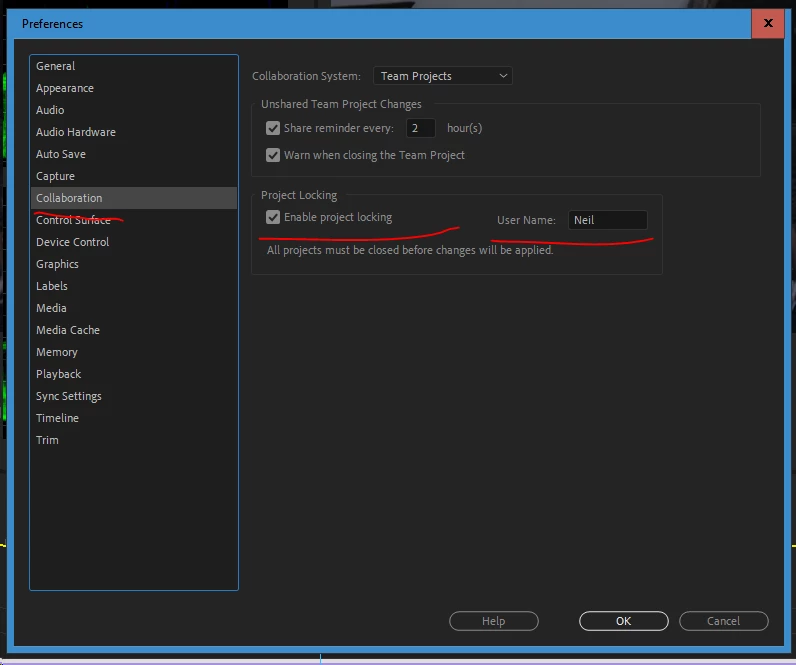
ANSWER: In premiere go to edit>> preferences>> collaboration and make sure the enable project locking is checked.

R Neil Haugen
R Neil HaugenCorrect answer
Legend
March 13, 2019

Somebody doesn't have "enable project locking" on ...

Neil

Everyone's mileage always varies ...
editbay3_vertigopost
Participant
March 13, 2019

Yesss I didn't even know this was an option. Thanks!

R Neil Haugen
Legend
March 13, 2019

Shared and Team projects have some HUGE advantages, I'm getting rather enamored of their "toys". But ... they come with a couple caveats, especially ... everyone has to have project locking enabled! Or ... chaos gallops merrily through thy edit bays ... whooping and hollering and having a great time.

For Team projects, well ... the only person who 'locates' media in Pr's main Media Browser panel is the 'owner' of the project. Everyone else MUST go to the menu system: Edit/Team Projects/Media Management dialog to link the media they've received of the project to Pr and put on a local drive.

You may ask how I'm so sure of that ... yea. Working with an editor from Capetown, SA, he was doing general editing passing to me for color & some graphics. I got the invite in Pr for the project, downloaded the project file from the cloud, saw all the media with question marks in bins. Immediately right-clicked on the top one, locate yada yada.

All was good on my end.

Then my phone rang ... it was about 1am in Capetown but pal had been up doing something and suddenly his entire project media went offline ... "Neil, what the ***** did you do?"

Took a day or so to find out about the leetle issue with relinking the wrong way ... ahem.

But .. .we're all good now ... um ...

Neil

Everyone's mileage always varies ...