
Participating Frequently
October 23, 2013
Answered

Premiere Pro CC Crashing At The Splash Screen - OSX Mavericks

  • October 23, 2013
  • 12 replies
  • 40046 views

Hello,

I'm having difficulty using Premiere Pro CC as it won't allow me to get past the splash screen. I've just updated to OSX Mavericks and apparently Premiere is compatible with Mavericks. However it appears to be crashing at every instance that I load it up, it flashes the splash screen and it crashes, giving me an error report.

I am a new member to these forums, so I apologise if I am asking in the wrong area.

I have the crash report here from Apple.

Message was edited by: Kevin Monahan. Crash log in attached doc. Please don't copy/paste crash logs in forum posts, attach them as separate documents. Thank you.
This topic has been closed for replies.
Correct answer jason wingrove

Ok despite almost daily updates from CC having no luck i seem to have SOLVED my crash on startup issue for now

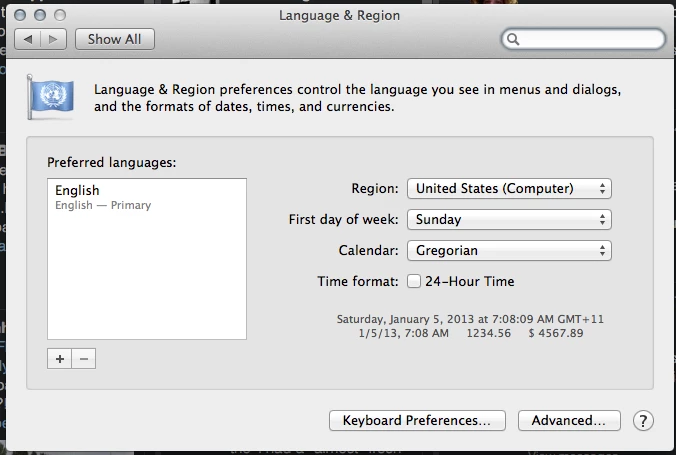
For me at least the fix is to change the system region to ‘United States Computer’ And Pref Language to ‘English'

12 replies

Participating Frequently
October 23, 2013

I have the same problem. Running 2009 imac i7. Tried reinstalling but no joy.

SWDoctorAuthor
Participating Frequently
October 23, 2013

Mid 2010 27" iMac i5.
Isn't there a way we can bump this so someone from Adobe can see it? I have client projects that I need to edit and I am unable to do so because the software won't load.

John T Smith
Community Expert
Community Expert
October 23, 2013

>so someone from Adobe can see it

https://www.adobe.com/cfusion/mmform/index.cfm?name=wishform is where you officially tell Adobe

Participating Frequently
October 23, 2013

+1. Exactly the same exception code.

SWDoctorAuthor
Participating Frequently
October 23, 2013

I'm afraid I don't understand?

Participating Frequently
October 23, 2013

It was just to say I'm having precisely the same issue as you.