
ChiterY52405670
Participant
February 2, 2019
Question

Premiere Pro CC - How to solve a problem?

  • February 2, 2019
  • 2 replies
  • 303 views

I installed Premiere Pro CC with a Creative Cloud on my personal computer (on Disc C), but due to the lack of control over it, I had to delete everything and download it to Disk D. There are no programs on my computer, but Creative Cloud provides feedback It gives it to install. I tried to install Premiere Pro CC separately but nothing left. Help urgently please! thank

This topic has been closed for replies.

2 replies

Legend
February 3, 2019

I recommend two things:

1. Perform a clean install of Windows 10 1809, 64 bit.  You may have to buy it.

2. Get a larger C: drive.  Install all programs in their default directory.

Ann Bens
Community Expert
Community Expert
February 2, 2019

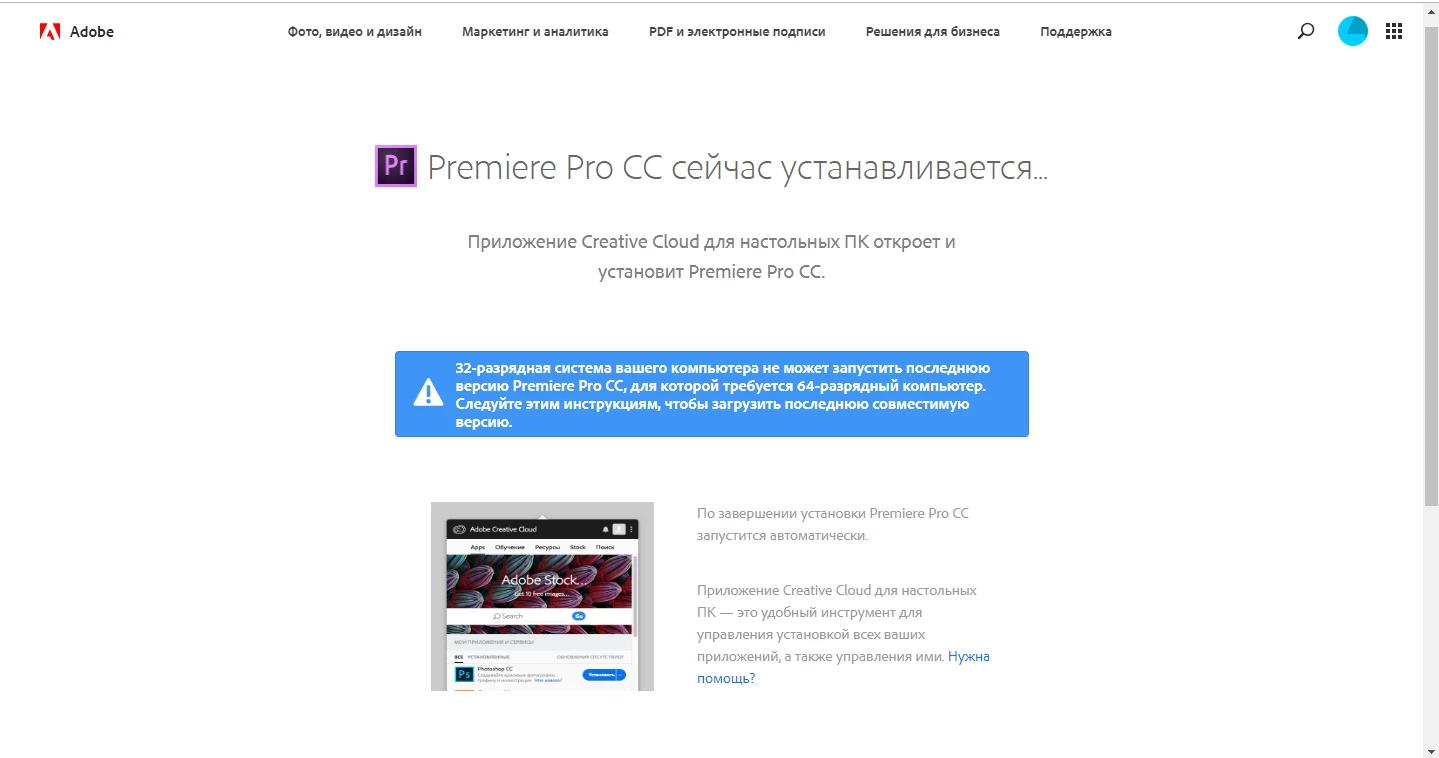
Is your computer 64 bits?

If it is 32 bits you cannot use Premiere.

ChiterY52405670
Participant
February 2, 2019

As I understand the whole problem is that the latest version of the program is 64-bit, and my system is 32-bit. Where to download the 32-bit version I don’t know how I can’t find, Help me, please

Averdahl
Community Expert
Community Expert
February 2, 2019

Where to download the 32-bit version I don’t know how I can’t find, Help me, please

There are no 32-bit version of Premiere Pro, you must get a 64-bit OS.