
Participant
June 17, 2017
Question

Premiere Pro CC Media Pending: Dead On Arrival

  • June 17, 2017
  • 2 replies
  • 2446 views

Hello,

I've seen many entries for Media Pending but all seem to occur some time after use.  In my case, I got the Media Pending fault immediately after installing and running the application.  None of the menu items were accessible nor were the windows controls.  I had to use Task Manager to kill the process.  Below are the steps that I have taken thus far.

Installation attempts

---------------------

1. Install Premiere Pro from Creative Cloud App.  Media Pending.

2. Uninstall Premiere Pro

3. Install Premiere Pro from Creative Cloud App.  Media Pending.

4. Restart computer.  Premiere Pro restarted.  Media Pending.

5. Installed updated graphics driver.  GeForce Game Driver Version 382.53 for

NVIDIA GeForce GT730 graphics card.

6. Restart Premiere Pro.  Media Pending.

7. Uninstall Premiere Pro.

8. Install Premiere Pro from Creative Cloud App.  Media Pending.

9. Let sit overnight in Media Pending mode.  No progress by morning.

10. Uninstall Premiere Pro

11. Contact support

Included are some screenshots.

This is the screen that I get after the splash screen.  I let it do this overnight.
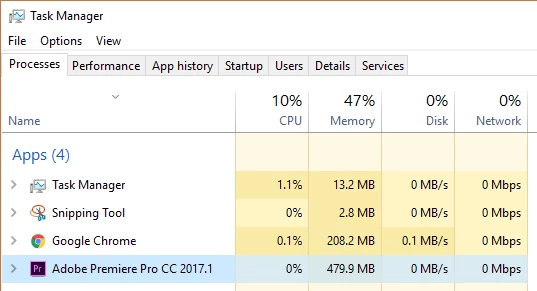
Premiere takes up about 500MB of memory and just sits there while showing the Media Pending screen.  The CPU, Disk and Network doesn't seem to do anything while it's waiting.
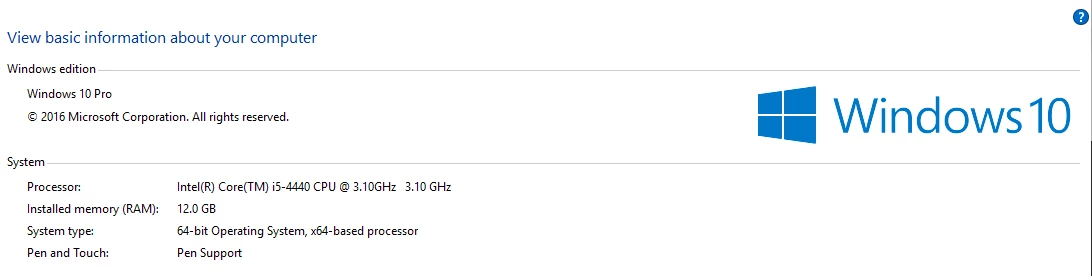
This is basic information about my system.

As a side note, Adobe Lightroom and Photoshop work fine and I am able to view videos using VLC Player.

Have any of you come across this problem?  If so, can you suggest further steps?

Thank you.

This topic has been closed for replies.

2 replies

fredn82597616
Participant
June 22, 2018

I just got the same error and pressing anything on screen gave me a "ding" sound effect, as in unresponsive. Pressing esc, however, removed the media pending box.

I know it's an old thread, but I feel like I want to leave it here anyways.

Inspiring
June 17, 2017

This is a fresh installation of Premiere Pro, or have you had a version of Premier Pro on your computer before?

If you've had a version of Premiere Pro on your computer prior to this install you may need to reset your preferences:

FAQ: How to reset preferences in Premiere Pro?

MtD

Participant
June 17, 2017

Hi Meg The Dog,

Thank you for your response and sorry, I was not clear.  This was a fresh installation the first time so I don't think preferences apply.  At each Uninstall, I selected the option to remove all files though, admittedly, I'm not sure if Registry settings were affected.

Thank you for your suggestion.

T

Inspiring
June 17, 2017

You might try it as there is no downside to doing so.

If you want to rule out a corrupt installation problem, you should use Creative Cloud Cleaner first to completely remove all the parts (hidden and otherwise) of CC and then re-download, but that is the nuclear option. You'll get all you CC apps removed and will need to re-download them all.

Use the Creative Cloud Cleaner Tool to solve installation problems

Or, wait until someone with Windows expertise answers your post.

MtD