Participant
March 29, 2017
Answered

Premiere Pro CC wont open!

  • March 29, 2017
  • 1 reply
  • 672 views

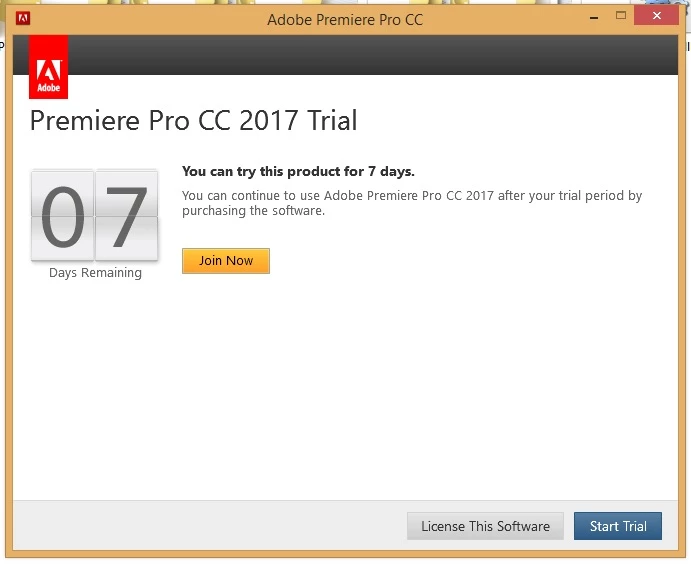
I bought Premiere Pro CC after my free trial period ended, but now it shows this message and wont open! Help?!

This topic has been closed for replies.
Correct answer John T Smith

I have read that it will take as much as 24 hours for a purchase to show in your Adobe account after purchase

Does your Cloud subscription properly show on your account page?

https://www.adobe.com/account.html for subscriptions on your Adobe page

If you have more than one email, are you sure you are using the correct Adobe ID?

.

If yes

Log out of your Cloud account... Restart your computer... Log in to your paid Cloud account

-Sign in help http://helpx.adobe.com/x-productkb/policy-pricing/account-password-sign-faq.html

-http://helpx.adobe.com/creative-cloud/kb/sign-in-out-creative-cloud-desktop-app.html

-http://helpx.adobe.com/x-productkb/policy-pricing/activation-network-issues.html

-http://helpx.adobe.com/creative-suite/kb/trial--1-launch.html

-ID help https://helpx.adobe.com/contact.html?step=ZNA_id-signing_stillNeedHelp

-http://helpx.adobe.com/creative-cloud/kb/license-this-software.html

.

If no

This is an open forum, not Adobe support... you need Adobe staff to help

Adobe contact information - http://helpx.adobe.com/contact.html

Chat/Phone: Mon - Fri  5am - 7pm  (US Pacific Time) <=== NOTE DAYS AND TIME

-Select your product and what you need help with

-Click on the blue box "Still need help? Contact us"

1 reply

John T Smith
Community Expert
John T SmithCommunity ExpertCorrect answer
Community Expert
March 29, 2017

I have read that it will take as much as 24 hours for a purchase to show in your Adobe account after purchase

Does your Cloud subscription properly show on your account page?

https://www.adobe.com/account.html for subscriptions on your Adobe page

If you have more than one email, are you sure you are using the correct Adobe ID?

.

If yes

Log out of your Cloud account... Restart your computer... Log in to your paid Cloud account

-Sign in help http://helpx.adobe.com/x-productkb/policy-pricing/account-password-sign-faq.html

-http://helpx.adobe.com/creative-cloud/kb/sign-in-out-creative-cloud-desktop-app.html

-http://helpx.adobe.com/x-productkb/policy-pricing/activation-network-issues.html

-http://helpx.adobe.com/creative-suite/kb/trial--1-launch.html

-ID help https://helpx.adobe.com/contact.html?step=ZNA_id-signing_stillNeedHelp

-http://helpx.adobe.com/creative-cloud/kb/license-this-software.html

.

If no

This is an open forum, not Adobe support... you need Adobe staff to help

Adobe contact information - http://helpx.adobe.com/contact.html

Chat/Phone: Mon - Fri  5am - 7pm  (US Pacific Time) <=== NOTE DAYS AND TIME

-Select your product and what you need help with

-Click on the blue box "Still need help? Contact us"

Participant
May 6, 2017

My Premier Pro CC will not open either...  But I do not get any message....  Nothing happens  ... I can click the Old Version Premier Pro CS6 and it opens and works fine...  But if I try to launch PP-CC nothing happens.. is as if i did n't click the launch button at all...  It was working until Windows 10 did an update and after that it stopped and i can't find anyway to reinstall it... Any suggestions.....