Participant
February 2, 2022
Answered

Premiere Pro completely oversaturated

  • February 2, 2022
  • 1 reply
  • 965 views

Hey People,

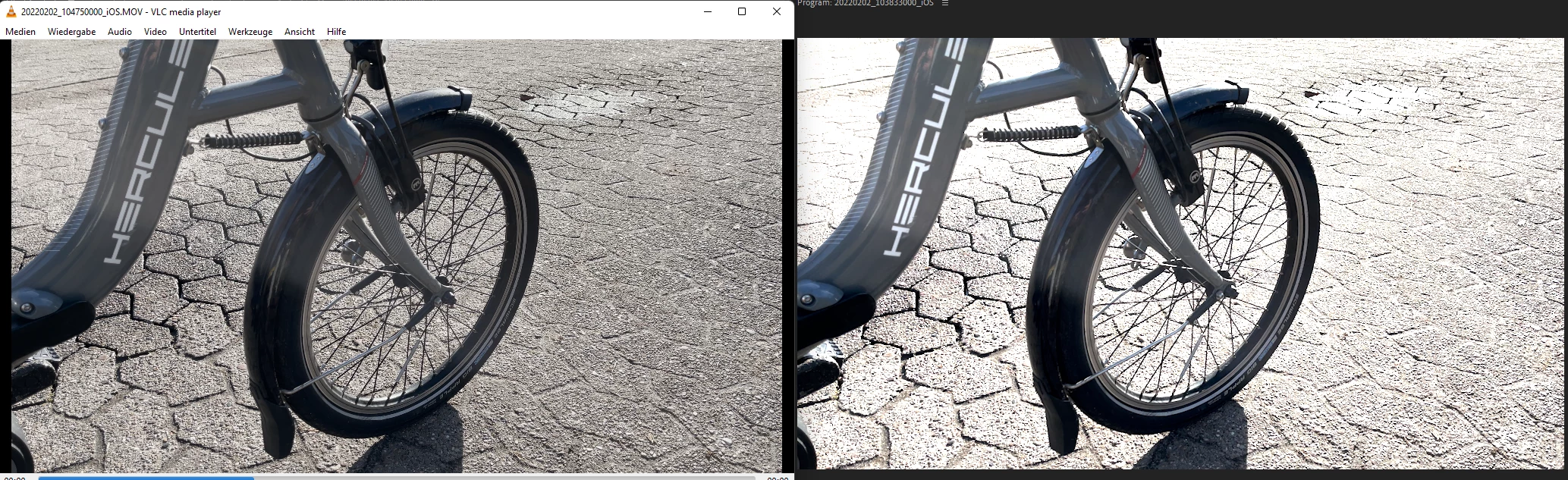
I had some trouble with my exported Video beeing completely oversaturated even though it looked fine in the Preview. Then I figgured when I turn on "Display Color Management" in the general settings it looks exactly as oversaturated in the preview as in the Export... Now what can I do about that?


Left you see the raw video file and right is the unedited just imported file in Premiere...
 

This topic has been closed for replies.
Correct answer Babi22958039spgp

OS: Windows 11

Codec/Format: idk (iphone 12 pro max recording)

Framerate: 60 fps


I fixed it for myself by setting the Working Color Spacec from Rec. 709 to Rec. 2100 PQ.

1 reply

Kartika Rawat
Community Manager
Community Manager
February 2, 2022

Hi there!

Thanks for writing in. Which OS you have? What type of files are you editing (codec/ format, frame rate, frame size)? 

Let us know if this article helps: https://community.adobe.com/t5/premiere-pro-discussions/faq-how-to-fix-saturated-over-exposed-hlg-clips-in-premiere-pro-v-22/td-p/12489252


Thanks,

Kartika

Babi22958039spgpAuthorCorrect answer
Participant
February 2, 2022

OS: Windows 11

Codec/Format: idk (iphone 12 pro max recording)

Framerate: 60 fps


I fixed it for myself by setting the Working Color Spacec from Rec. 709 to Rec. 2100 PQ.