May 10, 2012
Answered

Premiere Pro could not find any capable video play modules

  • May 10, 2012
  • 39 replies
  • 194643 views

I downloaded the trial of Premeire Pro CS6 today, and after I launched the application, it said "premiere pro could not find any capable video play modules".

Tried again, no luck.

My graphics card is at the latest driver that HP has out.

What should I do before I give up?

HP DV7t Quad 17'' Laptop

i7 2720

AMD Radeon 6770HD (Switchable Graphics)

8GB Memory

    This topic has been closed for replies.
    Correct answer alexandrepitre

    Has any one found a solution? every other CS6 app works fine but PP yet my laptop (same as the one mentioned above, HP dv7) is well within the specs (2.5gb 1920/1080 /w OpenGL 2) it is however a Radeon dualed with an intell HD... could this be the issue (dual cards OR Radeon) as I have noticed Adobe plastering Nvidia all over the website and the laptop won't initeate the higher end card until the program launches (i have mannualy configed it but have noticed that games that set the graphics before loading (Skyrim, Witcher2) willnot detect the higher graphics card, nore will dxdiag) have included some screne shots to hopefully help.
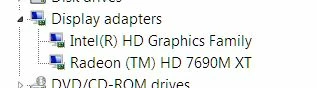
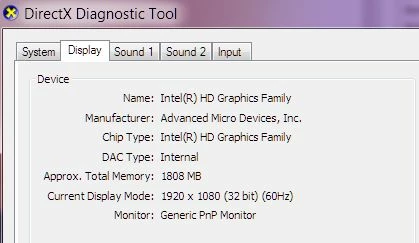
    I was able to resolve this problem on a laptop. In the AMD control panel, the main GPU selected was the Intel integrated video card that come with the processor instead of the more powerfull AMD video card.

    So, for those of you out there that have an Intel processor with the integrated GPU, make sure adobe premiere isn't using the Intel GPU to launch.


    39 replies

    albertined61013798
    Participant
    February 22, 2016

    Dear all,

    I've tried all the fix mentioned in this topics and some other found in other website but I have the same problem:-(

    When I start my Premiere CC 2015.2, trial mode downloaded some days ago, I receive the classical error.

    Here my Actions:

    - Start program as Administrator

    - Updated the nvidia driver > 361.91 > Nvidia GeForce GT 640M LE

    - Try the program execution for Windows 8, Windows 7

    - Nvidia panel > High performance (instead of balanced performance)

    Now I have only 20 days remaining to try the CC 2015.2, if you have any suggestion I'll very pleased as, at this point, I can't do anything more.

    Many thanks for you special support/consideration..

    Participant
    February 29, 2016

    I ran into this problem after using trying to increase my TCP performance with a tool called TCP Optimizer.

    Not thinking this change in my TCP registry settings caused it, I added the Dynamic Link manager and GPUSniffer programs to allow through my firewall.

    Didn't fix it.

    I had to go back and reset my TCP settings to Windows 7 default in TCP Optimizer.

    I haven't seen this as a resolution but want folks to be aware that if you do change your TCP settings or TCP registry entries, it will cause this issue even though you have a good internet connection.

    R/Hank

    tonyw84351483
    Participant
    December 18, 2015

    HP Pavilion g6 -1210TX with same problem. Have spent hours on phone to HPsupport who have been very helpful, have downloaded all new drivers...none resolve the  issue.

    Can get CS6 to work, but only if I disable Intel driver  in Device manager , however I lose all brightness control on laptop. HP have advised to talk to Adobe

    Anyone else resolved the two conflicts . Premier Pro CS6  functioning and Laptop  brightness ?

    Participant
    December 10, 2015

    For Mac users:

    Found this solution and it worked like a charm.  No removing package files and so on: Premiere Pro CC, CC 2014, or 2014.1 freezing on startup or crashing while working (Mac OS X 10.9, and later)

    jg3333
    Participant
    April 11, 2016

    This WORKS for mac users! - THX mikemitchum!

    Participating Frequently
    November 15, 2015

    I found a temporary fix for Windows 8.1.

    First, open My PC, or This PC, whatever yours is listed under.

    Second, click on the blue Question Mark or PC Help button. Mine is in the upper right corner.

    Third, type in Video Display Drivers.

    Fourth, click on Hardware And Devices, then click on Next.

    My computer automatically found the problem driver and fixed it long enough to open Premiere Pro once. I have to go through this process every time I turn on my computer, so it is not a permanent resolution.

    Participant
    November 7, 2015

    Make sure you don't block Adobe Premiere Pro and its processes, like GPUSniffer.exe and dynamicklinkmanager.exe with a firewall.

    If you block this program with a firewall, you might get this error:


    Participant
    August 21, 2015

    Hey all,

    I am having the same problem with a slight difference! I've called Adobe twice and they haven't be able to fix it. It's been 3 weeks where I can't edit at home and it's frustrating to say the least. Here's my problem.

    I don't have any GPU cards like AMD or NVIDIA, I have Intel (R) HD Graphics 3000. I wondered if I needed to upgrade for it to work but I read in the premiere pro system requirements that having an AMD or NVIDIA is optional.

    • Optional: Adobe-certified GPU card for GPU-accelerated performance


    So technically it should work but I just can't put my finger on what's the problem. I've everything on this thread and still no luck! Looks like I'm going to have to call Adobe again if I can't solve it. But if anyone else has any suggestions other than what's mentioned then please let me know! So many projects now on hold!


    Thanks

    Simon

    Participant
    April 25, 2015

    I downloaded the newest trial version and I'm using amd radeon hd 5970.
    It can lunch when I disabled the amd drive and only use default window driver but it's at a low resolution.

    Once I enabled the amd drive, it shows that "could not find any capable video modules" message again

    Please help!!!

    Participant
    March 12, 2015

    Update your intel HD graphics driver, it might not work through device manager so go to intel's website and download the latest, this will give you the open gl support before any application starts using your AMD card.

    Try opening premiere pro now. It wont work even now, because in catalyst control center premiere pro is somehow listed to use the intel GPU, so what you need to do next is just go to your program files directory and rename premiere pro.exe to something else just like some other guy has on some other website i dont remember, like premiere pro CC.exe or something.

    Try opening premiere pro now, it should work.

    Participant
    March 12, 2015

    update (download & install) your intel hd graphics drivers

    Participant
    February 22, 2015

    Hey I'm not sure if this will work for anyone that is having this problem, but since I did not have the switchable graphic card option I simply went to the adobe folder where this program is located and right clicked on it and clicked on the option "Comparability Troubleshoot." Worked just fine after that. Hope this helps.
