
Premiere pro crash when rendering
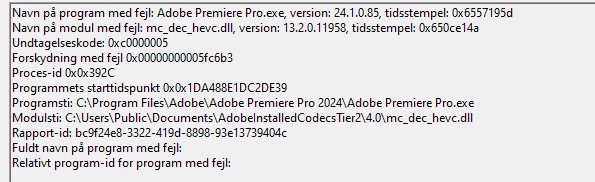
Premiere Pro frequently crashes during rendering, with no discernible pattern – at times it runs smoothly, while other instances result in multiple crashes. Occasionally, the crashes extend to my entire computer. I've undertaken various troubleshooting measures, including reinstalling the application, reverting to a previous Premiere Pro version, updating graphic drivers, resetting preferences, and clearing the media cache. Despite these efforts, the issue persists.
The Windows log indicates the following fail code:
This is my pc specs:
13th Gen Intel(R) Core(TM) i9-13900KF 3.00 GHz
64 gb ram
Windows 11 home
Nvidia Geforce RTX 4070 Ti
I'm reaching out in the hope that someone can provide assistance. If a solution cannot be found, I may be compelled to switch away from Adobe Premiere Pro.
 AdChoices