
Premiere pro crashes: cannot use it
Hi everyone, first of all I apologize for my poor english (not my fault, I'm french:))
This is my pc configuration, windows 10 is up to date (1909)
Case: Fractal design Nano S with 2x Noctua NF A12x25 PWM | 4x Noctua NF-A14 PWM
power supply: Seasonic SGX 650
motherboard: MSI B450i Gaming AC
CPU: Ryzen 7 3700x
Cpu cooling : Noctua NH-U12A
Ram: 2x Ballistix Sport LT Blanc 16GB DDR4-3200 UDIMM BLS16G4D32AESC
GPU: Asus RTX 2080 ROG STRIX
SSD: samsung 850 EVO 1To /crucial BX100 1To
Sound card: Xonar U7 (usb)
I tested ram with memtest: 24 hours without any errors. OCCT test for CPU and GPU for hours: rockstable. Prime 95: rockstable. I am positive: it is not an hardware problem. Temperatures are low.
This configuration was build on august 2019, I quickly tried premiere on august: it was working. I didn't need premiere since then, but this week bad news: I can't use it anymore.
I can't use premiere pro 2020 (14) or 2019 (13) on my pc I always get this error (I told you: I'm french)
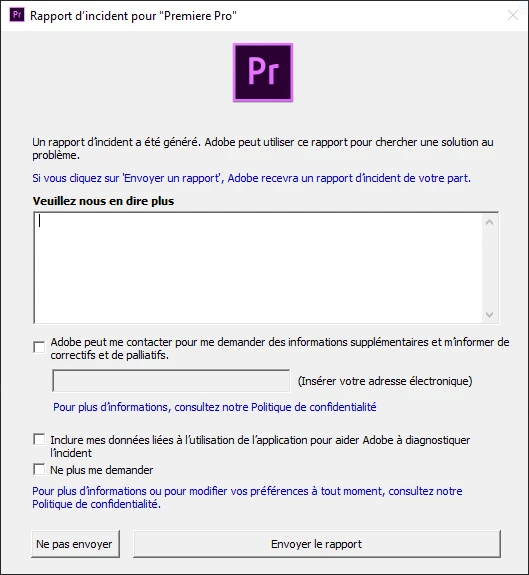
I got it on startup sometimes, or when I try to import videos, or even when I try to start a tutorial included. I tried:
-windows update
-nvidia update
-reboot
-uninstall/reboot/reinstall
-administrator mode
-a previous version (premiere 13/2019) with/without administrator mode
It's always the same story.
If I can't use it, I want to stop paying adobe CC subscription, the lightroom subscription will be enough (I just use lightroom and premiere, and if I can't use premiere I don't need to pay full price)
Thank you for your time, I hope we can find a solution
 AdChoices