
Participant
June 17, 2011
Question

Premiere Pro CS 5.5 can't do a simple cross dissolve with MPE enabled?

  • June 17, 2011
  • 9 replies
  • 20379 views

When adding cross dissolves to a project that I'm working on, I've come across an odd problem. I say odd because this should be dirt simple, but Adobe seems to have messed this up. Please advise on any solution or work around, or perhaps simply see if you can recreate the issue so we can get Adobe to fix this.

Problem:

Cross dissolves transitions don't seem to work consistently in cs 5.5. Note: I know how transitions work, and I'm not doing something stupid like trying to apply a transition to a cut without actually removing any video between the two clips (assuming the clips came from the same source video.). I'm able to recreate this issue on two different systems with premiere pro cs 5.5 by doing the follwing:

  1. Create a new project and and sequence with the default settings.
  2. Enable the Mercury Playback Engine if it isn't already enabled.
  3. I import the Wildlife.wmv video that comes default with Windows 7 systems.
  4. Drop it the video into the sequence.
  5. Ripple delete about a 2 second section of the video. be sure to do this in the first half of the video, and make sure the the video changes the scene during this period so that you will notice the cross dissolve transition when it is applied.
  6. Apply the default cross dissolve transition to the edit.
  7. Review the edit. For my test, this edit always seems to work fine.

This is a screen capture of the working cross dissolve transition.
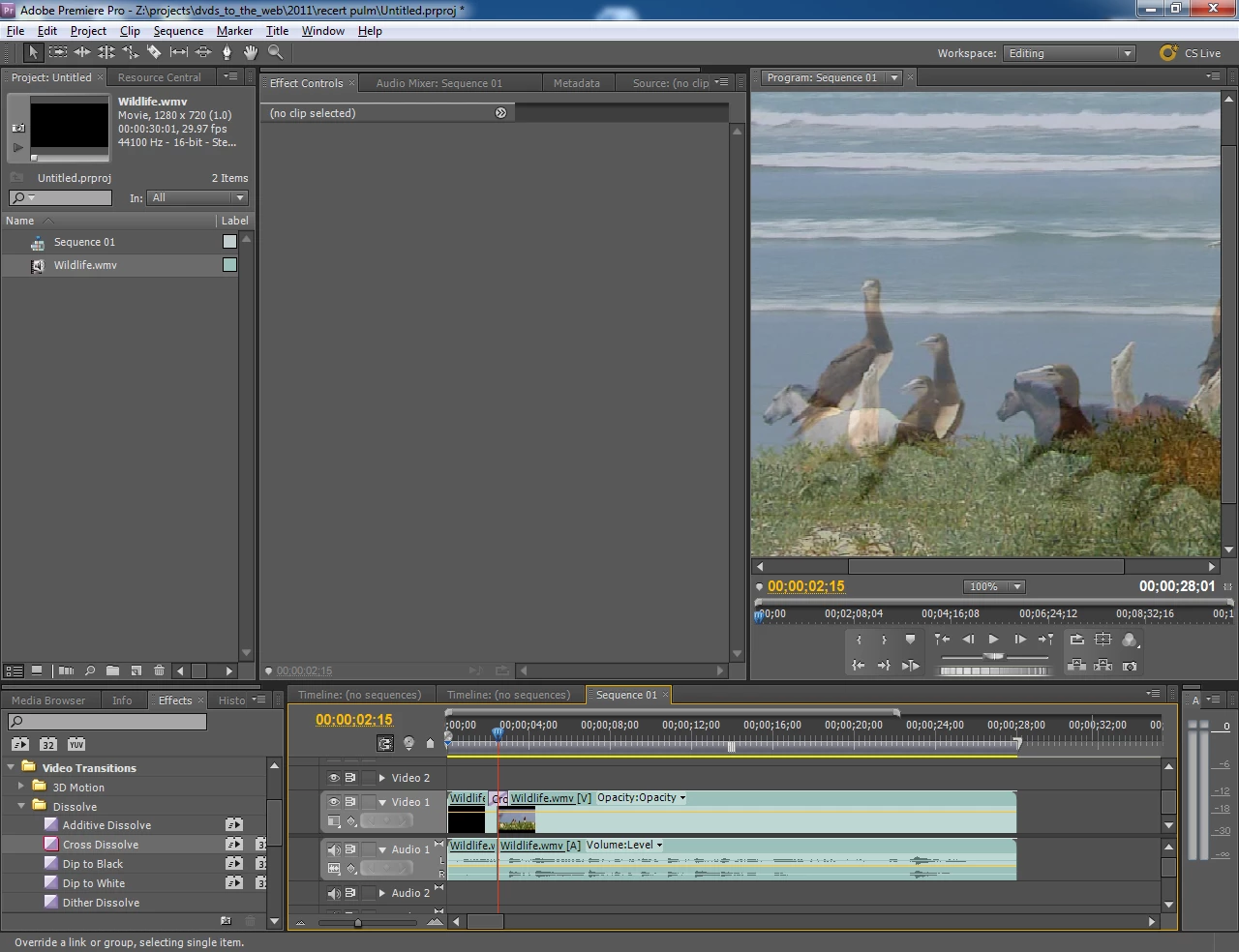
Now let me show you what happens when I do a similar edit somewhere in the second half of the video clip.

cross dissolve doesn

As you can see, for the duration of the transition, only the clip to the left is shown. At the end of the transition effect the program out preview jumps to displaying the clip to the right. There is no transition.

Additional notes:

This second transition works fine with MPE disabled, but because if of my other problem http://forums.adobe.com/message/3725642 that I have with MPE disable it is not a viable work around.

Help?

-Ted

    This topic has been closed for replies.

    9 replies

    Participant
    September 22, 2011

    Hi

    Thi issue goes back till CS4: http://forums.adobe.com/message/2789016#2789016 - and still exists. Adobe have said they would take care of it over a year ago. But nothing seems to have happened with this issue. i was about to uograde from CS5 to CS5.5 in the hope that they had solved this issue - but it seems to be living well...sadly enough.

    Mitch W
    Participating Frequently
    September 22, 2011

    It's fixed in the 5.5.1 update.

    BTW, you can install the 5.5 trial version then install the 5.5.1 update and see for yourself.

    Participating Frequently
    September 16, 2011

    Thanks Adobe.

    The 5.5.1 update seems to have fixed a lot of the  issues I was experiencing with 1080p/60 AVCHD footage.  Specifically with CUDA  transitions (cross dissolve) randomly not working, and playback issues  when the playback head passed from one clip to another in the timeline.

    I'll need to test more to confirm that the issues is completely gone, but I've not seen it come up since the update, which is a very good thing.

    Scrubbing is still choppy, but very much improved.

    -Jason

    Participant
    September 22, 2011

    Sorry - did not see your answer - seems that they have solved this issue after all? Or am I wrong? Anyone experiencing things are getting better concerning the above issues and issues described here: http://forums.adobe.com/message/2789016#2789016 after the 5.5.1 update?

    Cheers

    Morten

    Stephen_Spider
    Inspiring
    September 15, 2011

    Will check it tonight.

    *******

    Well, Not showing any update available 9:25 pm PST, 9-14-11. IDK if having Premiere Pro CS 5.5 stand alone over the entire suite would make a difference, seems unlikely.

    Todd_Kopriva
    Inspiring
    September 15, 2011

    > Not showing any update available

    Follow the link that I gave.

    Stephen_Spider
    Inspiring
    September 15, 2011

    Ah, it was the "...but not yet" in bold italics that I missed. Downloading from the direct link.

    Thanks for the reply.

    September 10, 2011

    This issue was resolved for me with one of the recent Adobe updates. If you still experience this problem you may not have updated yet.

    Stephen_Spider
    Inspiring
    September 11, 2011

    What update? I haven't seen one offered for CS5.5.

    lasvideo
    Inspiring
    September 11, 2011

    An Adobe employee posted that one would be released in the near future.

    Stephen_Spider
    Inspiring
    September 10, 2011

    Same problem using MPE and Cannon MXF files. My work around is adding a null gpu accelerated video effect to one of the offending clips.

    Hope that helps.

    Premeiere CS5.5
    Asus Board
    Core I5 2400K
    16GB Ram
    Nvidia GTX 560Ti (software hack)
    2TB Internal dedicated Video Drive

    Participating Frequently
    September 9, 2011

    I too am experiencing this issue.  AVCHD footage, GPU Acceleration, trying to apply a cross dissolve, and instead it randomly seems to see it as a simple cut.  The Cross Dissolve is simply ignored... Adjusting the footage length, removing the CDissolve, re-rendering, etc. have no effect.  For whatever reason, in that specific location on the timeline, a cross dissolve with GPU acceleration is impossible.  Yet, in other sections of the timeline, it is just fine.

    (The Fast Blur trick mentioned above worked (Thank you!) however, when I changed my playback resolution on the screen display, that broke the fix.  Deleting the fast blur, and applying it to the clip on the other side of the cross dissolve, re-enabled the work around)

    I also see an issue when a clip changes in the timeline, (cut from one piece of footage, to another) the video will begin to studder, dropping frames.  Framerate seems to drop to about 2fps.  To get smooth playback back, I have to pause and resume the playback.  Even if this is done very very rapidly, it still fixes the playback issue.  it's just really annoying to have to constantly stop and resume playback everytime a video clip changes in the timeline.

    I have a dedicated hard drive for video, and a dedicated mirrored array for the OS.  the video drive is a 7200rpm SATAII drive, and I'm using AVCHD footage.  I really don't think it's a disk speed issue... particularly as pausing and resuming (even if you do it as fast as you can possibly hit the keys) fixes it.  I'd rather not spend the $ to set up a RAID 10 for video, if I can avoid it and particularly if it's not needed.

    -Jason

    July 12, 2011

    I have the exact same issue. This bug affects AVCHD and presumably other source footage as well, and can be duplicated if you attempt to use either Cross Dissolve or Film Dissolve to dissolve cuts on the same footage. It's as if PPro can't see that there is a cut, and believes it to be uninterrupted footage since it's from the same source file, so it doesn't apply the dissolve.

    I have been with PPro since CS2 and something like this should have never happened. Cross dissolves are about the most basic, most used transitions in every editor's arsenal. Shame!

    Mitch W
    Participating Frequently
    July 12, 2011

    It's obviously a bug with MPE. It's an unfortunate fact of software development that bugs go undiscovered before a product is shipped. I'm sure Todd has filed a report on this by now and it's being reviewed by Adobe engineering. I can offer a little work-around that seems to resolve the problem until the Adobe engineering types can release a fix. Apply the Fast Blur effect to the clip and leave the blur level set to the default of 0 (zero). This causes a change in the render pipeline and the dissolve is now seen. Because Fast Blur is an MPE accelerated effect, there's still no rendering required. This trick will work with any MPE accelerated effect. It doesn't have to be Fast Blur.

    Todd_Kopriva
    Inspiring
    July 12, 2011

    Yep. We're working on fixes for some issues for dissolves when CUDA processing is used.

    RDA972
    Participating Frequently
    June 17, 2011

    Both transitions work perfectly well on my Win 7 machine whether MPE is enabled or not.

    Mitch W
    Participating Frequently
    June 17, 2011

    If it works correctly with MPE disabled, and incorrectly wih MPE enabled, then it sounds like a bug. File a bug report to get it in front of Premiere Pro engineering and QE so that they can test it (and hopefully fix it).

    Ted178Author
    Participant
    June 17, 2011

    I have submitted a bug report on this issue.

    Todd_Kopriva
    Inspiring
    June 17, 2011

    Ted178,

    Would you mind posting the project that is showing this for you as an attachment here?