
Participating Frequently
December 20, 2016
Answered

Premiere Pro CS6- Issues with changing sequence settings

  • December 20, 2016
  • 1 reply
  • 712 views

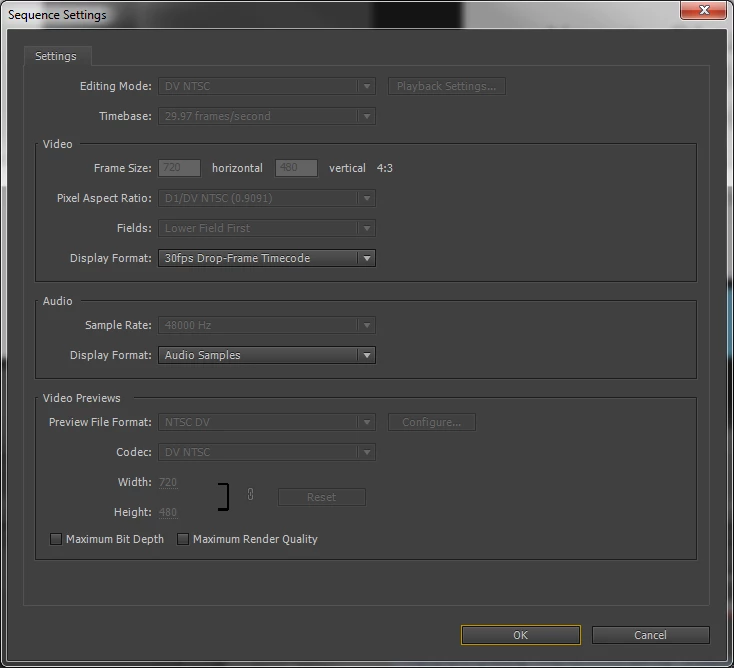
I've been advised i need to change the sequence settings on my project in order to scale the file to frame without compromising the quality.  Catch is, I can't change the sequence settings.  When I go in, most fields are grayed out and I"m unable to change them.  Any advice?  See screenshot below. Thanks.
    This topic has been closed for replies.
    Correct answer Kevin J. Monahan Jr.

    Hi DaniellaM,

    I've been advised i need to change the sequence settings on my project in order to scale the file to frame without compromising the quality.  Catch is, I can't change the sequence settings.  When I go in, most fields are grayed out and I"m unable to change them.  Any advice?


    As I recall, that's not possible in Premiere Pro CS6. Create a new sequence with the proper settings, then copy/paste the clips from the existing sequence into that new sequence. Changing Sequence Settings to existing settings is a feature in Premiere Pro CC.

    Thanks,
    Kevin

    1 reply

    Kevin J. Monahan Jr.
    Community Manager
    Kevin J. Monahan Jr.Community ManagerCorrect answer
    Community Manager
    June 1, 2017

    Hi DaniellaM,

    I've been advised i need to change the sequence settings on my project in order to scale the file to frame without compromising the quality.  Catch is, I can't change the sequence settings.  When I go in, most fields are grayed out and I"m unable to change them.  Any advice?


    As I recall, that's not possible in Premiere Pro CS6. Create a new sequence with the proper settings, then copy/paste the clips from the existing sequence into that new sequence. Changing Sequence Settings to existing settings is a feature in Premiere Pro CC.

    Thanks,
    Kevin

    Kevin Monahan - Sr. Community and Engagement Strategist – Adobe Pro Video and Audio