
Participant
February 13, 2022
Answered

Premiere Pro default effects missing

  • February 13, 2022
  • 5 replies
  • 9775 views

the other day i launched premiere pro, and looked in my effects panel to see that all of my effects have gone missing. im not sure how or why this has happened.

ive reset to saved layout, restarted my pc, uninstalled premiere pro twice completely, and i still have no effects. any suggestions or fixes?
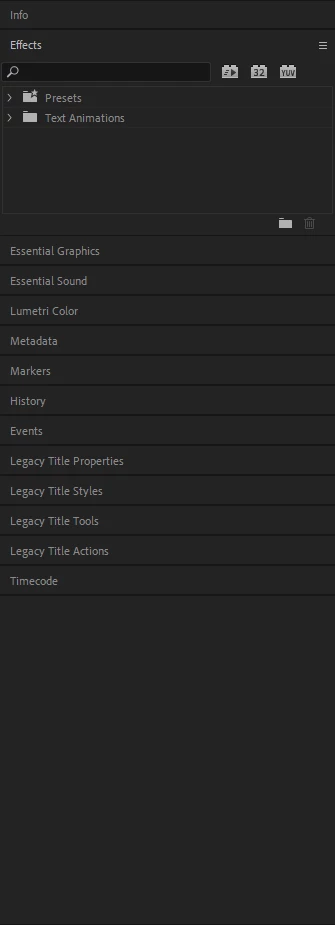
im using the latest version of premiere pro


This topic has been closed for replies.
Correct answer sponnify

conacted support and activated remote access. what he did was just remove all my plugins and move them into a seperate folder not affiliated with Adobe (for safekeeping), so there was nothing in my plugins folder. this fixed my issue.

5 replies

Participant
December 12, 2022

so, how does one do this? lol 

conacted support and activated remote access. what he did was just remove all my plugins and move them into a seperate folder not affiliated with Adobe (for safekeeping), so there was nothing in my plugins folder. this fixed my issue.

sponnifyAuthorCorrect answer
Participant
February 20, 2022

conacted support and activated remote access. what he did was just remove all my plugins and move them into a seperate folder not affiliated with Adobe (for safekeeping), so there was nothing in my plugins folder. this fixed my issue.

Participant
September 14, 2023

How do you contact support? I can't find a number or chat option.

Peru Bob
Community Expert
Community Expert
September 14, 2023
quote

How do you contact support?


By @TinBug


Please go to Adobe Customer Service (Make sure to sign in to your Adobe account first and allow popups and cookies on your browser. You may not be able to see the chat window if using a VPN.):
https://helpx.adobe.com/contact.html?rghtup=autoOpen will automatically open the chat window.
Type "Agent" in the chat box to bypass the chatbot and be connected to a person. Then ask for the Video Queue.

or Twitter:
https://twitter.com/AdobeCare

Peru Bob
Community Expert
Community Expert
February 13, 2022

Try a different workspace.

sponnifyAuthor
Participant
February 14, 2022

same thing in other workspaces.

Ann Bens
Community Expert
Community Expert
February 13, 2022

Did you use cleanertool before installing Premiere?

Signed in and out of your Account?

sponnifyAuthor
Participant
February 13, 2022

okay, i used ccleaner after i uninstalled, then signed in and out of the creative cloud suite before reinstalling and opening premiere pro again. this didnt work either, unfortunately.

Ann Bens
Community Expert
Community Expert
February 13, 2022

I am out of ideas except contact support.

Ann Bens
Community Expert
Community Expert
February 13, 2022

Tried resetting Preferences

FAQ: How to reset (trash) preferences.


sponnifyAuthor
Participant
February 13, 2022

this didn't work, unfortunately.