

Randune23
Inspiring
May 23, 2025
Question

Premiere Pro does not have audio files when importing MTS files

  • May 23, 2025
  • 6 replies
  • 1409 views

I am working on a project for work.  To do this, I have shot my B-roll and some of my testimonies.  Then I download them on my home computer from my HDVCs, iPhone, DJI wireless microphone, and then I copy them to my Google Drive.  This way, when I get to work, I can download all those files, and add them to my project.  However, after downloading them to my work laptop, I create the project and start to import all of my files.  As I was trying to sync up the video files from 3 cameras (2 Sony HDVCs and my iPhone), I noticed something as odd.  NONE of the MTS files have audio files...they are just the videos.  Which without the audio makes it IMPOSSIBLE to sync the three files.  This is what they look like after importing them into PP:
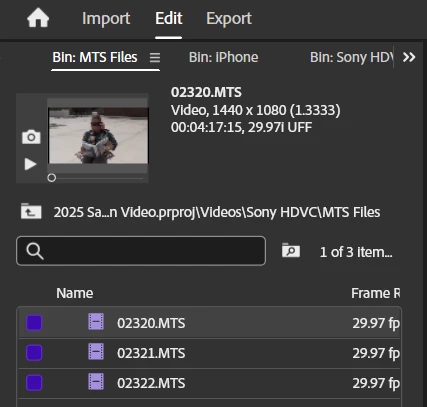
NO AUDIO FILES!!!

So I went to Google and tried searching for issues.  I guess since Sony and Adobe don't always play nice, one of the solutions was to convert them to H.264 using the Adobe Media Encoder.  So I encoded all of my MTS files.  When I added them to the project, they appear to have audio:
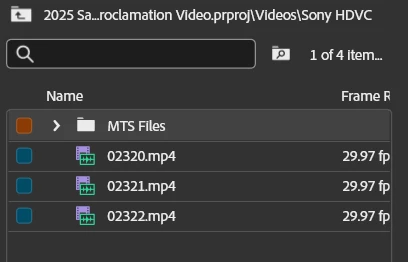
 

But after I add them to the timeline, hoping I will be able to sync all three cameras, this is what I get:
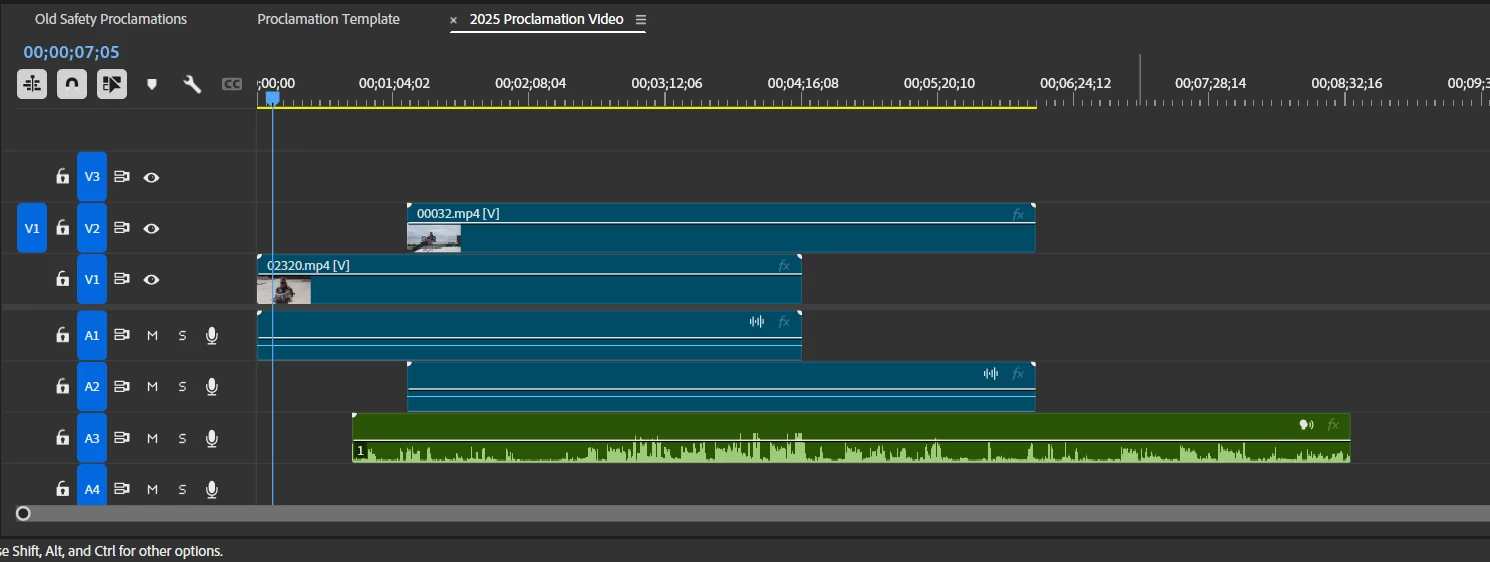
 

Only the DJI wireless mic displays the waveform.  When I try to play the converted files after encoding (using VLC player), they don't have ANY AUDIO!  The crazy part is when I open the MTS file in VLC, it plays the audio perfectly.  So what am I missing???


I really, really don't want to have to use my home computer to complete this project.


Any advice, tips, and tricks are greatly appreciated.


Randy M.


6 replies

Community Manager
May 26, 2025

Hi Randy M,

Welcome to the community! Could you please confirm the exact model of the Sony camera used to capture the MTS media? Also, if possible, could you share a download link for a sample MTS media to test at our end?


Thanks,
Sumeet

Randune23
Randune23Author
Inspiring
May 30, 2025

Sony HDR-CX260

Community Manager
June 3, 2025

Thanks for confirming that. Would it be possible for you to share a download link for the sample media to test at our end? It will help us investigate the issue properly,


-Sumeet

JonesVid
Community Expert
Community Expert
May 25, 2025

Hi@R Neil Haugen 

Yes, thanks for that, I actually came across that post accidently earlier today !.

Ref: https://community.adobe.com/t5/premiere-pro-discussions/no-ac3-codec-in-windows-11-24h2-solution-is-needed/m-p/14974444#M537883


Microsoft threw another curved ball at us - then also the Graphics driver issues with Win 11 24H2.

After reading the posts it seems the AC3 codec probably carried over from my Win 11 23H2 upgrade.

I agree with Averdahl's comments in the above post that downloading codecs from unknown 3rd party sites is not exactly the right solution we should have to resort to however.


JonesVid
Community Expert
Community Expert
May 25, 2025

Hi @R Neil Haugen 

Yes, I understood that, but I was curious if my Windows 11 24H2 build plus old Panasonic mts files would be supported. 
Anyway, this was a useful discussion .

R Neil Haugen
Legend
May 25, 2025

It can, apparently, if you follow the links of this thread and install the codec manually into your system.


https://community.adobe.com/t5/premiere-pro-discussions/no-ac3-codec-in-windows-11-24h2-solution-is-needed/m-p/14974444#M537883

Everyone's mileage always varies ...
JonesVid
Community Expert
Community Expert
May 24, 2025

Hi @Ann Bens @Randune23 


This post caught my eye as I still have loads of old .MTS files from my Panasonic GH2 (circa 2011) to edit one day.

Never was a problem on my old Windows 10 machine but my main PC now is Windows 11 machine built from scratch - first as Win 11 23H2 then Microsoft did an upgrade (in background) via Win Update.

I thought I better look at this.

Just did a test on an old .MTS file on Premiere 25.2.3 and the MTS file brings in AC3 audio and plays OK in Premiere

Obviously the AC3 codec is from somewhere, don't know where - I have Handbrake loaded?.

Media Info on sample file attached just for general info

I note that the AC3 audio is only at 192Kbs - which is a bit low for AC3.

Anyway - they play OK, but I learnt something here 🙂

Useful post and replies.


R Neil Haugen
Legend
May 24, 2025

As Ann notes, that's an issue with Microsoft, not Adobe. And is fixed by installing the codec from the link she provided.

Everyone's mileage always varies ...
Ann Bens
Community Expert
Community Expert
May 23, 2025

Guessing the MTS files have ac3 audio?

If you have a brand new W 11 installed (not an upgrade from W10), then that is correct: no sound.

W11 24H2 does not support ac3 anymore.

You will have to download or buy the ac3 codec and install it into Windows 11.


https://community.adobe.com/t5/premiere-pro-discussions/no-ac3-codec-in-windows-11-24h2-solution-is-needed/m-p/14974444#M537883

Randune23
Randune23Author
Inspiring
May 24, 2025

I received my new Dell work laptop with Windows 11 installed. I don't remember having issues with this before, but after a few Dell and Windows updates, I no longer get audio on my MTS clips.  I pulled the same clips into PP on my Dell Precision workstation in my YouTube studio (running windows 10) and it worked flawlessly.


I may have to share your post with our IT peeps because I cannot download or install any codecs (neither fonts LOL) on my work laptop.

So @Ann Bens, how do I find how PP treats the audio on these MTS clips I imported?  There is no file bin inside the project.


Randy


R Neil Haugen
Legend
May 25, 2025

The actual question isn't how Premiere treats the files, it's how your OS treats the files. Specifically.


That's the problem, Windows dropped support for that audio format. Which is why the codec must be added to your computer.

Everyone's mileage always varies ...