
Premiere Pro está generando una transcripción incorrecta, con palabras cortadas o sílabas sueltas, aunque seleccionás español y volvés a transcribir el video.
Adobe Premiere Pro 26.5.2 – Incorrect Spanish Speech-to-Text Transcription
Issue
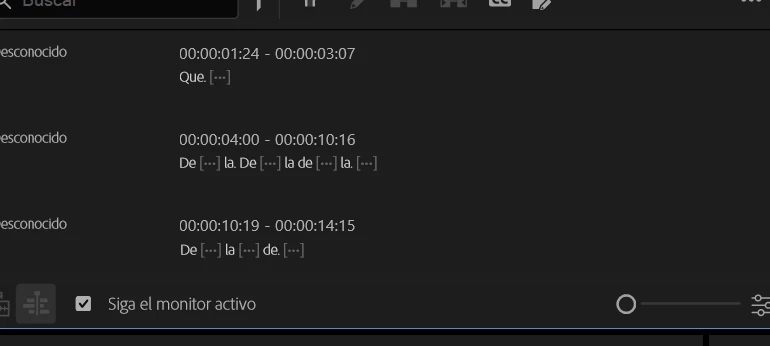
Adobe Premiere Pro generates severely inaccurate speech-to-text transcriptions in Spanish. Instead of recognizing the spoken dialogue correctly, it produces isolated syllables, unrelated words, and incomplete phrases that do not match the audio.
This issue started recently. Previously, transcription worked correctly, but now the problem occurs whenever I try to transcribe a video.
Steps to Reproduce
-
Open Adobe Premiere Pro 26.5.2.
-
Import a video containing spoken dialogue in Spanish.
-
Open the Text panel and select the Transcript tab.
-
Select Spanish as the transcription language.
-
Start the transcription process and wait for it to finish.
-
Review the generated transcript.
-
Delete the incorrect transcript and try transcribing the same video again.
-
Repeat the process with different videos and projects.
Expected Result
Premiere Pro should accurately recognize the spoken Spanish dialogue and generate a coherent transcript that matches the audio.
Actual Result
The transcription contains isolated syllables, unrelated words, and incomplete phrases that do not correspond to the spoken dialogue.
The transcription process finishes, but the resulting text is incorrect and unusable.
The issue persists even after:
-
Deleting the incorrect transcript and generating it again.
-
Verifying that Spanish is correctly selected as the transcription language.
-
Testing different video files.
-
Testing different Premiere Pro projects.
Since the problem occurs across multiple videos and projects, it does not appear to be limited to a single media file or project.
Screen Recording
I can provide screenshots showing the incorrect transcription. A screen recording can also be provided to demonstrate the issue.
Premiere Version
Adobe Premiere Pro 26.5.2.
Operating System
Windows 11, 64-bit.
GPU and Driver (Windows Only)
Intel Iris Xe Graphics integrated GPU.
Processor: Intel Core i7 .
Video Format
The issue has occurred with multiple video files. The exact video formats and codecs have not yet been verified.
Project Size
The issue occurs across different projects and videos. The affected projects contain multiple video clips and audio tracks.
Exact project file size and number of clips: Not yet determined.
Helpful Context
-
The issue started recently; transcription previously worked correctly.
-
It occurs with different video files and separate Premiere Pro projects.
-
It also occurs when transcribing newly imported videos.
-
Spanish is selected as the transcription language.
-
Deleting and regenerating the transcript does not fix the problem.
-
The transcription process completes, but the generated text does not match the audio.
-
The problem appears to affect the speech recognition process rather than a specific project or video file.
Request
Could you please confirm whether this is a known issue in Adobe Premiere Pro 26.5.2, particularly on Windows 11 systems using Intel Iris Xe integrated graphics?
I would appreciate any recommended troubleshooting steps or information about a possible bug or regression affecting Spanish speech-to-text transcription.
Thank you for your help.


 AdChoices