
Vespill
Participating Frequently
December 23, 2017
Question

Premiere Pro export error 512, error compiling movie

  • December 23, 2017
  • 15 replies
  • 49735 views

I have tried everything I could think of, but Premiere keeps failing to export my project, to either h.264 or h.265 (screenshot below)

My footage is from a Nikon D5200, and they are .mov files. This only happens when I apply any Lumetri Colour effect.

Help
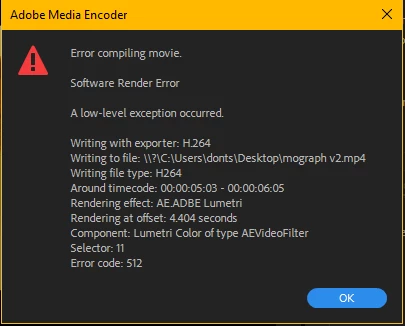
My PC specs are

Core i9 7900x

Gtx 1080ti

32gb ddr4-3200 ram

asus prime x299 deluxe mb

2x 1tb samsung 960 evo ssd

Update: I tried converting the footage to .mp4 using handbrake and using that, but to no avail

15 replies

bog51591315
Participant
January 4, 2018

I'm having the same issue...

Someone know how to fix it? ...

maybe it happened because of the update...

The project I want to export is kinda old.

Community Expert
December 27, 2017

How long is the sequence you're exporting?

I'd suggest trying to export a small part - say the first 2 minutes to see if that works. If it does, it may be a specific part of the file that is not causing the problem.

Vespill
VespillAuthor
Participating Frequently
January 6, 2018

I have tried that after your suggestion, but to no avail

Participant
December 27, 2017

I had this same problem today. I got around it by queuing the export to the Media Encoder instead of exporting directly from Premiere Pro.

Vespill
VespillAuthor
Participating Frequently
December 27, 2017

I have tried software only, same issue.

kulpreet singh
Inspiring
December 25, 2017

Hi Vespill,

I am sorry that you are not able to render your sequence.

  • Do you have any specific effect (inbuilt or 3rd party) used around 00:00:05:03 - 00:00:06:05?
  • Have you tried exporting your sequence from the Media Encoder?
  • Any update available for the video drivers?
  • Try this: open your project, click on File > Project settings > General & change the video renderer to ' MPE Software Only' and delete previews.

Let me know if that helps.

Thanks,

Kulpreet Singh

Vespill
VespillAuthor
Participating Frequently
December 25, 2017

The only other effect I have besides the lumetri colour is letterbox from the ignite pro 3rd party plugin.

I have tried removing that effect but it doesn't change anything

I have tried using AME but to no avail

All my drivers are up to date

I have yet to try the software only mode, but if it does work I suspect that it will be quite slow.

By the way it doesn't always fail at the same point in the video, sometimes it fails at 10% and other times at 80%

Is there any way to make it work using CUDA?

Vespill
VespillAuthor
Participating Frequently
December 24, 2017

Someone please help i need to finish this project