
KristianTalje
Inspiring
January 18, 2019
Answered

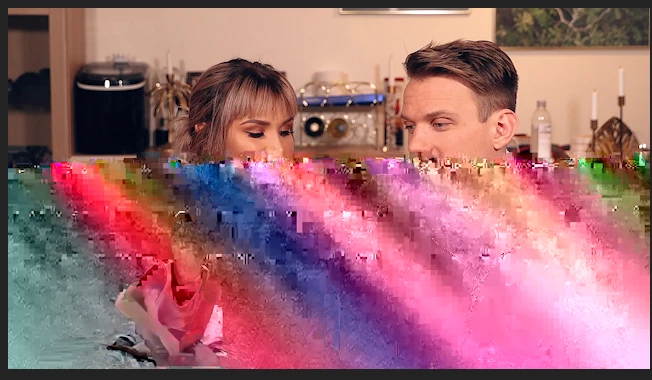
Premiere pro EXPORT Glitch

  • January 18, 2019
  • 13 replies
  • 67904 views

Hello,

I have never had problems with premiere pro export before. But now all of a sudden i started getting few frames like these. Only when exported, not in the project itself. Hardware accelerated is on and I've always used that. I use youtube 1080 preset and clikc in maximum render quality and render at maximum dephs.

Any help would be most appreciated. ❤️

Computer specc:
i9 9900k16 GB ram

Gtx 970
This topic has been closed for replies.
Correct answer KristianTalje

All wrong answers. disappeared

Spoke do Adobe support. turns out hardware encoding was the problem. Weird since I use the brand new i9900k. But they said it could be one of the files that I was using, not the processor itself. However, I switched to software encoding and the problem disappeared.

13 replies

Christian.Z
Community Expert
Community Expert
January 18, 2019

If you try to re-export, does the glitch happen at the exact same spot? or different glitches appear on different exports?

KristianTalje
Inspiring
January 18, 2019

Thx guys.


I will try again with your help.

But one question, why would this even matter since I have always used these settings before?

Peru Bob
Community Expert
Community Expert
January 19, 2019

KristianTalje  wrote

But one question, why would this even matter since I have always used these settings before?

You dont need max render, you have a dedicated card.

Also turn off max depth.  as Ann said.

-It taxes system resources and can cause anomalies.

Make sure the latest graphicscard driver from Nvidia is installed.  as Ann also said.

-Sometimes Windows Updates will install a driver which may not work as well as one directly from Nvidia.

On a lighter note:

That question reminds me of the fellow who is about to enter his car and notices one of the tires is flat.  He says to himself, "But it wasn't flat yesterday."

Legend
January 18, 2019

I would recommend turning off Maximum Render Quality.  It doesn't do what you think it does.

I recommend leaving Max Bit Depth turned on.  That can help with all exports, but isn't likely to be causing this issue.

Ann Bens
Community Expert
Community Expert
January 18, 2019

You dont need max render, you have a dedicated card.

Also turn off max depth.

Make sure the latest graphicscard driver from Nvidia is installed.

See how that goes.

On a sidenote:

You have a very nice cpu, little ram and an old graphicscard.....