
Participating Frequently
January 29, 2025
Question

Premiere Pro Failing to Transcribe clips

  • January 29, 2025
  • 3 replies
  • 413 views

Hey all!


I'm once again having issues with using Text-Based Editing in Premiere Pro 2025. I follow the instructions here ->https://helpx.adobe.com/premiere-pro/using/text-based-editing.html but the transcription never completes. I've tried playing around with putting the raw footage in the source window, program window, and the timeline down below with no improvements. It stays at 0% loaded with no estimation and then simply dissappears.
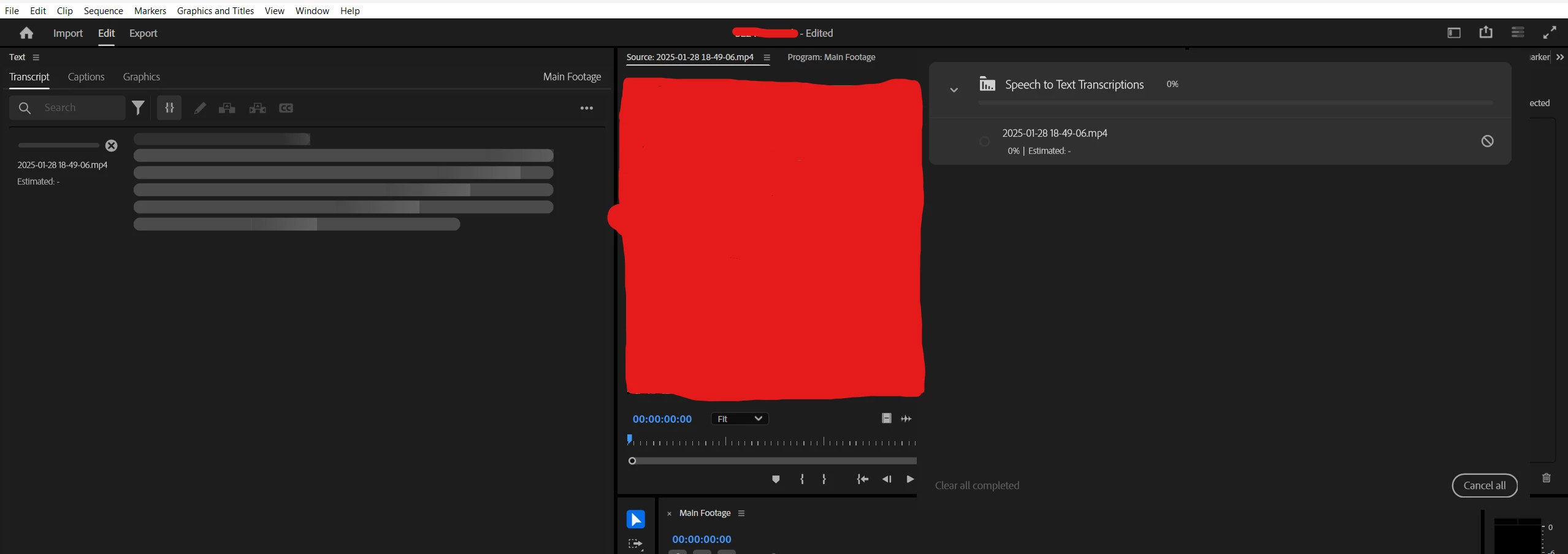
This issue occurs often. I'll have no trouble editing videos for a few weeks and then I'll go to create a new project exactly as I normally do and then this issue happens. Today I did a complete uninstall and reinstalled the program without any improvements.


Looking for any assistance that can be provided. Thank you!

3 replies

Participating Frequently
January 31, 2025

Just wanting to reiterate that this is still a problem and I'm happy to try and solutions that can be suggested. I moved from Premiere Elements to Pro solely to utilize Text-Based Editing so I really need this to work. Thank you!

Stan Jones
Community Expert
Community Expert
January 30, 2025

@Joshua34426197o4aq,


How many minutes is the clip you are transcribing?


Try it with the Progress Dashboard (upper right) CLOSED.


Post back and let us know. I'll explain more when I have a bit more time.


Stan


Participating Frequently
January 30, 2025

So I have opened the progress dashboard just to illustrate that it doesn't work. The behavior is the same whether it's opened or closed.

Stan Jones
Community Expert
Community Expert
January 30, 2025

@Joshua34426197o4aq,


Thanks for that information.


Your situation is different from most other transcription failures being reported because it works and then doesn't work.


The simplest test for transcription:

• Create a new test project,
• In the create new project screen, be sure that "auto-transcription" is turned OFF.
• Add one clip,
• In the Project Panel, right-click and pick Transcribe
• Click Transcribe
What happens?


You have probably taken these steps, but these basics often solve odd problems.


Generally, I recommend resetting workspace before resetting preferences. Go to Window -> Workspaces -> Reset to saved layout.


If  you have a lot of customization in the setup, be sure to read this before resetting preferences:

https://helpx.adobe.com/in/premiere-pro/using/reset-preferences.html


Stan


Kevin-Monahan
Community Manager
Community Manager
January 30, 2025

Hi @Joshua34426197o4aq,

Thanks for the note. Welcome to the forum. I hope we can help you here. @Stan Jones, so you know about this problem? Sorry for the frustration.


Thanks,
Kevin


Kevin Monahan - Sr. Community & Engagement Strategist – Pro Video and Audio