cihankurtnet
Participant
January 8, 2018
Answered

Premiere Pro is so hard to work on my MacBook!

  • January 8, 2018
  • 1 reply
  • 6233 views

Hello to everyone! First of all I apologize to you for my bad english. About a month ago I bought a Macbook with great hopes. The only reason for this was that my old computer was now inadequate for video editing. But I am having a great disappointment right now.

First of all I want to give you all the necessary information.

Features of my computer :

MacBook Pro (13-inch, 2017, Two Thunderbolt 3 ports)
2.5 GHz Intel Core i7
16 GB 2133 MHz LPDDR3
Intel Iris Plus Graphics 640 1536 MB

The characteristics of the video I have organized:

1080p 60 FPS
Iphone 8 Plus
h264

The problem I am having is:
I can not even edit 1080p at 60FPS video resolution. After you start editing, the timeline begins to freeze and the frame drop color turns yellow. When I opened the activity monitor, I did not see any trouble in Ram. But I can not say the same thing for CPU. Because the percentage of Premiere Pro is 400%. The fan is almost nervous. And as I said this is not 4k image 1080p!

I have tried many solutions for this.
I'm seeing it with Apple. There are no defects in the hardware. And I tried all the ways below.

I closed the effects while editing.

I made the maximum RAM I could use from the settings.

I formatted the Macbook.

I reinstalled Premiere Pro.

I turned off Maximum bit depth and Maximum render quality.

And many more solutions I found on the internet ...

Please help me. Because I've been struggling for days and I have not found any solution.

I put photos for more information.

Project Settings:

Premiere Pro not running CPU:

Premiere Pro not running RAM:

Effects off and resolution 1/4:

Premiere Pro Running CPU:

Premiere Pro running RAM:

This topic has been closed for replies.
Correct answer R Neil Haugen

Your media is a large part of the trouble your computer is having. It looks to be all long-GOP and so very demanding of the CPU and threads/cores/RAM ability. That's without adding any effects, and if you're throwing WARP, Morph, noise removal, Lumetri, anything like that, it just compounds the issue. Especially if you haven't converted the phone media to CFR via Handbrake ... that media could be causing issues as well.

NLE's put a much greater load on the computer than a simple playback program, and for it's joys, PrPro isn't the lightest resource user among NLE's.

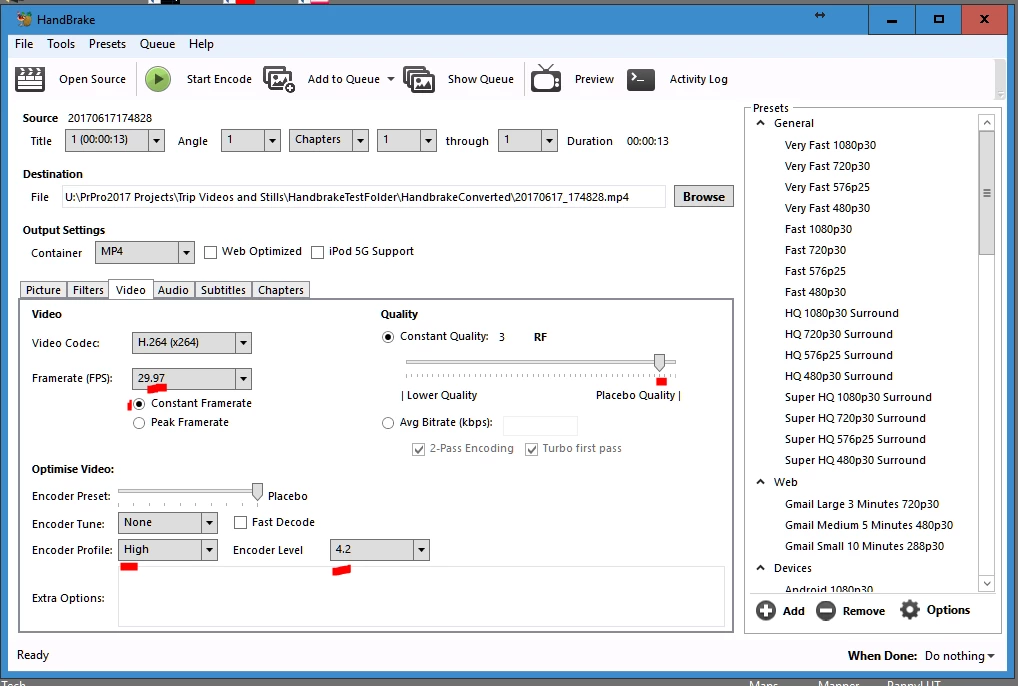
So ... if you've any phone media that's still VFR, I'd suggest using Handbrake to convert that to CFR so it works better in PrPro, and PrPro with that media.

https://handbrake.fr/downloads.php

These are the settings I use in that app for conversion of my phone media ...

Next, I would suggest using PrPro's built in proxy on ingest feature, though for the media already imported, you can right-click (and yes, even a full bin) your media in the Project panel, selecting Proxies/Create Proxies ... and use one of the included Cineform presets. This will play back so much easier on your machine.

To use the proxies created, click the + icon on the far right of the Program monitor. Drag the Toggle Proxy icon into your control block for the Program monitor, and when clicked and it's blue, you're playing back with proxy media. To check at full-quality click it so it turns gray, and you're seeing original media.

Neil

1 reply

R Neil Haugen
R Neil HaugenCorrect answer
Legend
January 9, 2018

Your media is a large part of the trouble your computer is having. It looks to be all long-GOP and so very demanding of the CPU and threads/cores/RAM ability. That's without adding any effects, and if you're throwing WARP, Morph, noise removal, Lumetri, anything like that, it just compounds the issue. Especially if you haven't converted the phone media to CFR via Handbrake ... that media could be causing issues as well.

NLE's put a much greater load on the computer than a simple playback program, and for it's joys, PrPro isn't the lightest resource user among NLE's.

So ... if you've any phone media that's still VFR, I'd suggest using Handbrake to convert that to CFR so it works better in PrPro, and PrPro with that media.

https://handbrake.fr/downloads.php

These are the settings I use in that app for conversion of my phone media ...

Next, I would suggest using PrPro's built in proxy on ingest feature, though for the media already imported, you can right-click (and yes, even a full bin) your media in the Project panel, selecting Proxies/Create Proxies ... and use one of the included Cineform presets. This will play back so much easier on your machine.

To use the proxies created, click the + icon on the far right of the Program monitor. Drag the Toggle Proxy icon into your control block for the Program monitor, and when clicked and it's blue, you're playing back with proxy media. To check at full-quality click it so it turns gray, and you're seeing original media.

Neil

Everyone's mileage always varies ...
cihankurtnet
Participant
January 9, 2018

First of all thank you for your comment. I did what you said and changed the format of the video. My CPU usage has been reduced from 300% to 200%. But this time my RAM usage has increased almost 3 times. Unfortunately I keep alive Frame drop.

New format converted:

H264 format Ram used:

New Format Ram Used: (effect closed, resolution 1/4)

R Neil Haugen
Legend
January 9, 2018

Are you using the Cineform proxies?

Neil

Everyone's mileage always varies ...