Rafael Cruz e Silva
Participant
April 27, 2026
Question

Premiere Pro não transcreve áudios

  • April 27, 2026
  • 2 replies
  • 105 views

Olá,

Meu Premiere Pro parou de transcrever áudios.

Já fiz o que está orientado em outros tópicos deste fórum: já desinstalei o pacote de idiomas (no caso, o Português) e o reinstalei em seguida, já converti o áudio p/ Mono ao invés de estéreo, já desinstalei e reinstalei o software. 

Testei em um projeto no qual há uma locução em inglês e a funcionalidade de transcrição também não funciona.

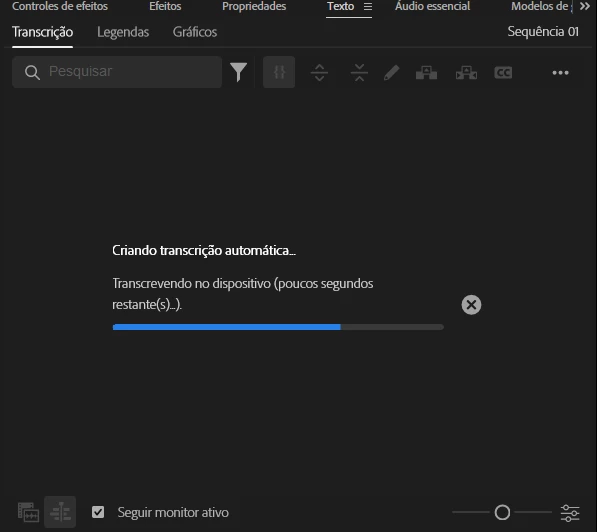
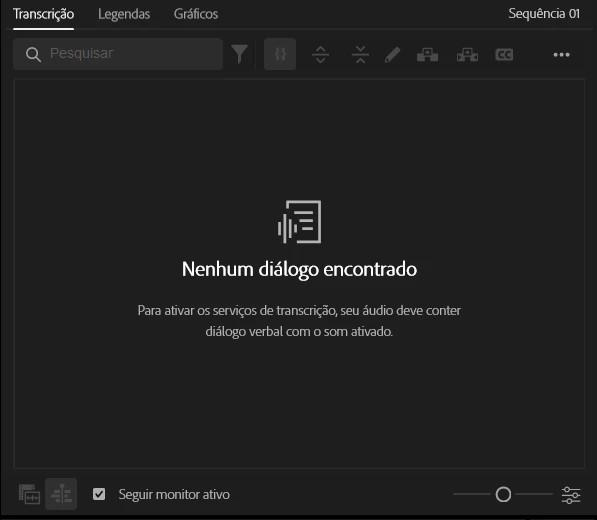
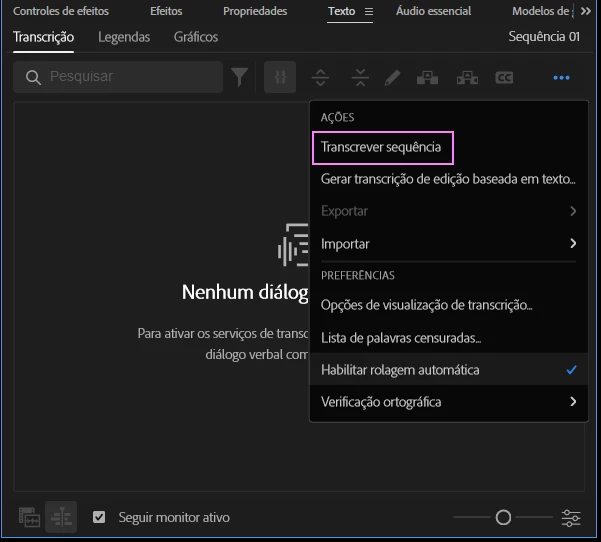
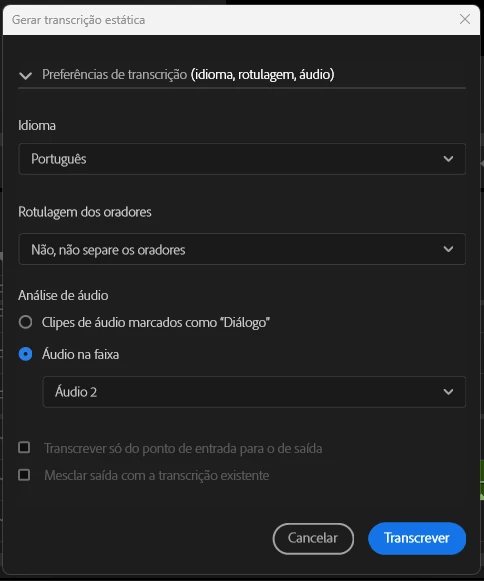
Quando clico na opção “Transcrever sequência”, na janela “Texto”, o Premiere inicia uma barra de progresso, como se estivesse fazendo a transcrição. Mas depois dela concluída, a janela volta a apresentar o aviso “Nenhum diálogo encontrado”
Passo 1
Passo 2
Passo 3
Passo 4


2 replies

Stan Jones
Community Expert
Community Expert
April 30, 2026

@Rafael Cruz e Silva,


Thank you for providing screenshots and the detailed description of  your troubleshooting. With the additional response to Kevin, it does appear to rule out the common causes.


As you say, there have a been a number of reports of transcription starting and ending without a transcript and then seeing “No dialogue found.” These began with 26.0.0 and are also present in 26.2.0. But some are probably because there is an actual issue with the file and many users do not report whether they are on 26.2.0. (There were updates with 26.2.0 that might have improved transcription, but that also might create issues.)


I don’t see a single thread that covers all the issues.


What is your OS language? What is the language of the clip?


I would do an additional test, although my best guess is that it will fail: create a new project, import one .mp4 with single audio track, right-click in the project panel, pick transcribe, and use the defaults. What do  you see?


Stan


Rafael Cruz e Silva
Participant
May 4, 2026

@Rafael Cruz e Silva,


Thank you for providing screenshots and the detailed description of  your troubleshooting. With the additional response to Kevin, it does appear to rule out the common causes.


As you say, there have a been a number of reports of transcription starting and ending without a transcript and then seeing “No dialogue found.” These began with 26.0.0 and are also present in 26.2.0. But some are probably because there is an actual issue with the file and many users do not report whether they are on 26.2.0. (There were updates with 26.2.0 that might have improved transcription, but that also might create issues.)


I don’t see a single thread that covers all the issues.


What is your OS language? What is the language of the clip?


I would do an additional test, although my best guess is that it will fail: create a new project, import one .mp4 with single audio track, right-click in the project panel, pick transcribe, and use the defaults. What do  you see?


Stan


Oi Stan, 

O idioma do sistema operacional é Português do Brasil. O idioma da locução do clip também é Português do Brasil.

Eu fiz um teste, conforme você orientou: criei um novo arquivo, importei uma única faixa de áudio, cliquei “transcrever” no painel, usei as configurações padrão. O comportamento segue o mesmo.

Eu consegui fazer a transcrição regredindo o Premiere Pro para uma versão anterior à 26. 

Community Manager
April 27, 2026

Hi Rafael,

Thanks for the detailed report—that’s very helpful.


If transcription completes but returns “No dialogue found,” it’s usually related to how the audio is being interpreted rather than the transcription feature itself. This can happen if the audio format isn’t fully supported, the dialogue levels are too low, or the incorrect track is selected for analysis.


I’d recommend trying the following:

  • Convert the audio to a standard format like WAV (48 kHz, 16- or 24-bit) and re-import it

  • Double-check that the correct audio track is targeted for transcription

  • Confirm the correct language is selected in the Text panel


Let us know if the issue persists. If so, please let us know your Premiere Pro version, OS, and the source audio format so we can take a closer look.


Thanks,
Kevin

Rafael Cruz e Silva
Participant
April 27, 2026

Hi Rafael,

Thanks for the detailed report—that’s very helpful.


If transcription completes but returns “No dialogue found,” it’s usually related to how the audio is being interpreted rather than the transcription feature itself. This can happen if the audio format isn’t fully supported, the dialogue levels are too low, or the incorrect track is selected for analysis.


I’d recommend trying the following:

  • Convert the audio to a standard format like WAV (48 kHz, 16- or 24-bit) and re-import it

  • Double-check that the correct audio track is targeted for transcription

  • Confirm the correct language is selected in the Text panel


Let us know if the issue persists. If so, please let us know your Premiere Pro version, OS, and the source audio format so we can take a closer look.


Thanks,
Kevin

Olá Kevin,


O problema persiste. Converti o áudio para um formato WAV de 48kHz de 24-bit e o reimportei. Além disso, chequei novamente: a faixa de áudio a ser transcrita está correta. Também confirmei o idioma correto o painel de texto. 

Minha versão do Premiere Pro é a 26.2.0 . Meu sistema operacional é Windows 11

Milena Bonilha
Participant
May 4, 2026

Olá, Rafael! Tenho sempre essa dificuldade em relação a transcrição de legenda a alguns áudios, como agora, passei por isso. O que sempre funciona pra mim é: fechar o premiere por completo, abrir o programa e tentar novamente, sempre funciona (depois de insistir em transcrever por diversas vezes e nao solucionar, eu reinicio o notebook ou só fecho o aplicativo, abro o premiere e resolve)… me diz depois, se deu certo! Boa sorte!