
Premiere Pro Not Detecting GPU Renderer (6600 XT) – Stuck on Software Only
Hey, My Premiere Pro isn’t recognizing my GPU at all.
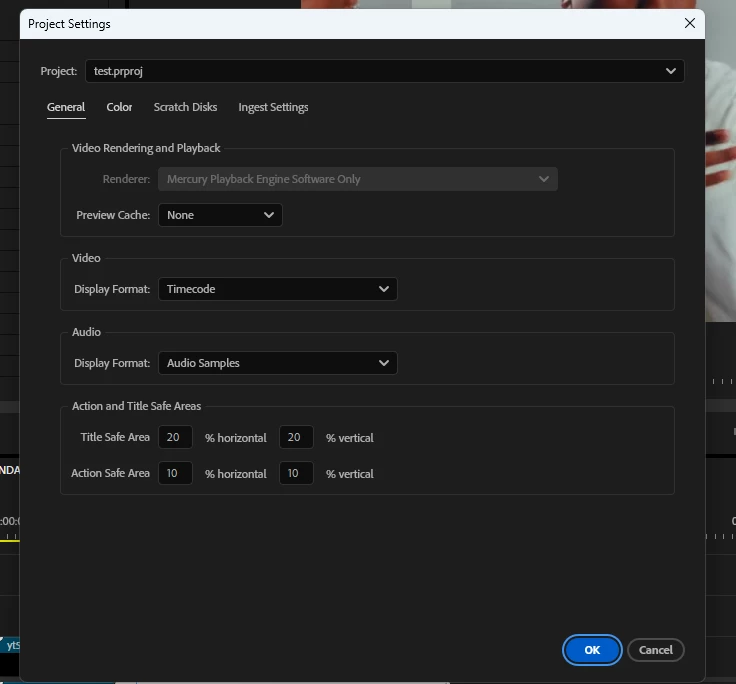
I’m using a Radeon XFX 6600 XT, which I know supports GPU acceleration (OpenCL). However, when I go to File > Project Settings > General, the only renderer option I see is “Mercury Playback Engine Software Only.”
I’ve tried the following:
Clean installed the latest AMD Adrenalin drivers for the 6600 XT
Made sure Windows is fully up to date (Windows 11 64-bit)
Ran Premiere as administrator
Checked Device Manager – my GPU is recognized and working
Forced high-performance G PU for Premiere in Windows graphics settings
No integrated GPU is enabled
I also ran GPUSniffer.exe in the Premiere Pro folder — it does detect the 6600 XT and says “Passed.”
Still, Premiere refuses to give me the GPU acceleration option.
Am I missing something? Is this a known issue with AMD cards in newer versions of Premiere, or is there a specific workaround to force it to recognize OpenCL support?
Any help would be seriously appreciated!


 AdChoices