
Participant
January 11, 2020
Question

Premiere Pro not letting me use Constant Gain between two audio clips

  • January 11, 2020
  • 2 replies
  • 9962 views

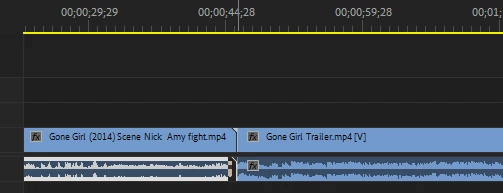
Premiere Pro is being really stupid right now and not letting me apply constant gain between two audio clips. It only appears to work at the end of the first audio clip, which makes absolutely no sense. The two clips are perfectly alligned too. Can someone please help here??
 

This topic has been closed for replies.

2 replies

Wiley Visuals
Inspiring
January 12, 2020

You can tell by that little white triangle in the top right corner of your first clip that you've reached the end of the media. It can't do a fade/transition because there is nothing there for it to overlap with.

As Gerikp said, trim a few frame of the end of the first clip, and then try again.

gerikp
Community Expert
Community Expert
January 11, 2020

Maybe your clip doesn't have enough frames in your clip handle to accommodate the transition. As a test trim off a couple of seconds from the beginning of your second clip, butt the two clips together and apply your transition again. You need enough overlapping frames in your clip for the transition to work. 

Participant
January 11, 2020

Hmmm, what do you mean by clip handles? Both of the video/audio clips are about at least 30 seconds long.

gerikp
Community Expert
Community Expert
January 12, 2020