
Premiere Pro not using neither my CPU nor the GPU
Hi everyone! Hope you can help me on this. The screenshot is from a 10 minute video export without effects or anything at 1080p 60fps (half an hour render time). Playback doesn't use the cpu either and it's VERY choppy and the export came out choppy as well. The same happens when I export via Media Encoder (even with CUDA activated). I installed Resolve and it uses the PC's full potential, either in the playback and in the export. I changed my power plan from AMD Balanced to High Performance and it worked fine for 2 minutes and then the choppy playback and the low CPU usage came back again. On a side note, Photoshop runs really bad as well, freezing constantly when I zoom in or change tools. I'm new to the forum so if you need any more info please let me know. Again, I hope you can help me, thanks.
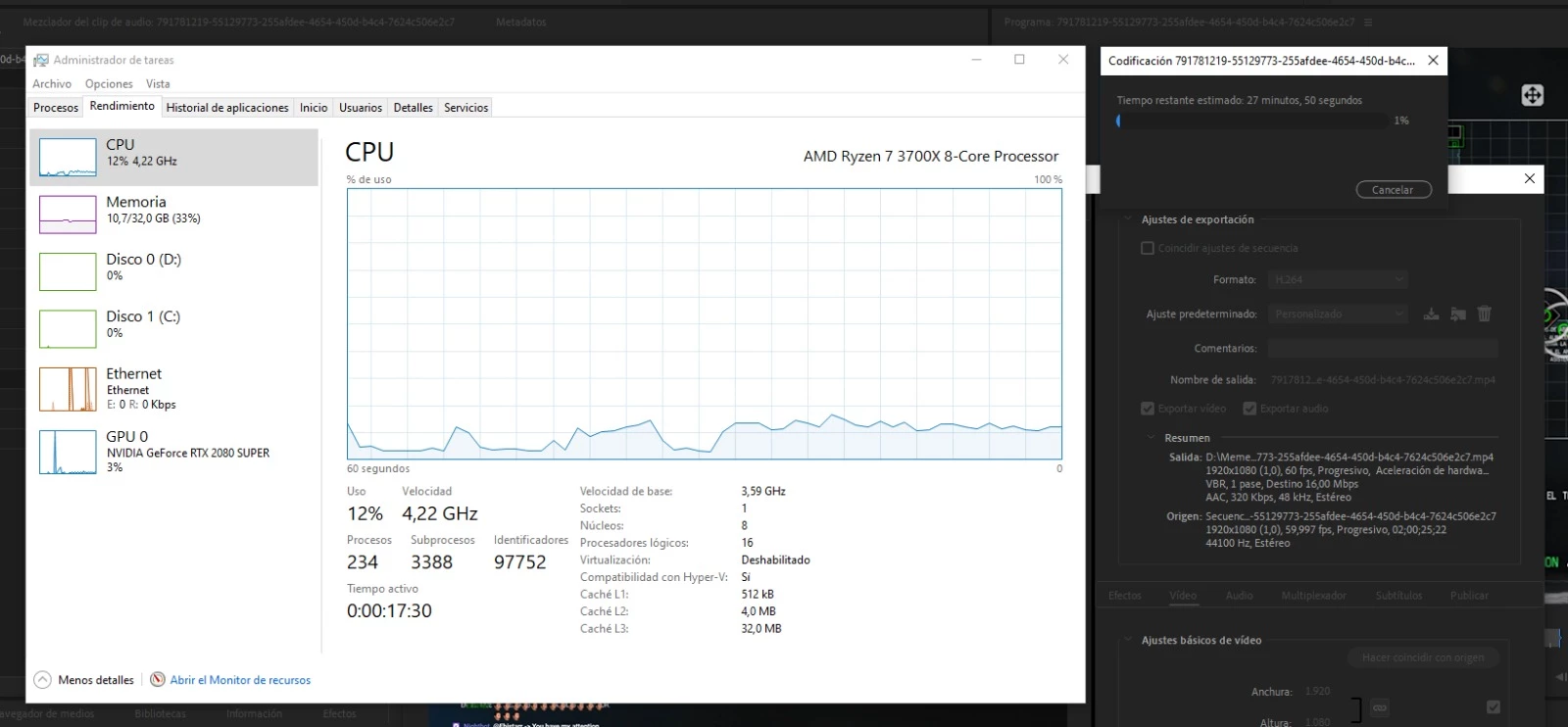
Processor: AMD Ryzen 7 3700x
Installed RAM: 32.00 GB @ 3200 MHz (26 GB assigned to Adobe programs)
C Drive: 500 GB NVMe (Free: 296 GB)
D Drive: 953 GB NVMe (Free: 361 GB)
Display adapter type : NVIDIA GeForce RTX 2080 SUPER (I tried both gaming and studio drivers)
Resolution: 2x 2560 x 1440 @ 144 Hz
Latest Windows 10 Pro update
Premiere Pro CC 14.5.0 (Build 51)
 AdChoices