
'Premiere Pro renders to m4v and mp4' problem
Dear community!
After a little halt (about 2 months) without video editing, I got back to Premiere Pro 2018 CC. I remember everything worked fine, but now when I want to render out the edited clips in h.264 it creates a ~0kb M4V file and an MP4 file which is only audio. I have not changed any settings before.
I looked for solutions and already tried these:
- Check the "Export Video" and "export audio" boxes
- Check the multiplexer settings (it says "MP4" and "Standard")
- Tried Adobe Media Encoder too, but that has the same problem
- Tried to export the video without checking the "Export Audio" box, and that created a useless M4V file and an XMP file
- Tried to set from CUDA rendering to OpenCL and Software, nothing worked.
Another strange thing is that a small dot appeared after some words in the program inside. I attach a photo to see what I mean. It's like it's showing that there are problems with the settings, or I don't know...
Please help me because I'm already really upset that I'm always spending my life more with problem-solving rather than producing...
Thank you very much in advance!
(Here is the picture of the dots, they appear elsewhere, too)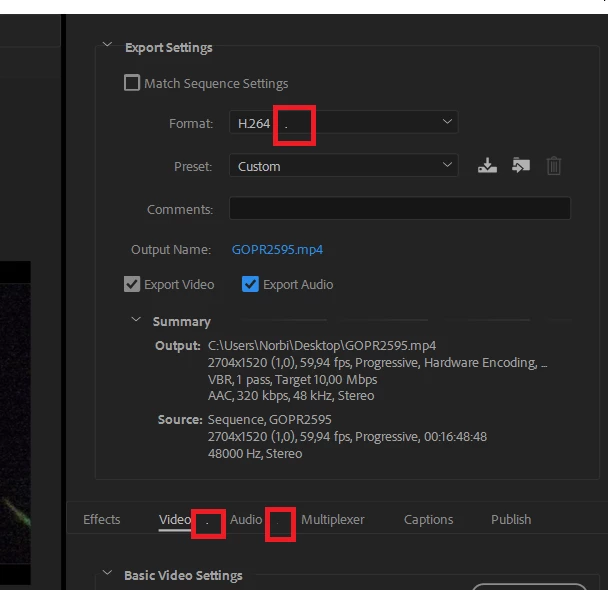
 AdChoices