Participant
September 4, 2024
Answered

Premiere Pro's functions are not working.

  • September 4, 2024
  • 2 replies
  • 386 views

The more I use the app, the more problems I encounter. At first I couldn't color grade any clips, still can't, it doesn't show up or change in the slightest even if I render it. Now I can't even do basic effects like blur. The effect doesn't show up, like all the other effects I've struggled with, rendering doesn't change anything, starting a new project doesn't, uninstalling and reinstalling Premiere doesn't either. 
 

This topic has been closed for replies.
Correct answer MyerPj

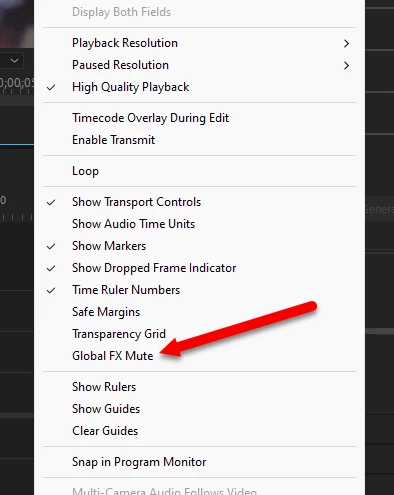
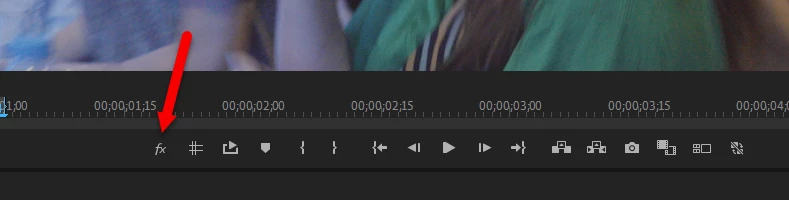
There's a 'global fx mute' button available on the Program Monitor. Use the + sign if it's not on your monitor like here:

There's also a menu item on the Wrench Icon for the program monitor, you can set it from there also.


2 replies

MyerPj
Community Expert
MyerPjCommunity ExpertCorrect answer
Community Expert
September 4, 2024

There's a 'global fx mute' button available on the Program Monitor. Use the + sign if it's not on your monitor like here:

There's also a menu item on the Wrench Icon for the program monitor, you can set it from there also.


Participant
September 6, 2024
Thank you, that fixed it, didn't see it anywhere so didn't even know that's what caused it.
MyerPj
Community Expert
Community Expert
September 6, 2024

I think that's happened to all of us! Its' a very good feature, but also able to catch one out.

Glad you got it. 🙂

Kartika Rawat
Community Manager
Community Manager
September 4, 2024

Hi Christelle29025847oqyc!

Sorry about that. Which version of Premiere Pro are you using? Have you already tried resetting preferences and deleting cache files

Could you also share your system details (OS, CPU, RAM, GPU)? 


Let us know.

Thanks,

KR