paul.os
Participant
November 23, 2023
Answered

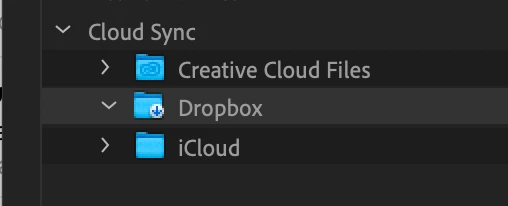
Premiere Pro's media browser does not open Dropbox folders. Can't link files in the dropbox folder.

  • November 23, 2023
  • 4 replies
  • 2646 views

Premiere Pro's media browser does not open Dropbox folders. Can't link files in the Dropbox folder. Is there are way to fix that?

Correct answer johnr48685593

This was soooo complicated. But I figured it out: 

Made a quick video to explain it.


4 replies

johnr48685593
johnr48685593Correct answer
Participating Frequently
July 28, 2025

This was soooo complicated. But I figured it out: 

Made a quick video to explain it.


Participant
August 12, 2025

YOU ARE THE MAN !!!! GOOD IDEA TO SHARE THE SCREEN RECORDING !!!!!   THANK YOU


Participant
November 25, 2024

I have Mac Os Sorona and I just upgrade my Pr Premier Pro  to 2025. I went to Pr Pro Settings  and click the Dropbox button. Thats all


Participant
December 16, 2024

Hey there, where would I find the settings you posted to activate Dropbox?

Thank yoU!

Participant
December 16, 2024

Found it. thanks

Peru Bob
Community Expert
Community Expert
November 23, 2023

As stated by MyerPj , Dropbox doesn't always work well with Premiere Pro. 

Many users have experienced problems, including lost links and renders. 

paul.os
paul.osAuthor
Participant
November 24, 2023

I never had problems with Premiere Pro and Dropbox before. Never lost anything. Even if the files were online, when Premiere accessed these files, Dropbox downloaded them and everything was fine. Now the problem is that after the last update, Premiere Pro's media browser does not see the content of the Dropbox root folder.

Participant
May 27, 2024

I found this answer in a Forum


"I have solved the issue. Steps to replicate:

First, give Dropbox and Premiere Full Disk Access in Privacy. Second, open Terminal and type chflags nohidden /Users/<replacewithyourusername>/Library

Then, Premiere can see it. The problem lies with Premieres awful internal file browser being unable to see hidden files and folders. chflags nohidden removes the hidden flag from your user library folder and allows premiere to see it."

Solved! But I had to link media one by one. And some clips stilll getting error. Ironically, this clips are the ones that already link to the external HD in the process. 

This problem occurs because Dropbox files are no "local files" anymore, instead they're "cloud drive files" now. 

I wish you luck!

Ps: I'm not native, so I don't know if I got clear?

MyerPj
Community Expert
Community Expert
November 23, 2023

That's a good thing. You don't want to use dropbox files in PP, the files should always be local. Even from USB drives it's marginal.


With that said, I've found some programs respond to a mapped network drive. 

paul.os
paul.osAuthor
Participant
November 24, 2023

Files that are located in the Dropbox folder are not online. They are located on the hard disc as a copy of the cloud storage. So it does not make sense. From the point of view of the file system, it does not have any difference between files located inside the Dropbox folder or outside of it. It's the same.

paul.os
paul.osAuthor
Participant
November 24, 2023

I think the problem is with the path system on macOS.