
Participant
February 6, 2015
Answered

Premiere Pro Script execution without ExtendScript Toolkit confirmation

  • February 6, 2015
  • 1 reply
  • 5687 views

Hi everyone,

I'm creating a video browser OSX app, that will import files to opened project, open and play it in the source viewer in Premiere Pro.

The app creates a JSX file with:

"#target premierepro";

app.enableQE();

var result=qe.project.importFiles(argv);

var num=qe.project.numItems;

var proje=qe.project.getItemAt(num-1);

proje.openInSource();

qe.source.player.play();

It works correctly in ESTK, but if I open it inside my app, calling:

NSWorkspace *workspace = [NSWorkspace sharedWorkspace];

[workspace openFile:jsxFilePath];

//This exactly the same than opening it in Finder via double-clicking it

It shows me this confirmation dialog (sorry for the Spanish localization)

If I press 'Si(Yes)', the script is executed correctly inside Adode Premiere, if I press 'No', then ESTK opens in Debug mode. This is the same behavior if I open the jsx file in the Finder.

Then, how can I avoid this dialog every time the app runs a script?

Thanks a lot,

Regards,
This topic has been closed for replies.
Correct answer Bruce Bullis

Ok,I still have more doubts than when I wrote my initial question:

  • I created the file 'extendscriptprqe.txt' next to the .app, and now it works partially, because when I execute:

          /.../Adobe\ Premiere\ Pro\ CC\ 2014 /C es.process "alert('Hello');"

          Why I say partially? Because the alert appears, but before any PremierePro window is launching or any project (previous) is loaded, what pointed me that no useful script could be  used in this scenario.

  • If I execute the simplest PPro script I can: /.../Adobe\ Premiere\ Pro\ CC\ 2014 /C es.process "app.enableQE();qe.source.openFilePath('/Volumes/LaCIE/MEDIA/xxxxx.mxf');" I got an exception that start like this (I don´t include all the Exception stack to avoid make this unreadable:

          <140735216841488> <Contract Violation> <0> inProject != NULL [/cloudroom/releases/2014.09/PremierePro/Mezzanine/Src/ProjectActions.cpp-4452]

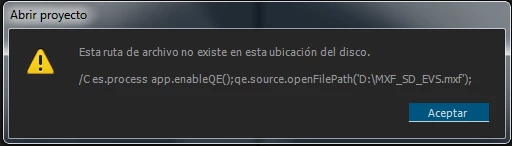
  • If I try the same command in a Windows machine nothing new happens, the same error than before:

Thanks,

Regards,


         Why I say partially? Because the alert appears, but before any PremierePro window is launching or any project (previous) is loaded, what pointed me that no useful script could be  used in this scenario.

That's correct behavior; many scripts open a project. You need a project open before you can do many things.

If you'd like to talk through how best to support your workflow, write me directly at b b b at adobe dot com.

1 reply

Bruce Bullis
Community Manager
Community Manager
February 6, 2015

Here's how to send an ExtendScript to PPro, from terminal:


/Applications/Adobe\ Premiere\ Pro\ CC\ 2014/Adobe\ Premiere\ Pro\ CC\ 2014.app/Contents/MacOS/Adobe\ Premiere\ Pro\ CC\ 2014 /C es.processFile /Users/username/Desktop/example.jsx

...and from a Command Prompt:

"C:\Program Files\Adobe\Adobe Premiere Pro CC 2014\Adobe Premiere Pro.exe" /C es.processFile "C:\example.jsx"

machaconAuthor
Participant
February 6, 2015

Thanks a lot!

I tried to run it the same way but with the /r switch, thanks to point me to the /C es.processFile switch. There is no way to find it in any documentation (at least for me...)

What is supposed to do the /C switch? And what is the es.processFile argument? Is there any other es.xxxx command that could be of interest?

Regards

Bruce Bullis
Community Manager
Community Manager
February 6, 2015

/C = nothing useful.

The only other useful option here is that, instead of a file path to a .jsx, you can pass your script as a string;

"C:\Program Files\Adobe\Adobe Premiere Pro CC 2014\Adobe Premiere Pro.exe" /C es.processFile "alert('whee!');"