


Participant
January 2, 2024
Answered

Premiere Pro scripting keyframe interpolation

  • January 2, 2024
  • 1 reply
  • 1297 views

Hi to all.
I'm struggling with adding keyframe interpolation in PP.

here is simplyfied code below, I want to interpolate a keyfreme, there are several types of interpolation, but I can't make it work with any of them.

var position = app.project.activeSequence.getSelection()[1].components[1].properties[0];
var currentTime = app.project.activeSequence.getPlayerPosition();
position.setTimeVarying(true);
position.addKey(currentTime);
position.setValueAtKey(currentTime, [0.5,0.5]);
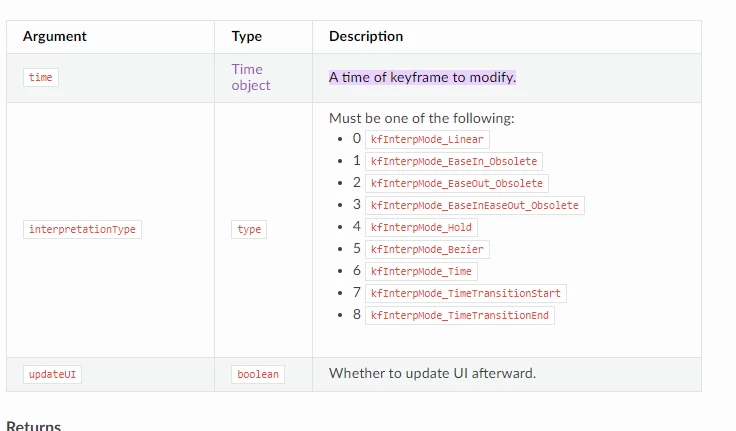
position.setInterpolationTypeAtKey(currentTime, kfInterpMode_Bezier,1);

this script adding a keyframe but at last line it gives me an error.
HELP!!!
Correct answer MrDruz

Thank you, Brusce, that helped.
Here is code which gave me eased key:

var position = app.project.activeSequence.getSelection()[0].components[1].properties[0];
var currentTime = app.project.activeSequence.getPlayerPosition();
position.setTimeVarying(true);
position.addKey(currentTime);
position.setValueAtKey(currentTime, [0.5,0.5]);
var interpol = 5;
position.setInterpolationTypeAtKey(currentTime, interpol,1);


Also if I set var interpol = 4; it give me hold keyframe.
interpolation 1, 2, 3, marked as obsolete didn't work for me.


1 reply

Bruce Bullis
Community Manager
Community Manager
January 2, 2024

Probably a documentation bug. [Mea culpa.]

In the PProPanel sample, I see:

var KF_Interp_Mode_Bezier = 5;
Try passing '5' instead of "kfInterpMode_Bezier".
MrDruzAuthorCorrect answer
Participant
January 2, 2024

Thank you, Brusce, that helped.
Here is code which gave me eased key:

var position = app.project.activeSequence.getSelection()[0].components[1].properties[0];
var currentTime = app.project.activeSequence.getPlayerPosition();
position.setTimeVarying(true);
position.addKey(currentTime);
position.setValueAtKey(currentTime, [0.5,0.5]);
var interpol = 5;
position.setInterpolationTypeAtKey(currentTime, interpol,1);


Also if I set var interpol = 4; it give me hold keyframe.
interpolation 1, 2, 3, marked as obsolete didn't work for me.


Bruce Bullis
Community Manager
Community Manager
January 2, 2024

Here are valid values, defined in PProPanel (I also cheated, and looked at our source; these are used):