Participant
May 31, 2023
Question

Premierę Pro takes a lot of RAM and crash

  • May 31, 2023
  • 2 replies
  • 283 views

Hello, somebody know the solution of this kind of problem ? I was edit all day, and in one moment premier pro start use 90gb ram and crash
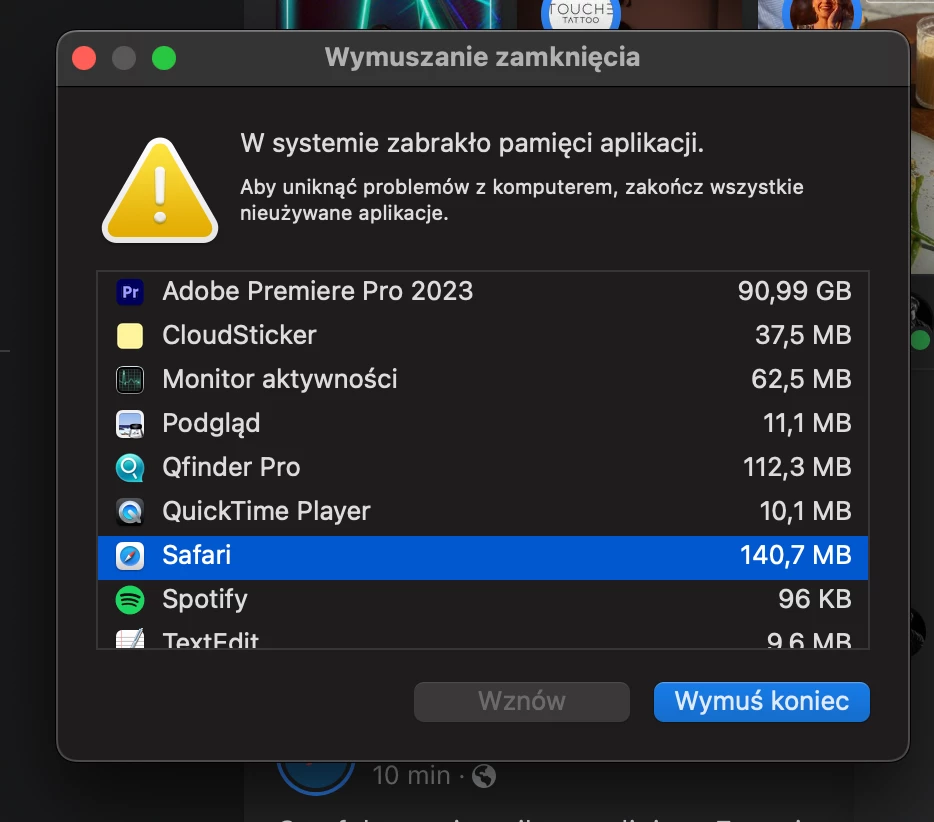

This topic has been closed for replies.

2 replies

Participant
June 18, 2023

just open adobe creative cloud and go to premiere. then click the 3 dots next to "open" button and the choose open (intel)

and that's it. works fine


Kevin-Monahan
Community Manager
Community Manager
June 2, 2023

Hi @Lukasz30188693bo67,

I got your message. You're experiencing what looks like a "memory leak." That can happen sometimes with either a third party plug-in or a project corruption. Do you have any plug-ins working in your current sequence? If so, update or remove them from clips they are applied to. If you don't have any suspect plug-ins, try fixing a project corruption by creating a new project, and then importing the contents of the legacy project into the newer one. I hope one of these pieces of advice helps you. Please come back and let us know what happens.


Thanks,
Kevin

Kevin Monahan - Sr. Community & Engagement Strategist – Pro Video and Audio