Participant
June 23, 2020
Answered

Premiere Pro - Time Cue Points
  • June 23, 2020
  • 2 replies
  • 1396 views

Hi all, 


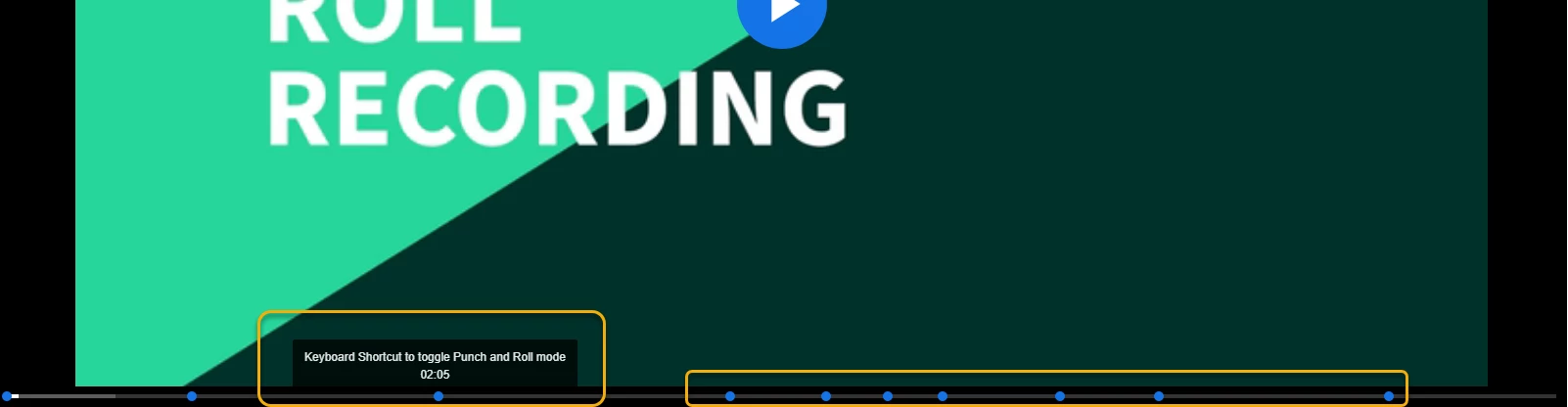
I am looking to see if there is a way to add a timeline cue marker in PP CC so that a user can easily jump topics in a video (MP4 output). What I have seen in the playback timeline is a little blue dot and once you hover over it a short description pops up. Just like in the attached image. Again this is for the final output, not while editing. 


However, I am not certain about how to add that into PP CC. 


Any help would be greatly appreciated. 


Running PP V14

This topic has been closed for replies.
Correct answer Graeme Bull

Hi Ann, 


Will that show up in the final render (MP4), though? That is what my goal is, just like in the embedded image.


My apologies. I may not be using the correct terminology.   


No, those won't show up unless it's a quicktime file, all others just lose them. They also must be a "chapter marker" if you're not using them. If you want these things in other players then you have to create an external file that makes markers for that player. Usually the player will read in an XML file or something like that which puts the markers in the timeline of the player based on the timestamps and descriptions etc.

2 replies

Inspiring
June 24, 2020

sounds pretty fancy to me, so good going !   It's cool to have some chapter marker links ?

Can't someone just give timecode to a friend to say what they should be looking for when yappin about editing stuff and shooting ?


Ann Bens
Community Expert
Community Expert
June 23, 2020


Do NOT add images via the "attach files" box, as you are then forcing everyone to DOWNLOAD the file to view it outside their browser. Drag/drop the image files directly ONTO your reply box so other users can see them without needing to download unknown strange files.

Participant
June 23, 2020

Hi Ann, 


Thanks for the feedback and guidance. I followed the steps and I have added the image accordingly. 

Ann Bens
Community Expert
Community Expert
June 23, 2020
 

With this button you can add sequence markers.

Double click and a window pop up where you can add text and change the color.

If you alt click in them in the timeline you can expand the marker over the timeline.