Inspiring
April 16, 2024
Question

premiere pro timeline do not align with playhead

  • April 16, 2024
  • 2 replies
  • 527 views

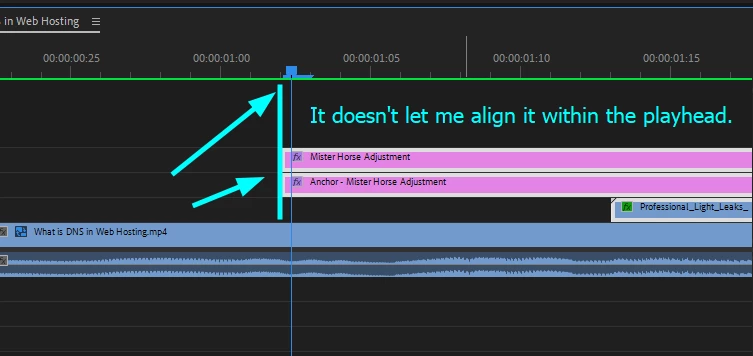
Hey guys, when I align my playhead outside the frame line, it doesn't let me set the playhead in there. What setting is this to enable or disble from only setting the playhead within the frame line? Please see screenshot. Thanks, Guys!
This topic has been closed for replies.

2 replies

Peru Bob
Community Expert
Community Expert
April 16, 2024

If your timecode is set to audio units, try setting it to frames.

mauamolatAuthor
Inspiring
April 16, 2024
Hey, man. Thanks. It didn't work out. I'll probably try to reinstall my
driver. And hey, if you notice the screenshot, let me know what you think:

[image: image.png]
Peru Bob
Community Expert
Community Expert
April 16, 2024
quote
 if you notice the screenshot, let me know what you think:[image: image.png]
By @mauamolat


There was no screenshot.

Peru Bob
Community Expert
Community Expert
April 16, 2024

Try resetting the preferences:
https://community.adobe.com/t5/premiere-pro/faq-how-to-reset-trash-preferences-in-premiere-pro/td-p/8236158?page=1

If that doesn't work, try resetting the Workspaces:
Reset a workspace
Reset the current workspace to return to its original, saved layout of panels.
1. Do one of the following:
• Click the Workspace menu icon and select Reset to Saved Layout.
• Choose Window > Workspace > Reset to Saved Layout.
from here:
https://helpx.adobe.com/premiere-pro/using/workspaces.html

If that doesn't work, try Preferences > Audio Hardware and set Input to None.

If that doesn’t work, try updating or rolling back your graphics driver directly from the video card manufacturer’s site. If NVIDIA, do a clean installation of the latest Studio Driver (NOT the Game Driver).

If that doesn't work, try creating a new project and import the old one into it.

mauamolatAuthor
Inspiring
April 16, 2024
Thanks, man. I'll try this. Reinstalling the drive. I tried the rest,
doesn;t work. But please review this screenshot:

[image: image.png]