Inspiring
October 12, 2018
Answered

Premiere Pro trimming many clips to 1 second each.

  • October 12, 2018
  • 1 reply
  • 1392 views

Hi there.

I have many many clips that are 1 - 2 seconds each, some of them are longer and some of them shorter.

Any quick way that I can set them all to be a 1 second each, there are too many to that manually.

Thanks a lot
This topic has been closed for replies.
Correct answer Kib

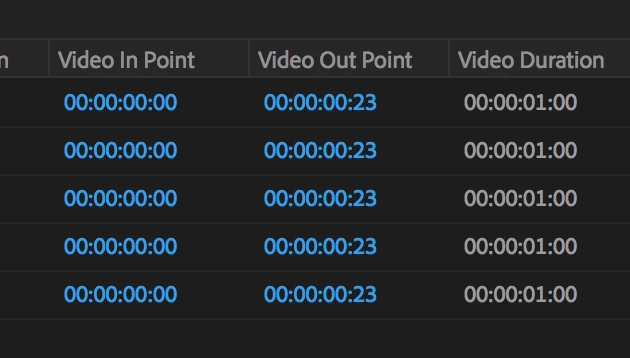
If you view your clips in List View do they all have a Video In Point time of 00:00:00:00?

If so you could enter a custom Video Out Point (1 frame less than your frame rate) and copy and paste that down the column.

Still manual but efficient manual.

(Picture shown was 24fps clips)

1 reply

KibCorrect answer
Participating Frequently
October 12, 2018

If you view your clips in List View do they all have a Video In Point time of 00:00:00:00?

If so you could enter a custom Video Out Point (1 frame less than your frame rate) and copy and paste that down the column.

Still manual but efficient manual.

(Picture shown was 24fps clips)

seeyo76Author
Inspiring
October 12, 2018

Thank you ! that works too