Participant
August 8, 2024
Answered

Premiere Pro uses wrong aspect ratio... maybe

  • August 8, 2024
  • 1 reply
  • 741 views

Hi!

I stumbled across a problem I never encountered before.

At the moment I'm working on a project regarding a TV show and my main timeline ist 1440x1080 with square pixels. So essentially HD in 4:3.

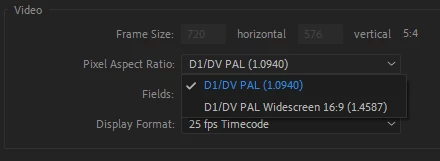
Most of the material ist from DVD or DV. All in PAL 4:3 which ist 720x576. Premiere recognizes the files' PAR correctly and marks them as 4:3 bit when I put them in my timeline and try to resize them, it does not fit. They are slightly wider and I end up with small black bars in top and bottom. Not thick as letterboxing but annoying.

Why does SD4:3 not match HD4:3?


Cheers

Björn 


This topic has been closed for replies.
Correct answer Averdahl
quote

Hi Bjorn,

720x576 is 1.25 not 1.3333 so there would be a resize needed.


By @Rach McIntire


720x576, a.k.a PAL, is not 1.25. PAL is either 1.0940 (4:3) or 1.4587 (16:9). 🙂


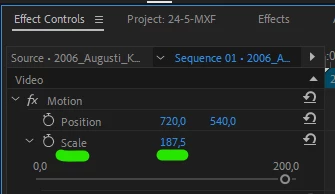
@Björn25807059coj1 If you resize your 4:3 PAL footage to 187,5 manually in the Effect Controls panel in your 1440x1080 (1.0) timeline you will get rid of the black bars. But yes, it will crop away a tiny bit from the width of the video.


1 reply

Community Manager
August 8, 2024

Hi Bjorn,

720x576 is 1.25 not 1.3333 so there would be a resize needed.

Participant
August 8, 2024

Hi!
But in this case it is because of the pixel aspect ratio. All PAL DVDs are 720*576 and NTSC DVDs are 720*480 regardless of 4:3 or 16:9 but the PAR is different. But you might be right here because with the PAR applied it might be around 1.3675

I'm just confused because it states 4:3 but then it is not 😄