

TAPE Production
Inspiring
November 21, 2021
Question

Premiere Pro using too much memory

  • November 21, 2021
  • 7 replies
  • 25811 views

Hello. I have problem with Premiere Pro (v 22.0.0 Build 169) on my MacBook Pro M1 with 16GB RAM.

After 30 minutes of work Premiere Pro crashes and consumes all of my memory. In setting I have set Optimize rendering for memory and allowed maximum 13 GB of RAM for Premiere Pro. 

However, Premiere Pro uses more memory, often 50-60 GB. So MacBook is swapping all memory from SSD. Any solutions?
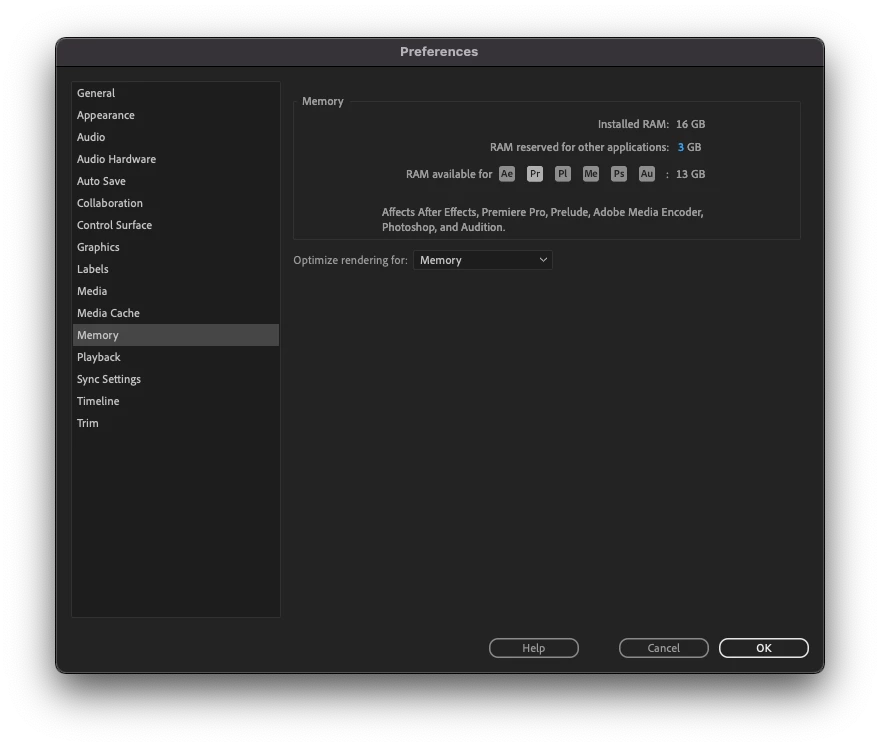

  

This topic has been closed for replies.

7 replies

Kevin-Monahan
Community Manager
Community Manager
November 22, 2022

TAPE Production has not returned to the discussion. We can assume that this one is solved. If you have a similar issue, create a new post.


Thanks,
Kevin

Kevin Monahan - Sr. Community & Engagement Strategist – Pro Video and Audio
Participant
October 1, 2022

I am just now starting to have this issue.


Does anyone have a definitive fix?


I am on  M1 macbook pro with the most recent version of premiere.

Participant
May 12, 2022

Did you ever find a solution for this, Tape Production? I'm having  the same exact issue with premiere pro 2020 on apple M1 Monterey 

Known Participant
May 12, 2022

In my case, it was a corrupt preference setting that kept getting synced down using Adobe Sync. Once I turned this off in adobe preferences (workspaces, preference sync etc) and cleared out all settings related to Premiere, it worked without issues. Here are the notes I took of all the locations these preferences live. Delete them all and reboot, then reload Premiere and you should be all set! Good luck.


https://helpx.adobe.com/creative-cloud/kb/cc-cleaner-tool-installation-problems.html

Adobe extensions path (delete extensions)

/Library/Application Support/Adobe/CEP/extensions

/Library/Application Support/Adobe/Common/Plug-ins/7.0/MediaCore

Shft + Option to clear plugin cache

Setting Preferences

https://helpx.adobe.com/in/premiere-pro/using/preferences.html


Click on finder

Click on Go->Go to folder

Type ~/Library

Preferences->Adobe->Premiere Pro

Rename Premiere Pro to Premiere Pro.old  

Documents->Adobe->Premiere Pro

Rename Premiere Pro to Premiere Pro.old

Library->Application Support->Adobe->Common->Plugins->7.0->MediaCore

Library/caches/Adobe 

Library/Preference

Library Audio Plugins

Kevin-Monahan
Community Manager
Community Manager
May 12, 2022

Hi TheBreeze21,

Thank you for detailing how you terminated the problem you had with soaring memory. I have heard that Creative Cloud re-syncing bad preferences might be causing problems for at least one other user. I see a little weirdness along these lines with specific personal projects I am working on. I'll try your steps to see if my issue might resolve too. If so, I'll certainly file a bug on your behalf. 


Thanks again,

Kevin

Kevin Monahan - Sr. Community & Engagement Strategist – Pro Video and Audio
Known Participant
February 24, 2022

I am having this same issue on my Intel MacBook Pro. Memory increases randomly after an hour of so if editing, then starts using swap and eventually tunning out of application memory. This issue is unnerving. A7siii footage, Dropbox and Google drive are not running in background. Adobe Case ADB-22937837-L9X8 CRM:03988000005050

Kartika Rawat
Community Manager
Community Manager
February 24, 2022

Hi there! Sorry to hear that. Can you try increasing the amount of memory that the operating system uses to achieve a 50% balance between Adobe and other applications/OS? and then restart Premiere Pro.


Let us know how it goes.


Thanks,

Kartika

TAPE Production
Inspiring
November 24, 2021

I tried to install Premiere Pro - BETA version. And in Beta is memory usage allright. In iddle Beta version uses 3,38 GB of memory. During playing playback it is about 7 GB of memory, during render (4K 4.2.2 10bit 60 sec footage) 13 GB (which is set in settings). After render, memory usage skip to 3,38GB. 

Adobe, please fix this in full release! 

Known Participant
February 24, 2022

I'm curious of you are using A7siii footage when experiencing this issue? Just trying to find commonalities to others having this issue

Participant
November 22, 2022

I am experiencing the same with the A7siii.

Participant
November 23, 2021

Im experiencing the same issues on my M1 iMac 24" with identical premiere settings on both the 2021 and 2022 versions.

This has been happening since June and hasn't been fixed. 

Jeff Bugbee
Community Expert
Community Expert
November 22, 2021

Are you running the M1 version or Intel version?

TAPE Production
Inspiring
November 22, 2021

Hello Jeff. Thank you very much for your answer. I am sure I am using M1 version. 

In Activity monitor it show Apple CPU. See picture bellow. Or is it any other way to check what version am I running?