
Participant
August 28, 2018
Answered

Premiere Pro v.14 has no control for ligatures...

  • August 28, 2018
  • 6 replies
  • 8894 views

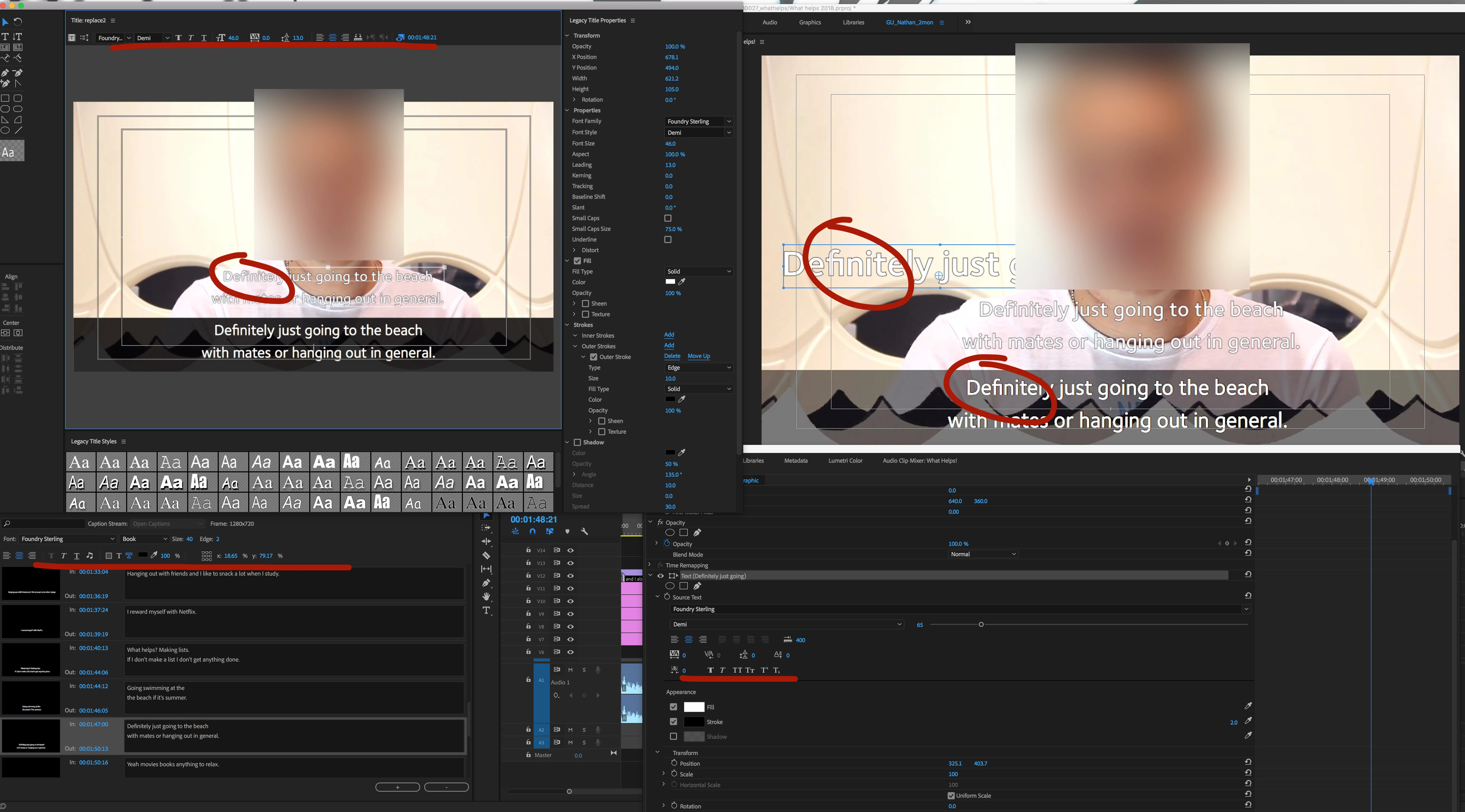
... and in addition to this each of the text tools do things differently.  See attached screengrab.


The caption tool has ligatures turned on and no option to toggle.

The new title tools has ligatures turned on and no option to toggle.

The Legacy Title tool has ligatures turned off and no way option to toggle.


Here's a use case scenario:


The Foundry Sterling font is a part of my organisations branding so must be used in this scenario, but it won't be particular to this font.

SRT file is imported as for use in the Caption tool, but ligatures are on and some of the text instances need changing.

The sections of text where ligatures appear must be identified amongst all the captions and deleted from the Caption tool.  Legacy title tool objects must be made to replace those instances matching size and spacing.  It starts to make the Caption tool redundant for the whole process.

It may not be that many out of a whole video, but it's also a workaround and extra steps for something that could have the same amount of font control as say, Photoshop already has.
This topic has been closed for replies.
Correct answer Jacob.5

Coming here to update because I couldn't find this answer anywhere else: the "Ligatures" checkbox in Preferences > Graphics has NO EFFECT on captions in Premiere. In order to turn off ligatures in caption tracks, you have to right click on the caption track in the timeline and select "Track Settings". This will bring up a window where you can turn off ligatures for that caption track. Hope this helps others as frustrated as I have been trying to find this setting...

6 replies

Kevin-Monahan
Community Manager
Community Manager
April 1, 2024

Legacy Text question. This tool is obsolete. Locking.


Thanks,
Kevin

Kevin Monahan - Sr. Community & Engagement Strategist – Pro Video and Audio
Jacob.5
Jacob.5Correct answer
Inspiring
April 4, 2023

Coming here to update because I couldn't find this answer anywhere else: the "Ligatures" checkbox in Preferences > Graphics has NO EFFECT on captions in Premiere. In order to turn off ligatures in caption tracks, you have to right click on the caption track in the timeline and select "Track Settings". This will bring up a window where you can turn off ligatures for that caption track. Hope this helps others as frustrated as I have been trying to find this setting...

Jacob.5
Inspiring
April 4, 2023

This is true in 2023 as well as 2022 versions I believe.

Inspiring
February 26, 2021

Go to Edit > Preferences > Graphics.
Under Text Engine select "South Asian and Middle Eastern"
Under Text Styling, remove the checkmark next to "Ligatures"
Now this will be your default for all Essential Graphics text boxes going forward. I'm curious if changing the Text Engine from "European and East Asian" will weirdly affect something else with text in Essential Graphics, hopefully not...


I haven't poked around too much with the settings lately but this seems like a new thing that just became available via the Adobe CC updates. FYI, my current PrePro version is v14.0 (Build 52)

Participant
April 9, 2021

This^. Thanks payday0023 – that solved it for me! 👍

Participant
July 11, 2020

How do I turn off ligatures in Premiere Pro 14? I can't use the desired font unless I can turn it off.

brianmagallanes
Participant
October 2, 2018

This is the most frustrating issue in premiere. How is there no toggle for ligatures for this yet, as the toggle feature exists in virtually every other Adobe program.

Stan Jones
Community Expert
Community Expert
August 29, 2018

Bottom line: make a feature request:

Premiere Pro: Hot (2250 ideas) – Adobe video & audio apps

Currently, nothing with "ligature." In Photoshop, Type Layer Properties, Advanced there is an icon/toggle for "Standard Ligatures." Very cool; never knew.

I used Adobe Garamond Pro for testing, and I get your results for Legacy (default off) and new graphics panel (default on), but on Open Captions, adding a new caption, I get default Off.

Participant
August 31, 2018

A fair call Stan, thanks for the link.  Feature request submitted.

Interesting discovery about entering new captions as opposed to importing a file.

Stan Jones
Community Expert
Community Expert
August 31, 2018

Voted for it.

The direct link is:

ligature – Adobe video & audio apps

Are you setting the font in the .srt you import? Not sure of the srt format for that. The default for me is Arial, and when I change to a ligature font, ligature is off.