

carlopixelframe
Participating Frequently
November 11, 2024
Answered

Premiere Pro v 25.0 plugins cannot be loaded more

  • November 11, 2024
  • 17 replies
  • 5601 views

Hello everyone,
I am facing a problem with Premiere Pro version 25.0.

My previously purchased and well-functioning advanced plugins cannot be loaded.

They appear in the window, but nothing else happens; they just don't load.

Has anyone had similar experiences or other feedback on this? It is particularly strange because I am using the German version of Premiere Pro. Apparently, the plugins work on the English version but not on the German one. This problem did not exist in the previous version 24.


Now with the new version 25.0, the plugins are not loading and the window does not start. 


  • Adobe Premiere Pro version number: 25.0.0 (Build 61)
  • Operating system - Windows 11 Pro Laptop MSI - the operating system is German language
  • System Info: 
    • Intel i7 -10710U 

    • 32 GB RAM

    • NVIDIA GeForce GTX 1650 with Max Q Design
    • Hard Drive 1 TB SSD  


My plugin providers are: 

  • AE Viewer,
  • Atom X, Envato,
  • Motion Pro,
  • Premiere Builder


All these providers claim that they have no problem. I suspect that I have a German version of Premiere Pro 25. Everything worked perfectly up to version Premier 24. After updating to version 25, all these plugins no longer work. I have contacted the respective providers, and they confirm that the plugins work for them. I really hope that you fix this problem as soon as possible. 

Thank you for your feedback and help with troubleshooting. Thanks!
Correct answer Bruce Bullis

> You urgently need to address this.


We can only address behaviors we can reproduce, and no one else on the planet has reported this behavior.

Multiple team members have attempted to reproduce the behavior, without success. I've checked with the partners whose panels you've mentioned; none of them have encountered anything like the problem you've described.


> I am really getting annoyed about this.


Understandable!

The key will be determining what's unique about your system, that's preventing the extensions from loading. 

Have you experienced this behavior, on any other computer? Do you have another system, in the same environment, on which you can test? 


Is there anything special/unique about the network access, available on that system? [closed ports, VPN, anything that could impact web browsers...]


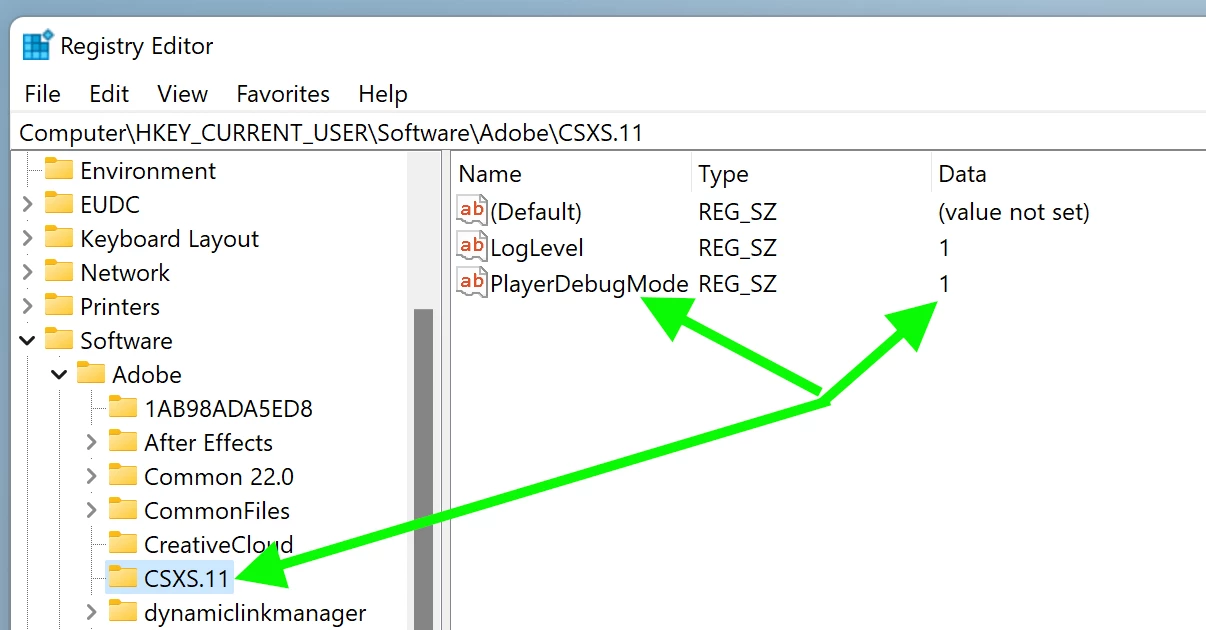
Has your system ever been used to develop extensions? I'm wondering whether you've ever had occasion to set 'PlayerDebugMode', which allows the loading of unsigned extensions. 

If you enable PlayerDebugMode, does the behavior change? Here's a screenshot from our developer documentation, showing the necessary Registry edit. NOTE: PPro 25.0 uses CEP12, so make the change in the "CSXS.12" folder, not "CSXS.11".


17 replies

Bruce Bullis
Bruce BullisCorrect answer
Legend
November 15, 2024

> You urgently need to address this.


We can only address behaviors we can reproduce, and no one else on the planet has reported this behavior.

Multiple team members have attempted to reproduce the behavior, without success. I've checked with the partners whose panels you've mentioned; none of them have encountered anything like the problem you've described.


> I am really getting annoyed about this.


Understandable!

The key will be determining what's unique about your system, that's preventing the extensions from loading. 

Have you experienced this behavior, on any other computer? Do you have another system, in the same environment, on which you can test? 


Is there anything special/unique about the network access, available on that system? [closed ports, VPN, anything that could impact web browsers...]


Has your system ever been used to develop extensions? I'm wondering whether you've ever had occasion to set 'PlayerDebugMode', which allows the loading of unsigned extensions. 

If you enable PlayerDebugMode, does the behavior change? Here's a screenshot from our developer documentation, showing the necessary Registry edit. NOTE: PPro 25.0 uses CEP12, so make the change in the "CSXS.12" folder, not "CSXS.11".


carlopixelframe
Participating Frequently
November 15, 2024

Hello everyone and hello Bruce,

thank you for your feedback and for testing Premiere Version 25. Also, thank you for the tip to install everything. However, I am slowly getting a bit annoyed. I have installed the entire Adobe Cloud with Photoshop, Illustrator, and all plugins. Then I reinstalled everything as you suggested. Nevertheless, Version 25 still does not work. So we are still where we started.

What I did then was switch versions. Now I definitely see that the problem lies with you and you need to solve it. I also conducted tests, as you can see in the screenshot.


The first screenshot shows Adobe Premiere Pro Version 24.6.3, which I additionally installed. And lo and behold, the plugins work. In Version 24.6.3, everything runs smoothly, but Version 25 does not work. This increasingly frustrates me as it costs me time, money, and jobs in a version that I pay for and that does not work.

You urgently need to address this. The problem exists with Version 25. If I am the first to report this, then so be it. I can't take it anymore. I followed your advice, installed and reinstalled everything. I lost half a day only to find out that I have to go back to Version 24, where everything works stably. This is not acceptable.

I am really getting annoyed about this. I also understand why many YouTubers and others in the industry are slowly switching to other manufacturers. There is an urgent need for action here. I am waiting for positive feedback from you and for an update to come. You need to solve this.

I hope I don't have to wait forever because that would continue to annoy me. Next time, when it comes to renewing Adobe, I will think about it thoroughly. It wasn't the first time. There were already problems with Version 23, and with Version 24, it was the Ü keys and the magnification.

It gets more annoying year by year with more functionality. I thank you for positive feedback and a solution approach and wish you a nice day.


Regards,
Carlo

Bruce Bullis
Legend
November 13, 2024

We've tested 25.x on a variety of systems (including German OS'es), and no one is seeing that behavior.

I suppose a 'scorched earth' approach is most likely to get your system back in a working state:

  • Uninstall all extensions
  • Uninstall all Creative Cloud apps
  • Uninstall Creative Cloud
  • [reboot for luck]
  • Install Creative Cloud
  • Install PPro
  • Install one extension (that previously didn't work). Result: Does it work now?
carlopixelframe
Participating Frequently
November 12, 2024

Hello everyone,


I would like to explain how I did this in versions 22 to 24 of Premiere Pro.


1. Installation of the purchased plugin from YouTuber Premiere Gal:


- Purchased plugin from Premiere Gal ToolKit Atomix https://premieregal.com/toolkit-help

- Opened the ToolKit Atomix file with ZXP-Installer software
- Installed the ZXP file using the ZXP-Installer.
- Premiere Pro was closed during the installation process
- After installation, I was able to start Premiere
- Under "Window" -> "Extensions," I see all my plugins displayed in black, as it should be.


2. However, there is a problem with all plugins, including the aforementioned Atomix from Premiere Gal:

- Atomix appears in black, and I can click on it, but the window does not pop up anymore
- All other purchased or free plugins (e.g., Envato) have the same issue

- You can also test this with Envato without making a purchase https://exchange.adobe.com/apps/cc/200494/envato
- After updating to Premiere Pro v. 25.0, I encountered the same problem.


Summary:
- The tools or plugins are not functioning, even though they are installed on my system and visible under "Window" in Premiere (see screenshot)


- The problem occurs regardless of the language (it worked with my system language "German" in Premiere 24 or 23)
- After updating to Premiere 25, the tools no longer work
- Therefore, it seems to be a bug in the Premiere application or its programming.

I hope this was clear enough. I hope this issue will be resolved by you as quickly as possible. I'm looking forward to your proposed solutions. With that said, thank you in advance, and I wish you a pleasant evening or day.


Best regards, Carlo

Bruce Bullis
Legend
November 11, 2024

Hi Carlo, 

My team manages integration for PPro, and works with all our partners; we've heard of no issues like what you're reporting. Hopefully, there's some configuration-specific issue, that's affecting them all...

How were those extensions installed? 

Kevin-Monahan
Community Manager
Community Manager
November 11, 2024

Hello @carlopixelframe, Hey @R Neil Haugen,

Thanks for the bug report. I have not heard of this problem before. Let me ask around today. Some key staff members are out of the office right now, but hopefully an engineer can pick up the task to try and get a reproducible case. I don't have access to these plug-ins, so I can't immediately test, but I will search around to see if anyone else might know of the issue and a solution. Sorry for the frustration. I hope we can assist you shortly.


Take Care,
Kevin


Kevin Monahan - Sr. Community and Engagement Strategist – Adobe Pro Video and Audio
R Neil Haugen
Legend
November 11, 2024

Do the providers say that they've tested their products in the Deutsch language version? 


And of course, it would be good to get a dev to reply with Adobe knowledge of such issues.


@Kevin-Monahan  ... which staffer would be best for this question?

Everyone's mileage always varies ...