



Premiere Pro Windows Dual Monitor Fullscreen Workspace Limitation
Hello Adobe Team,
I am a Premiere Pro user on Windows, and I would like to report a workflow limitation regarding dual monitor support compared to macOS.
On macOS, Premiere Pro allows a much cleaner dual-screen workflow. Detached panels or secondary workspaces can behave like proper fullscreen windows with native maximize/fullscreen controls. This makes it possible to use one monitor entirely for the timeline and another for preview/program monitors in a seamless professional editing setup.
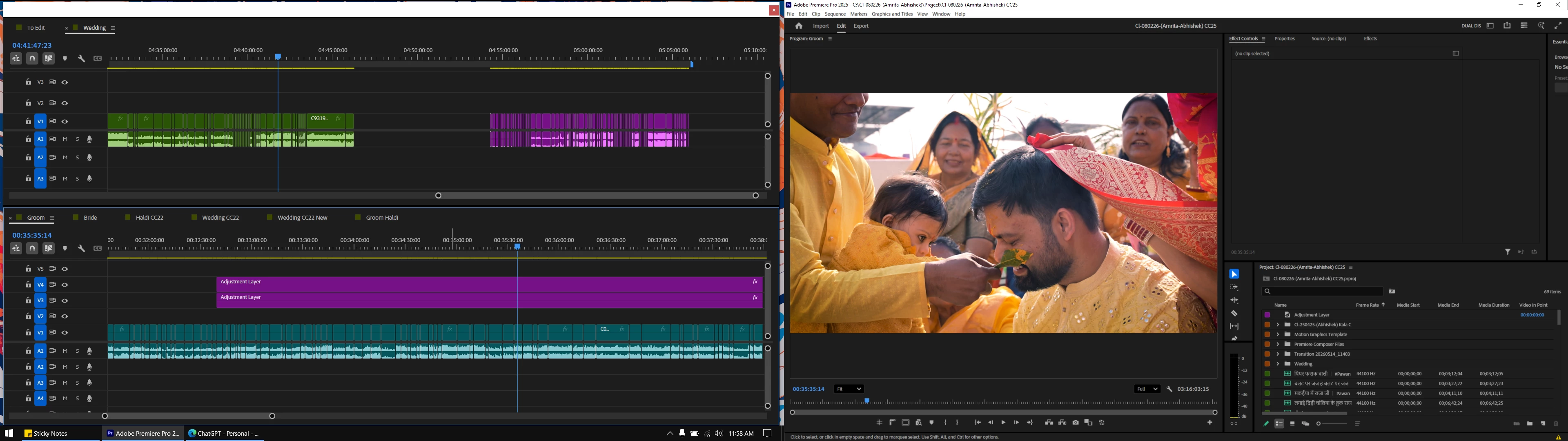
However, on Windows, detached Premiere panels behave like floating utility windows instead of proper independent application windows. These floating panels do not provide standard maximize/fullscreen behavior like regular Windows applications.
For example:
- The Timeline panel on a second monitor cannot truly maximize fullscreen
- Floating panels lack native Windows maximize controls
- Panels behave like tool windows rather than independent workspace windows
- Windows snapping/fullscreen behavior is inconsistent compared to macOS
I would like to request:
- Native fullscreen/maximize support for detached Premiere panels on Windows
- Proper independent monitor workspace behavior similar to macOS
- Better Windows multi-monitor workspace optimization
- Support for true borderless fullscreen panels on secondary monitors
Many professional editors on Windows use dual or triple monitor setups, and improving this workflow would significantly enhance usability.
Thank you for your work on Premiere Pro, and I hope this feedback can help improve the Windows editing experience.
 AdChoices