
Known Participant
March 21, 2023
Answered

Premiere Sort by Creation Date Metadata Issue/Not reading Metadata Correctly ✅

  • March 21, 2023
  • 11 replies
  • 6961 views

Premiere is not reading the correct "creation date" metadata on certain video files (in this example, GoPro hero 9 & A7siii videos, even when it shows the correct date/time created in finder on a Mac). It's useful to sort by creation date so you can see all footage in chronological order (regardless of the camera used).

How to reproduce: 

  1. On a Mac computer, download the zip file with video files from Google Drive link. Double-click on the zip file to extract video files.
  2. Open the extracted folder. If you don’t see the date created, right-click on the menu and select “date created”.
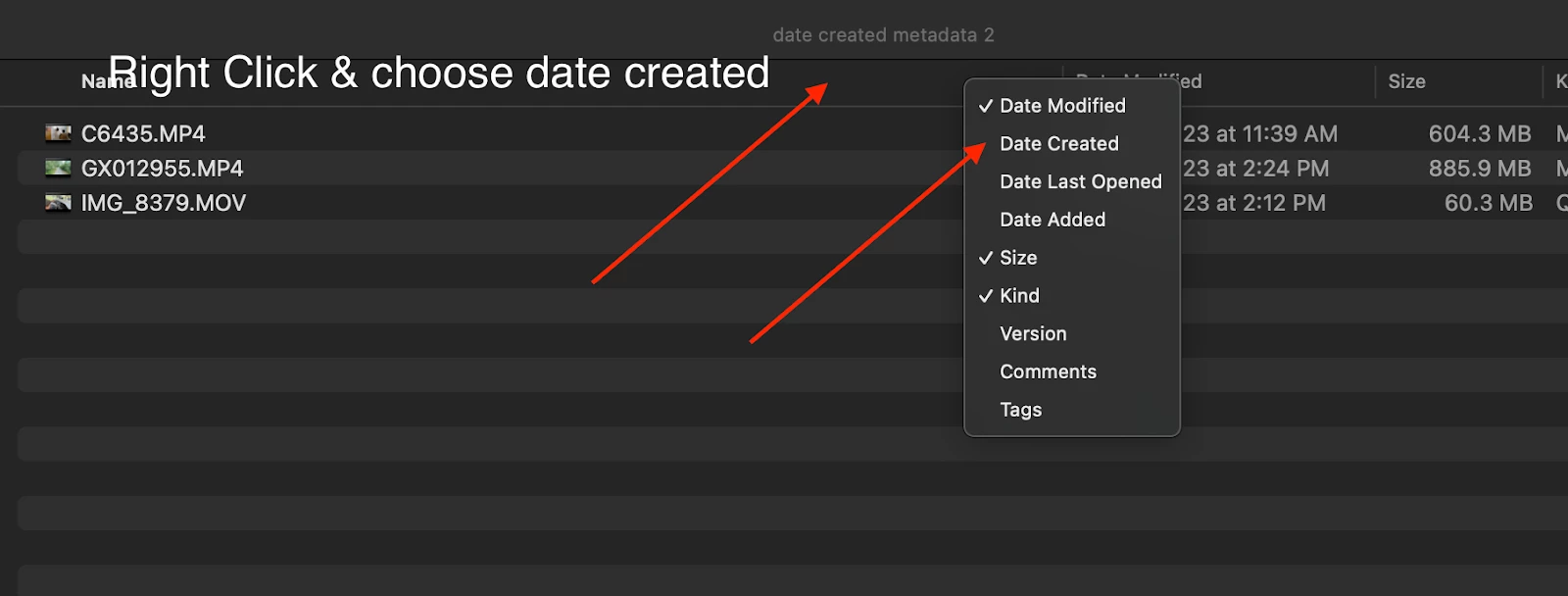
  3. In Finder Click on date created to sort by date created. You will see that file name C6435.MP4 (A7siii)  was created on March 17th at 11:39 AM. IMG_8379 (iPhone video) was created on March 17th at 2:12 PM and GX012955 (GoPro Hero9)  was created on March 17th at 2:24 PM.

     

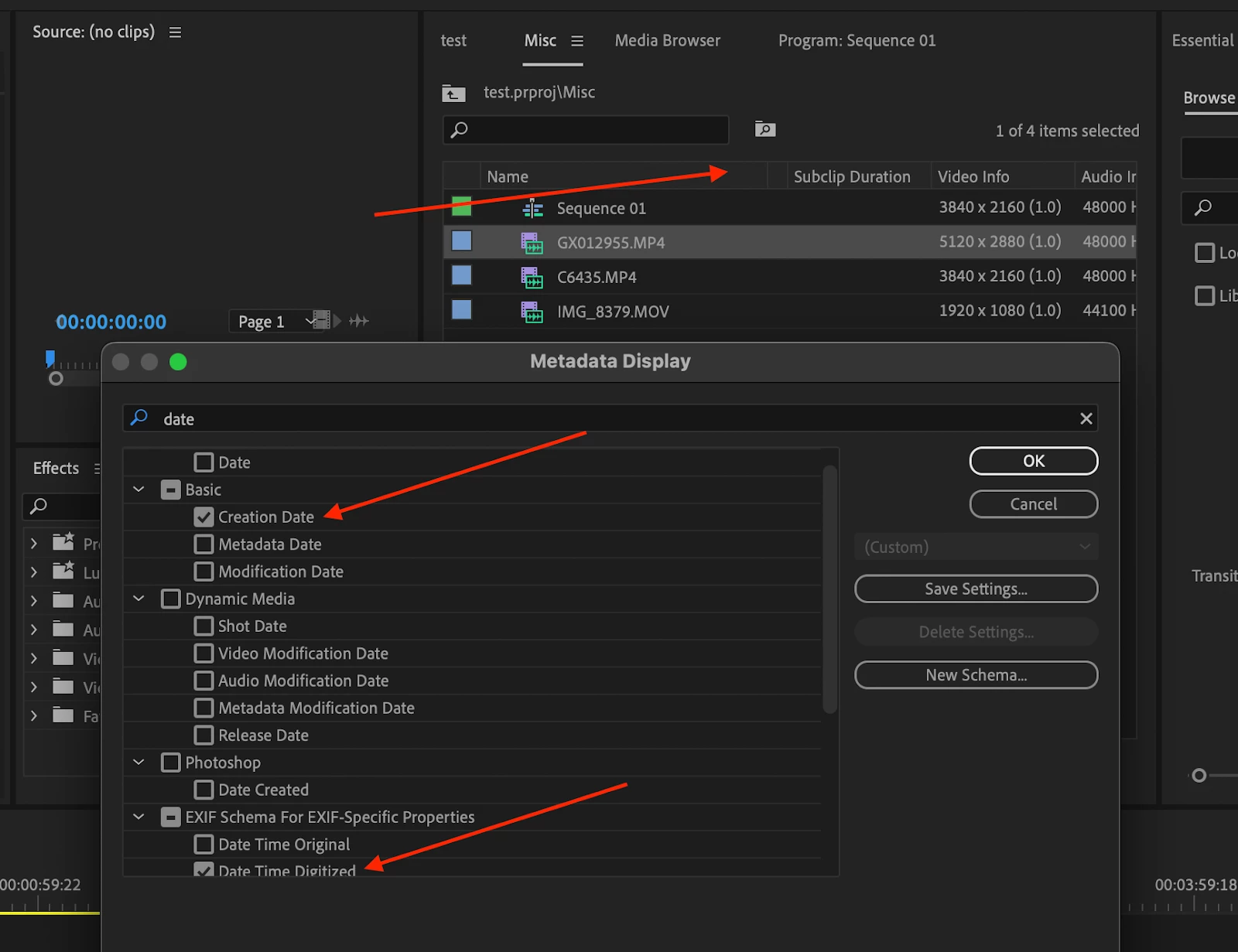
    4. In Premiere, open and create a new project and Import the video files you downloaded from Drive into Premiere. In the bin where the files are located, Right-click the menu in list view and select metadata display. Search for and choose “Creation date” and “Date Time Digitized”. Click OK and sort by date created. 
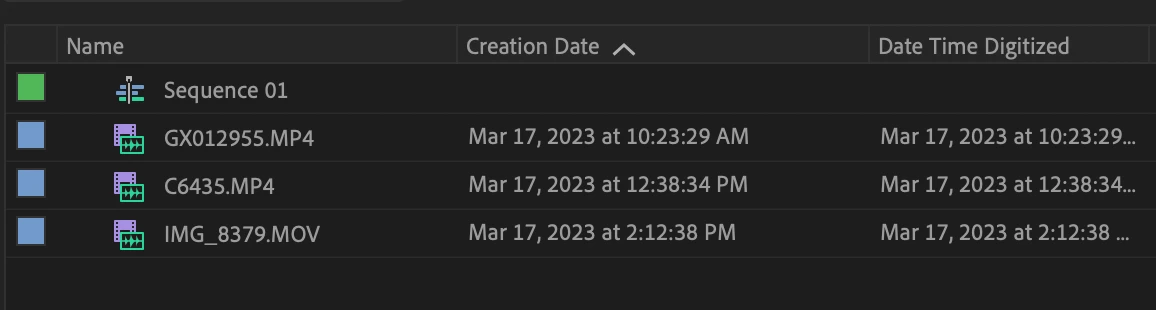
5. Review if the metadata creation date matches what finder on Mac shows. It doesn’t display correctly compared to the finder creation date metadata. Sort by “Creation Date” and notice that file C6435 now has an incorrect metadata date/time of March 17th at 12:38 PM, IMG_8379 shows the correct date/time of 2:12 PM and GX012955 now shows an incorrect creation date as 10:23 AM instead of 2:24 PM. Date Time Digitized and Creation Date seem to have the same metadata.
The way it should work is to sort all video files by the date/time created and have them listed in order of date/time created chronologically. Also, ensure they are not grouped by the device (unless specified). If I add, iPhone, GoPro, and A7siii videos in a bin and choose “creation date”, it should list them all chronologically based on date/time.  


Mac M1 Max (Ventura 13.2.1)

Premiere Pro 23.2.0

Sony A7siii 422 10 bit

Gopro Hero 9

Gopro Hero 11


You can also watch this video to see how the metadata is being displayed correctly in Davinci Resolve and Final Cut Pro allowing you to sort by date/time created. Premiere currently is changing metadata on import which does not give me the ability to accurately sort by creation date. 
Correct answer mattchristensen

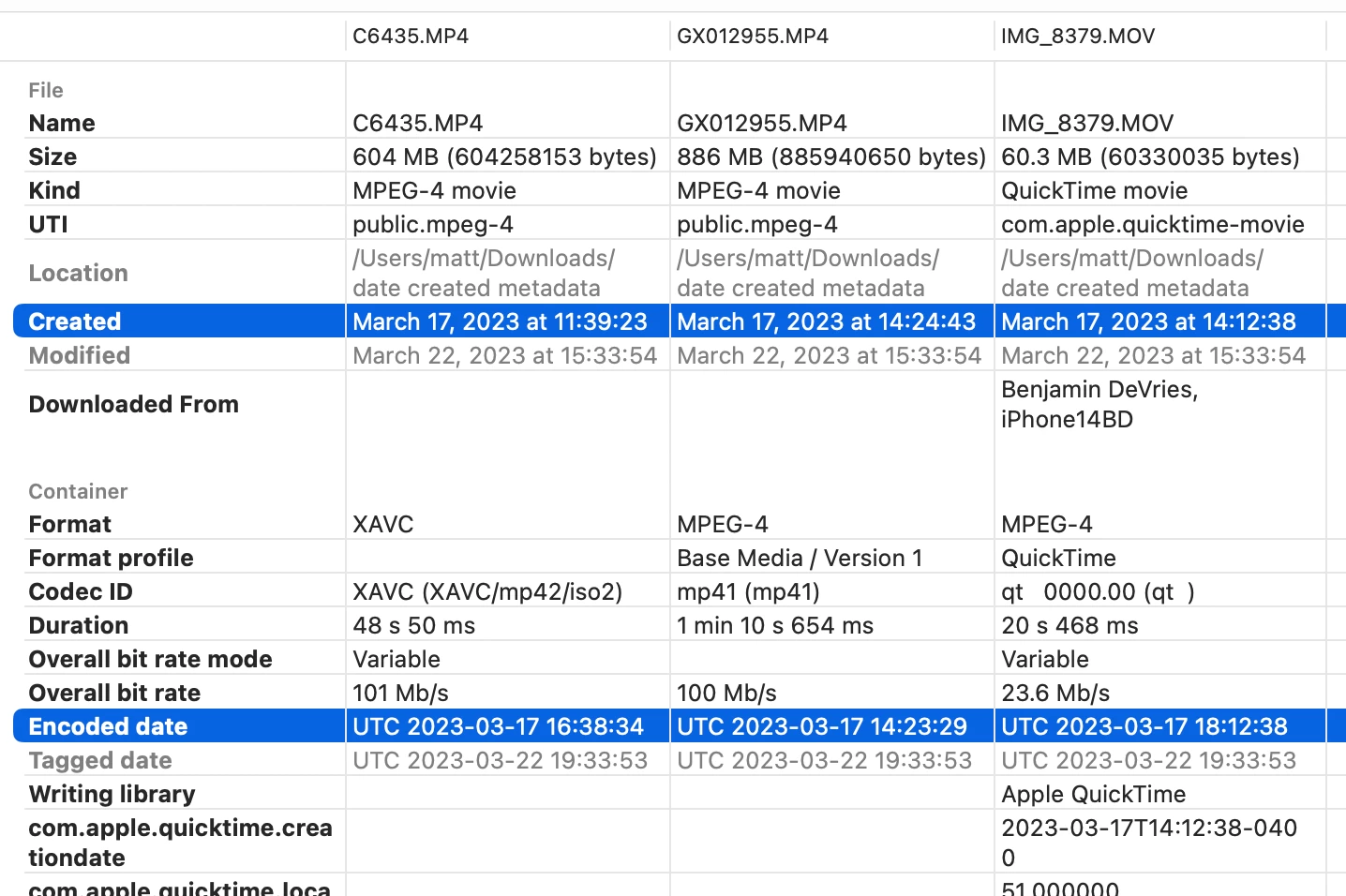
The issue here seems to be a discrepency between two different metadata encodings in each of these files. MediaInfo is an open source tool for viewing metadata inside video files, and below is a screenshot of the excellent Invisor app on Mac, which uses MediaInfo but allows you to load multiple files for easy comparison.


Take note of the "File > Created" and "Container > Encoded date" fields, highlighted in this screenshot for the three files in question:

The Created field is in an implied time zone, whereas the Encoded date uses UTC. Using UTC allows for applications that make use of the time metadata to interpolate it to the user's local time zone, as any time zone is represented as an offset from UTC.


When Premiere Pro is displaying Creation Date in the Project panel for these files, it is reading the UTC time out of the Encoded date field and then translating it to my system time. My system is on US East Coast time which is UTC-4, so what was 16:38:34 (4:38pm) in UTC is translated backwards 4 hours to 12:38:34. Finder and Resolve appear to be using the Created field instead.


There are tradeoffs to using either field. Asking the file system for the creation date is faster, as the file doesn't have to be imported or parsed in any way. But it's pretty common for the fileystem's creation date to accidentally be reset as files are copied around. The Encoded date embedded in the video's metadata is less likely to be modified, but is slower to read because it requires actually parsing the file.


Below is a table of the various time zones encoded in the file metadata and what Premiere Pro, Finder, and Resolve report. Premiere Pro is consistent in using the Encoded date UTC and subtracting 4 hours to my UTC-4 system time. Note also how these files are (I presume) from three different cameras and each encodes their Created and Encoded date a little differently:

  • The first clip (C6435.MP4) encoded a 4 hour, 59 minute, 11 second difference between the two times
  • The second clip (GX012955.MP4) encoded a 1 minute, 14 second difference
  • The final clip (IMG_8379.MOV) encoded a 4 hour difference betweent the two times, and a QuickTime specific third metadata entry for creation date, likely due to being MOV rather than MP4

I hope that helps,

Matt

11 replies

mattchristensen
mattchristensenCorrect answer
Legend
March 23, 2023

The issue here seems to be a discrepency between two different metadata encodings in each of these files. MediaInfo is an open source tool for viewing metadata inside video files, and below is a screenshot of the excellent Invisor app on Mac, which uses MediaInfo but allows you to load multiple files for easy comparison.


Take note of the "File > Created" and "Container > Encoded date" fields, highlighted in this screenshot for the three files in question:

The Created field is in an implied time zone, whereas the Encoded date uses UTC. Using UTC allows for applications that make use of the time metadata to interpolate it to the user's local time zone, as any time zone is represented as an offset from UTC.


When Premiere Pro is displaying Creation Date in the Project panel for these files, it is reading the UTC time out of the Encoded date field and then translating it to my system time. My system is on US East Coast time which is UTC-4, so what was 16:38:34 (4:38pm) in UTC is translated backwards 4 hours to 12:38:34. Finder and Resolve appear to be using the Created field instead.


There are tradeoffs to using either field. Asking the file system for the creation date is faster, as the file doesn't have to be imported or parsed in any way. But it's pretty common for the fileystem's creation date to accidentally be reset as files are copied around. The Encoded date embedded in the video's metadata is less likely to be modified, but is slower to read because it requires actually parsing the file.


Below is a table of the various time zones encoded in the file metadata and what Premiere Pro, Finder, and Resolve report. Premiere Pro is consistent in using the Encoded date UTC and subtracting 4 hours to my UTC-4 system time. Note also how these files are (I presume) from three different cameras and each encodes their Created and Encoded date a little differently:

  • The first clip (C6435.MP4) encoded a 4 hour, 59 minute, 11 second difference between the two times
  • The second clip (GX012955.MP4) encoded a 1 minute, 14 second difference
  • The final clip (IMG_8379.MOV) encoded a 4 hour difference betweent the two times, and a QuickTime specific third metadata entry for creation date, likely due to being MOV rather than MP4

I hope that helps,

Matt
