


Participant
Feb 11, 2025 9:39 PM UTC
Answered

PremierePro wont show anchor points

I'm trying to work on a basic animation for a client. 
This animation takes a PNG of their logo, and is supposed to zoom in on a dot in the i.
I was hoping to use the anchor point feature to zoom into the spot, but when I click on the effect controls panel, and open the 'motion' category, and click on achor points, with the PNG selected, nothing happens and i cannot see the anchor point that i see in every tutorial i have been able to find.
What am I doing wrong?

 

Ann Bens
Ann BensCorrect answer
Community Expert
Feb 11, 2025 10:05 PM UTC

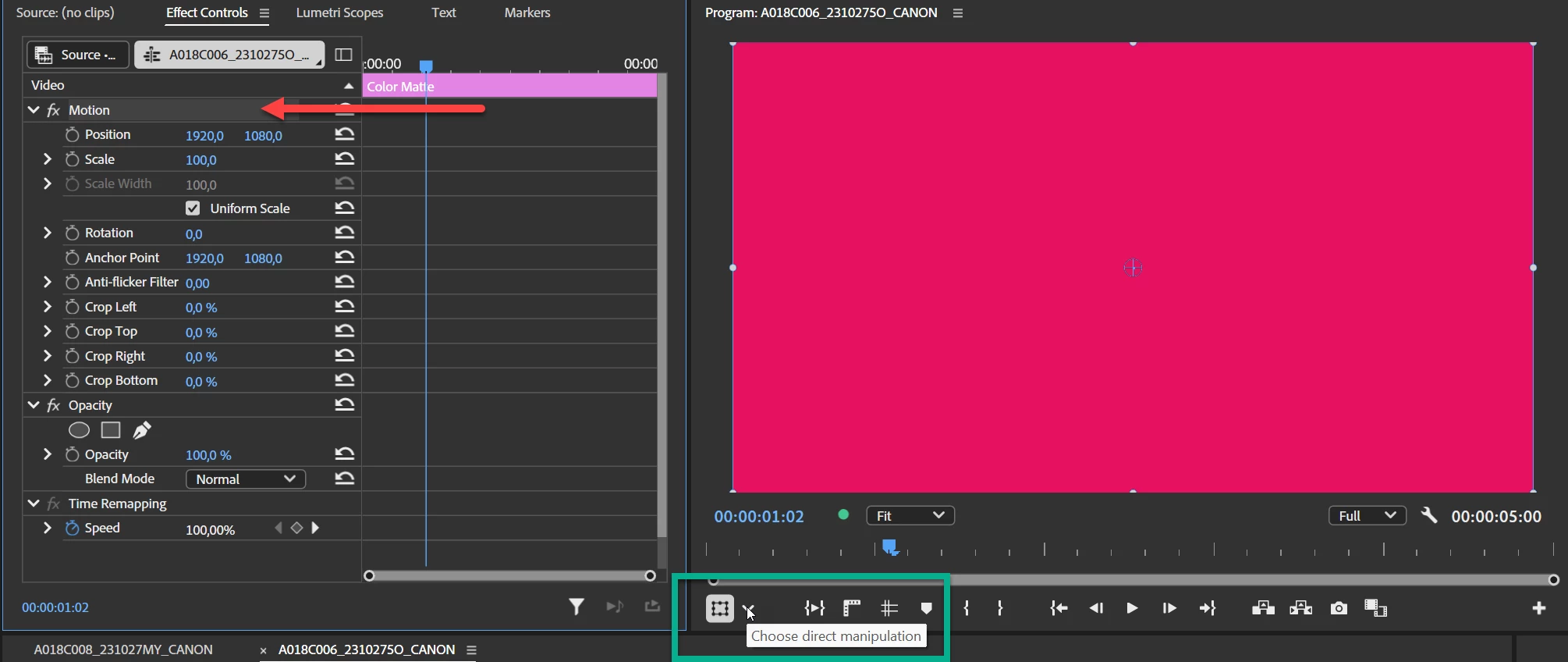
Either click on the word Motion in the Effect Controls or

select the Transform button in the Left bottom corner of the Program Monitor (choose direct manipulation)

to show the wireframe.

One reason for not seeing the anchor point (very well) is when using a clip with a lot of blue.

1 reply

Ann Bens
Community Expert
Ann BensCommunity ExpertCorrect answer
Community Expert
Feb 11, 2025 10:05 PM UTC

Either click on the word Motion in the Effect Controls or

select the Transform button in the Left bottom corner of the Program Monitor (choose direct manipulation)

to show the wireframe.

One reason for not seeing the anchor point (very well) is when using a clip with a lot of blue.

Translate