Participant
Mar 9, 2021 8:48 AM UTC
Answered

Presets folder

Where is the presets folder in Premiere Pro CC 2020? Every folder named "Presets" is empty. I use windows 10 Home. I have got folder with presets to import.

This topic is closed to new replies. Start a new post to keep the conversation going.
gerikp
gerikpCorrect answer
Community Expert
Mar 12, 2021 3:10 PM UTC

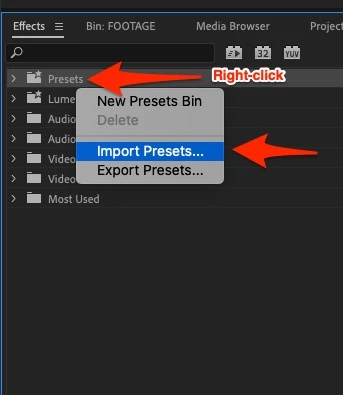
Generally, I import presets in the Effects Panel.


5 replies

gerikp
Community Expert
Community Expert
Mar 11, 2021 2:13 AM UTC

For Windows users, I believe it's.....

C:\Users\[user name]\Documents\Adobe\Premiere Pro\14.0\Profile-[user name]\Settings\Custom

Translate
Filip5C28Author
Participant
Mar 11, 2021 6:58 AM UTC

I have just imported these presets manually, but i want to learn other ways. I can't see any custom folder (image)


Translate
gerikp
Community Expert
gerikpCommunity ExpertCorrect answer
Community Expert
Mar 12, 2021 3:10 PM UTC

Generally, I import presets in the Effects Panel.


Translate