Participant
October 5, 2020
Answered

Preview off center when applying warp stabilizer
  • October 5, 2020
  • 6 replies
  • 2786 views


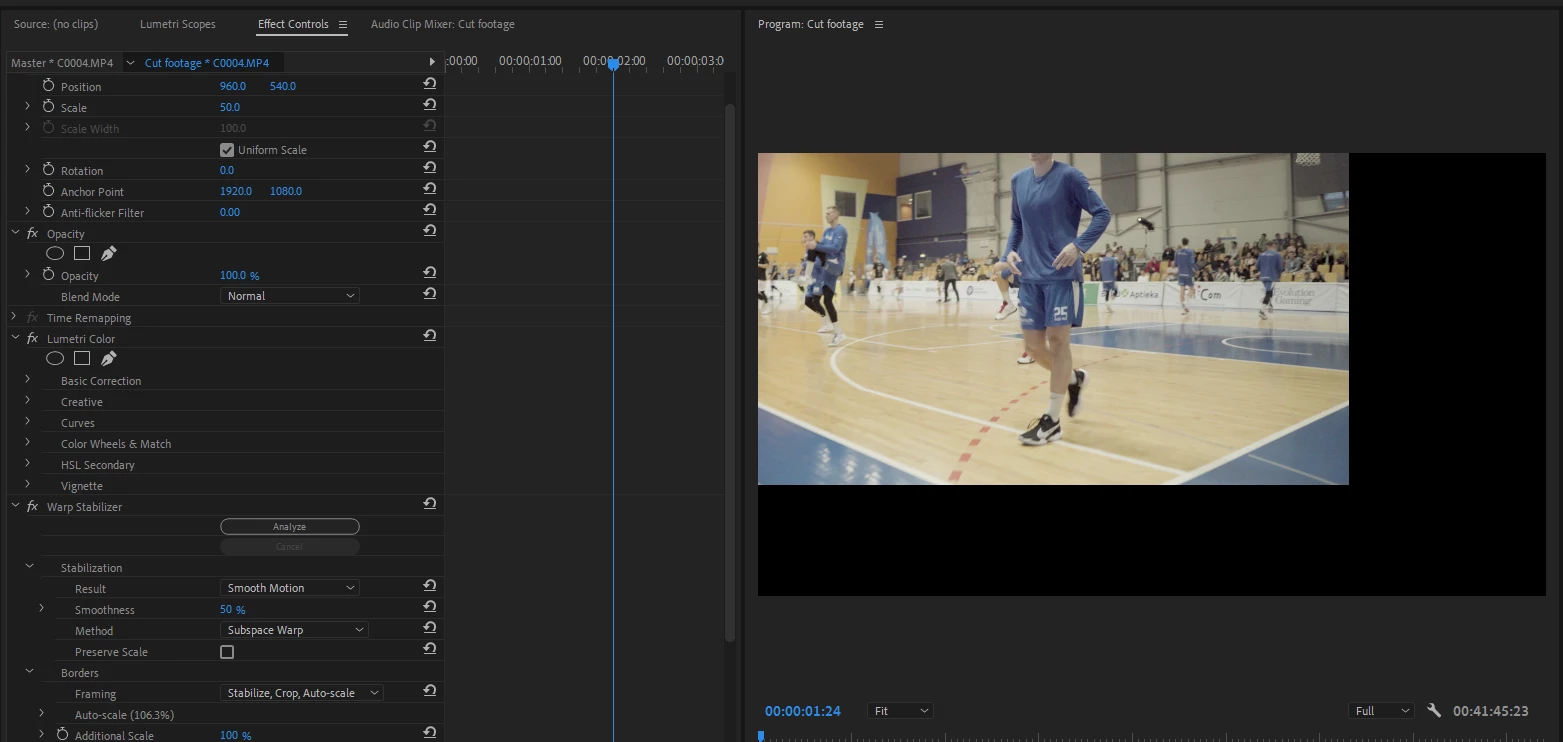
Every time I apply warp stabilizer to a clip and play the preview it goes off center, but when i render the final video edit it's fine. I have tried 4k, 1080p timelines and clips vice versus but no success. Any fix for this? I'm on newest Windows 10 2004 version and Premiere Pro version 14.4.0 (Build 38) but I have this happen in older versions of windows and premiere so it's been a problem for a while for me.

This topic has been closed for replies.
Correct answer caroline_edits

Hi all, super sorry about this frustration! We've identified that this happens when warp stabilizer is applied to a clip scaled down to 50% or less. There's a simple workaround of setting the scale to 50.1% to get accurate playback. Here's a video tutorial in case anyone needs it! 

6 replies

Participant
January 18, 2023

18/01/2023 windows 11 Premier 23.1.0 and the problem still occurs.

Adobe please, can you fix this on an update?

The temporary workaround works but its one more step in the editing process that takes us a lot of time when need to do it on a big timeline.


Thanks,


Participant
July 5, 2023

Agreed! This is super frustrating. Adobe you need to FIX the issue not give us workarounds that make more work in the editing process. 

caroline_edits
Community Manager
caroline_editsCommunity ManagerCorrect answer
Community Manager
December 2, 2022

Hi all, super sorry about this frustration! We've identified that this happens when warp stabilizer is applied to a clip scaled down to 50% or less. There's a simple workaround of setting the scale to 50.1% to get accurate playback. Here's a video tutorial in case anyone needs it! 

Misteleta
Participant
January 25, 2023

This is not a useful workaround if my scale needs to be anywhere below 50 %, which is the case 😞

Participant
November 28, 2022

2022 and this is still an issue!

I've tried the obvious:
- Nesting

- Changing Preview File Format 

- Latest Update (Running PR 20223 v23.0.0)


The only workaround is Rendering In to Out (section on the timeline should be Green). Yellow bar playback makes the video position offset. So annoying!

Inspiring
November 20, 2020

try nesting the clip before applying the warp stabilizer.

Ann Bens
Community Expert
Community Expert
November 20, 2020

Could try updating to Premiere 14.6.0 and windows to 20H2.

Joel Powley
Inspiring
November 20, 2020

This is also driving me nuts.