


Participating Frequently
June 10, 2025
Question

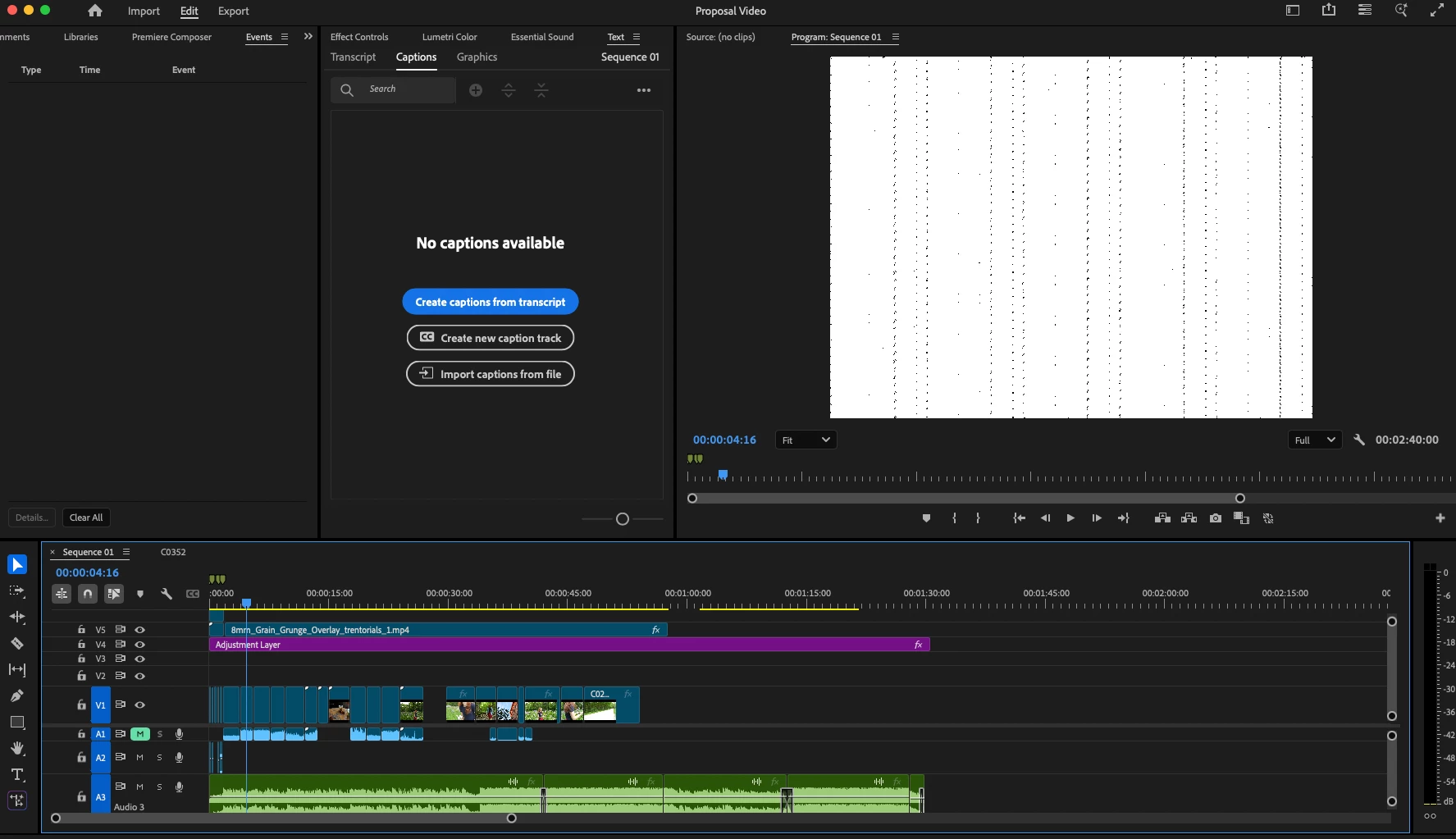
Preview showing white and black artifacts when paused

  • June 10, 2025
  • 5 replies
  • 576 views

Has anyone experienced this issue before? The preview appears like this when paused. It is happening on all the projects that I have opened. This has happened to me in the past, and I was able to fix it by moving everything to a new project and sequence, but I am wondering if there is an easier way around it. Thanks!
5 replies

Community Manager
June 13, 2025

Got it and thanks for the details @Aaron36104484dbcp. Issues like this are usually GPU related. Are you able to update your macOS to Sequoia? There have been previous reports of similar problems here, and updating from Sonoma to Sequoia was a fix.

Participating Frequently
June 11, 2025


@Dani_V. The only effect it has is noise. I will try exporting with those other settings. And yes, it's an mp4.


I believe it may be an issue completely outside of the footage because I just reopened the project after a night of having my computer asleep, and it's back to normal. But when it does show up, it seemingly "infects" every project that I have open at the time. Could it have something to do with storage space or something like that?


Thanks

Community Manager
June 10, 2025

Thank you for the additional screenshots @Aaron36104484dbcp! Does this overlay have any effects or filters added? If you go to Preferences > Media, can you try disabling 'hardware accelerated decoding'? And what are your export settings? Can you try exporting with Software Encoding instead of Hardware Encoding under Video > Encoding settings? If you think it's specific to the overlay (this is an .mp4 too right?), you could also try to 'Render and Replace' the file.

Participating Frequently
June 10, 2025

@Dani_V. 


Attached are screenshots of the specs for Premiere and my Mac.

All file types being used are MP4. There's a transparent version of the issue when exported, but only when the one overlay is in the video. Looks like it might be the black parts of the bug showing up. I included a screenshot of that as well.

And no, the issue doesn't show up when playing, only when paused on the timeline, with the exception of the export.


Exported video when the one overlay is on screen.


Community Manager
June 10, 2025

Hi @Aaron36104484dbcp,

Welcome to the Premiere Pro forums. We need a few more details to try to help with the issue, like the exact version of Premiere Pro you are on. Please see: How to Report a Problem.

Could you provide additional details on the hardware you have and operating system system version? (You can check in the Apple menu > About This Mac)

This is only when paused and is not showing up in playback or exports? Is this only happening with specific files? What kind of media files are you working with?

Sorry for the frustration and hope we can help you soon,

Dani

Darian5FAF
Participant
February 6, 2026

Hi! Wondering if this issue was ever solved? I’m experiencing it now.