


Participant
August 8, 2025
Answered

Priemer pro 2025 (25.3) does not support my RTX 3060Ti

  • August 8, 2025
  • 3 replies
  • 390 views

Hello, 

I have a question about Premiere Pro 25.3. I can't change the settings in video rendering and playback, as I don't know if that means Premiere Pro can't read my GPU, or this version doesn't support the GPU, which is NVIDIA GeForce RTX 3060 Ti? And how can I solve this problem? 
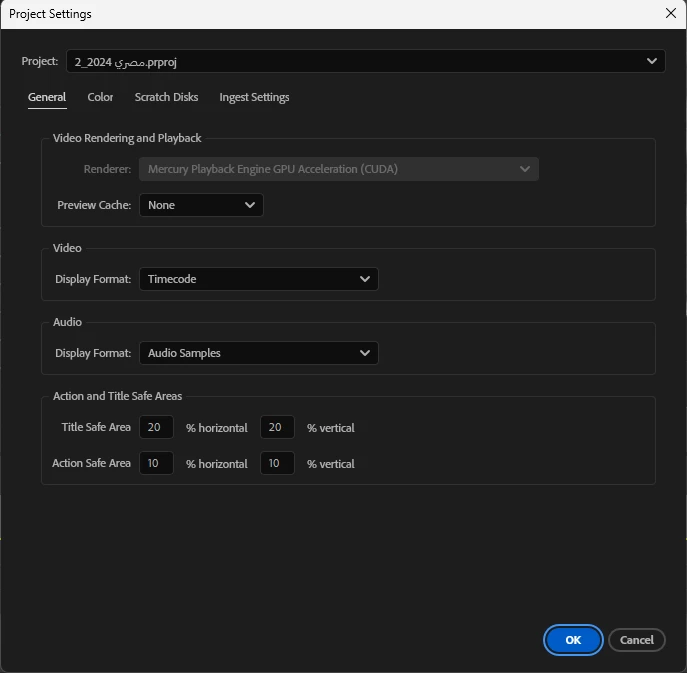


Another question, if anybody can please explain exactly how Priemer Pro divides work between GPU and CPU? When I work on the timeline, the CPU is used at almost full percentage between 90% and 100%. I used CPU Intel Core i7 12700 KF 12th Gen, but I thought it was supposed to use the GPU while working in the timeline 


Please, if anyone has a clear explanation, I actually need help.


[title edited by mod]

Correct answer Ann Bens

Render settings have changed. Software rendering has been removed as of 25.2.

Don't worry, your card is supported.

Please read below doc:

Software rendering update

3 replies

Ann Bens
Community Expert
Ann BensCommunity ExpertCorrect answer
Community Expert
August 8, 2025

Render settings have changed. Software rendering has been removed as of 25.2.

Don't worry, your card is supported.

Please read below doc:

Software rendering update

Averdahl
Community Expert
Community Expert
August 8, 2025

Premiere Pro is using your GPU for rendering, as shown on your screen dump so it´s not a problem.


For the CPU that are used when you playback footage, go to Edit > Preferences > Media and make sure that H264/HEVC hardware accelerated decoding (requires restart) is checked. I use a Xeon CPU and have no iGPU either but have no issues since my GPU decode H264 footage when i play it.


Make sure to use the latest Studio Driver from NVIDIA: NVIDIA Studio Driver 577.00 | Windows 11


quote

I can't change the settings in video rendering and playback, as I don't know if that means Premiere Pro can't read my GPU, or this version doesn't support the GPU, which is NVIDIA GeForce RTX 3060 Ti? And how can I solve this problem? 


By @Tamer_Ali3956
R Neil Haugen
Legend
August 8, 2025

They changed it this version so you can only disable while holding Shift on launch. It's confusing but it's using your GPU.


The CPU and GPU are not simply extensions of each other. They are completely different devices with different code doing different things. You can ho to their Help docs and find a list of things the GPU does.


Abd incidentally, the F in your CPU name means it has no iGPU, so the CPU has no hardware for internal long-GOP H.264 encode/decoder working.

Everyone's mileage always varies ...