Answered
Problem for opening a PRPROJ
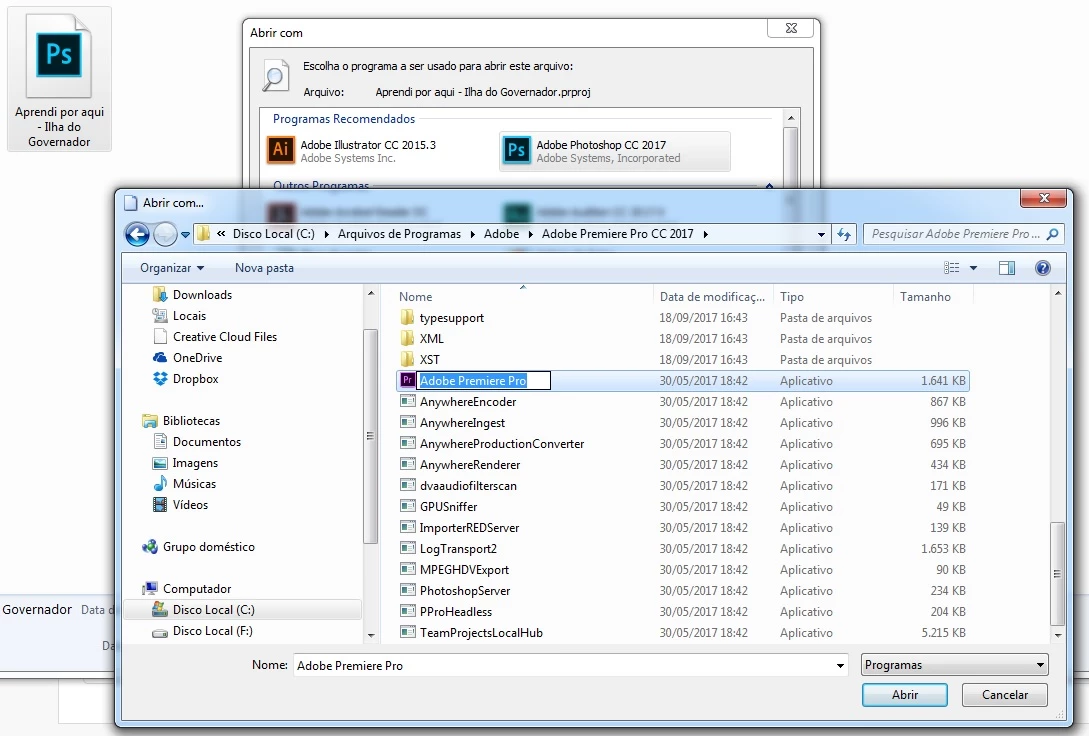
My projects PRPROJ are oppening as photoshop or illustrator. If a change for premiere as the image show, when i check the option, the premiere don't save.
PS: I already reinstall the photoshop and the premiere

My projects PRPROJ are oppening as photoshop or illustrator. If a change for premiere as the image show, when i check the option, the premiere don't save.
PS: I already reinstall the photoshop and the premiere
Part of that sounds like Windows has the file-association wrong. But as you don't have a screen-grab showing a PrPro project file, I can't be sure. If you could make a screen-grab of one or more PrPro project files (those with .prproj extensions) that would be very helpful.
What you're showing there is the PrPro main application file, it looks like ... which isn't helpful. It's the file association for the project files that's the key. Here's a couple ways to get your PrPro files re-associated, if that is the issue.
This is for just the PrPro project files extension ... done in the "Explorer" file manager app.
This is a way that allows you to re-assign numerous files at once.
Neil
Already have an account? Login
Enter your E-mail address. We'll send you an e-mail with instructions to reset your password.
 AdChoices