marliton
Community Expert
Community Expert
August 6, 2021
Question

Problem videos DJI Mimo with front iPhone camera.

  • August 6, 2021
  • 2 replies
  • 1831 views

Hi. I record videos using the DJI Mimo app (using an Osmo mobile) with an iPhone 11 and I founded a weird problem in Premiere with the videos recorded with the frontal camera:


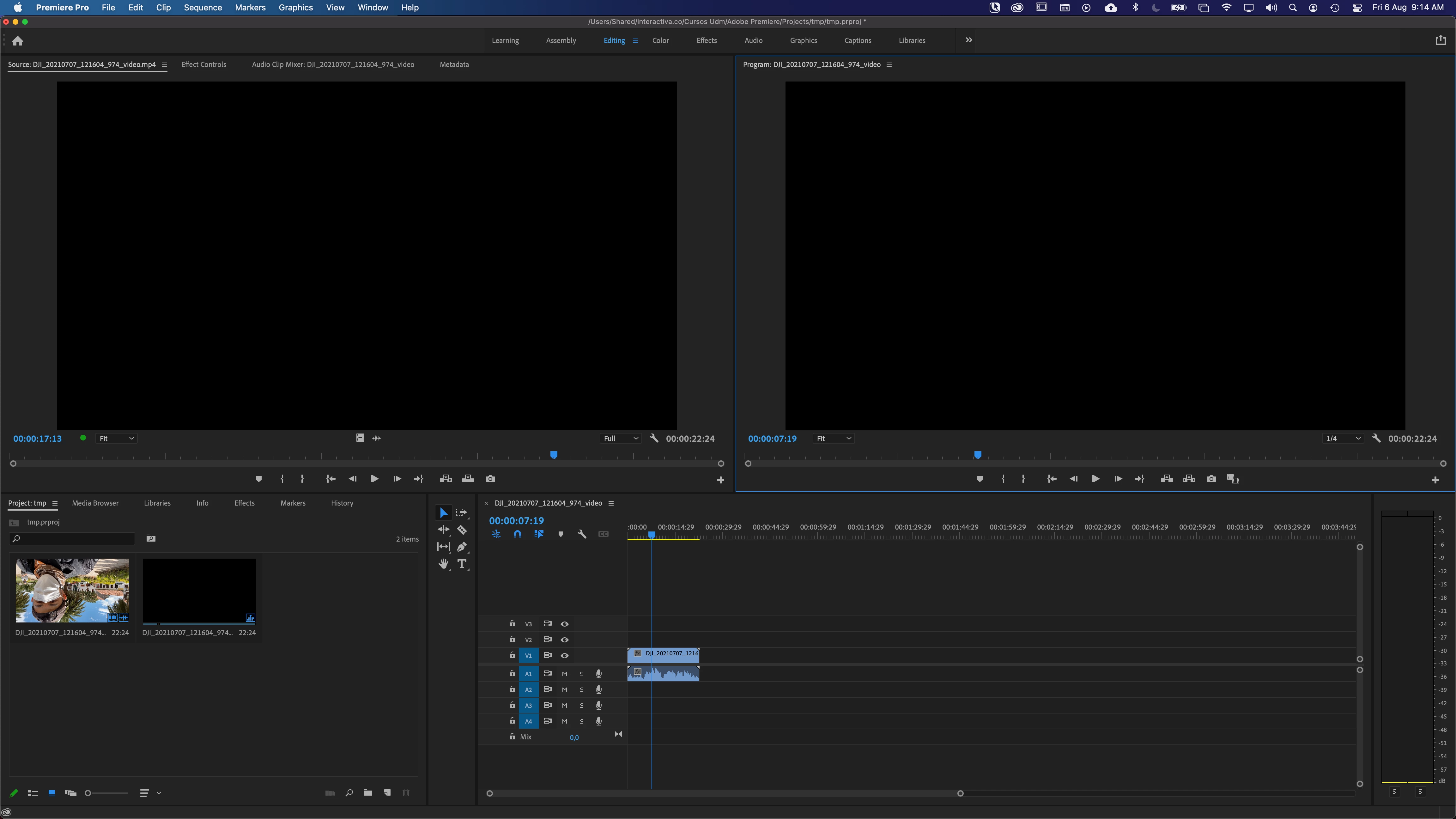
  1. When I add those videos to the Project panel, the preview of the icon is rotated 180 degrees (with the Icon or Freeform view activated). There is not preview when I hover the pointer on the icon but when I drag the preview square, the preview works.
  2. When I add the videos to the Source panel, there is no preview at all, just a black color.
  3. When I add the videos to the Timeline, the preview is black but when I play the video it preview correctly (but rotated 180 degrees).


I'm working with the latest Premiere version (15.4.0) and with the latest beta version. With both versions I get the same problem. Mi computer is a MacBook pro 13in M1 16 Gb ram. The videos recorded with the same app but with the back camera doesn't have problems. I appreciate any help or guide for fix that issue.


This is one of those videos: http://marliton.com/varios/tmpborra/DJI_20210707_121604_974_video.mp4 
 

This topic has been closed for replies.

2 replies

Participant
June 17, 2024

Hi!


Finally I think I found the solution! 🙂

(First step, if you want: Lumetri color: basic correction: auto)

And here is the essential part:

export settings: effects: tone mapping: hue preservation (good for iPhone HDR)

If you choose the right tone mapping method when you export the file, you will happy with the result...

Community Manager
August 6, 2021

Hi Marlon Ceballos,


Sorry about the poor experience. Please try to switch the Renderer to Mercury Playback Engine Software Only & let us know if it's restoring the preview.


Thanks,

Sumeet

marliton
Community Expert
marlitonCommunity ExpertAuthor
Community Expert
August 6, 2021

Thanks for your response. I can't make that switch in my Macbook Pro M1.


Marlon Ceballos
Ann Bens
Community Expert
Community Expert
August 6, 2021

I would convert the file to an edit friendly codec such as Prores 422 HQ.

Besides its variable framerate which also can cause strange issues.

Shutter Encoder encoding|converting video FREE PC|Mac

I tried the clip and after converting it looks normal.

I recognized the place: Villa de Leyva - Colombia.