
Participant
November 2, 2017
Question

Problem with Adobe Premiere on Mac X El Capitan OS

  • November 2, 2017
  • 1 reply
  • 1265 views

Hello!

Since my previous MacBook Pro crashed and I downloaded my Creative Suite on my new MacBook Pro OS X El Capitan,  I'm having serious issues with it.


To start:

1.  Audio is only in Mono (I looked over ALL the audio settings which are in Stere, but audio plays only on the left side in all my headsets)

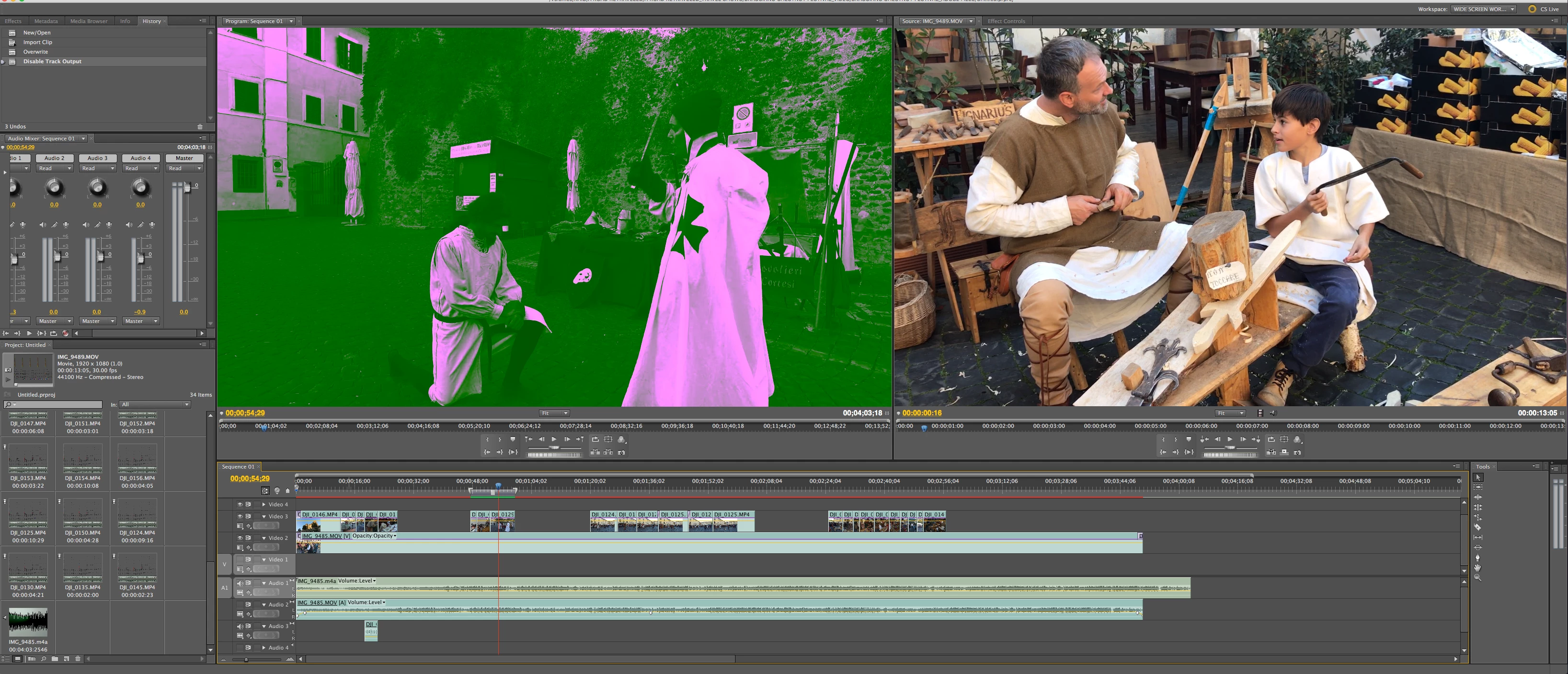
2.  Thumbnail images in the Project are no longer visible... just some static lines

3.  When I render, the image changes color into something green!!

I attached a screen shot for you all to see.

I never had such problems on my previous older computer that ran on previous OS.  I never updated the OS on my old computer for the purpose of not messing with my Adobe programs. This time, I had no choice as it was already installed in my computer.

Any idea how to fix this??
Thanks

Simone
    This topic has been closed for replies.

    1 reply

    kglad
    Community Expert
    Community Expert
    November 2, 2017

    reset your preferences -   https://forums.adobe.com/thread/526990

    update your os

    if that fails, what premiere version?

    [moved from Creative Suites to Premiere Pro CC]

    ARRT2Author
    Participant
    November 2, 2017

    Ciao! The Premiere is from my Creative Suite 5S.  It worked perfectly with Yosemite which I never updated to newer OS in my old MacBook Pro to avoid Adobe problems. 

    The moment I started to use Premiere on my new MacBook Pro that came with El Capitan installed in it, the problems started from the moment I opened my premiere project. 

    It appears after a bit of searching online that El Capitan is not very compatible with Adobe (although the problems reported by others are not what I'm experiencing)... but I don't know what to do about it now. This computer didn't have any previous operating systems to downgrade to.  How are we supposed to use Adobe with a crappy OS like this?

    Any ideas?  Other than taking my new mac to Apple to see if they an install an older Yosemite in it instead?

    Thanks

    kulpreet singh
    Inspiring
    December 28, 2017

    Hi ARRT2,

    In case if it hasn't been fixed yet please try this workaround: open your project, click on File > Project settings > General & change the video renderer to ' MPE Software Only' and delete previews.

    Thanks,

    Kulpreet Singh